This time we’re going bigger than ever. Fabric, Power BI, SQL, AI and more. We're covering it all. You won't want to miss it.
Learn moreDid you hear? There's a new SQL AI Developer certification (DP-800). Start preparing now and be one of the first to get certified. Register now
Hello,
We are currently using Power BI Report Server May 2020 (Build 15.0.1103.227). I know build 232 exists but there is nothing in the change log about this issue and we haven't deployed it yet.
In Power BI Desktop, when using a Decomposition Tree with a dimension with many elements there is an arrow to scroll:
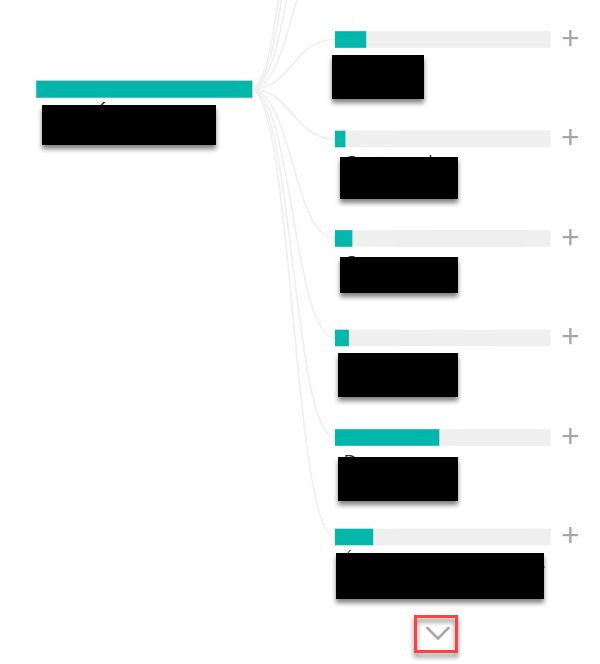
However when I upload this same report on Report Server there is no arrow. I have tried with IE, Chrome and Firefox, same behavior with all browsers.
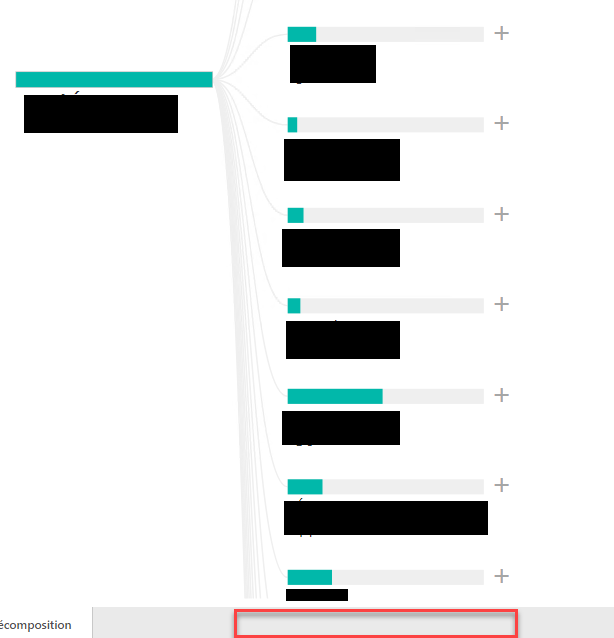
I've tried to reduce the height of the visual in case the arrow was created outside the page but it didn't help.
You can see that there are many more lines going down in the second screenshot. It seems like it's rending the whole thing without realising it's running out of space.
Anyone else encountering the issue?
Thanks!
Solved! Go to Solution.
HI @JeanMartinL ,
tested by myself and your right there is no arrow to expand the tree. But you can drag the tree back and forth ;).
Best,
Kathrin
If this post has helped you, please give it a thumbs up!
Did I answer your question? Mark my post as a solution!
HI @JeanMartinL ,
tested by myself and your right there is no arrow to expand the tree. But you can drag the tree back and forth ;).
Best,
Kathrin
If this post has helped you, please give it a thumbs up!
Did I answer your question? Mark my post as a solution!
You are right, we can indeed navigate by dragging, I'm not sure how I missed that.
It's still wierd that Power BI Desktop and Report Server provide 2 different navigation methods, I'm don't know if that is intended or not.
Thanks!
Check out the April 2026 Power BI update to learn about new features.
If you have recently started exploring Fabric, we'd love to hear how it's going. Your feedback can help with product improvements.
| User | Count |
|---|---|
| 4 | |
| 3 | |
| 2 | |
| 2 | |
| 2 |
| User | Count |
|---|---|
| 5 | |
| 3 | |
| 3 | |
| 3 | |
| 3 |