Hello everyone.
I am very new to the Report Building tool, but I cannot find a solution to this very simple scenario (or maybe I am not understanding the other entries in the forum).
I want to replicate this simple matrix:
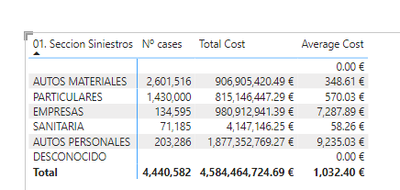
Where, as can be seen, the third column is the result of the second divided by the first.
In Report Builder, I get something like this when I build the query:
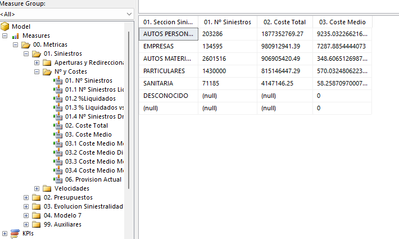
Great! The numbers are the same. Good. Now let's add it to a matrix:
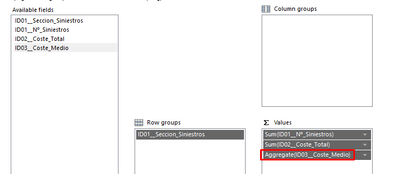
Note that I select "Aggregate" because I don't want the averages to be summed. This I learnt from Paginated Reports in a day tutorials, it can be seen in https://www.youtube.com/watch?v=JhEa_TugXeE&list=PL1N57mwBHtN1icIhpjQOaRL8r9G-wytpT&index=15&ab_chan... at 16:08.
After finishing the matrix, I get an empty result:
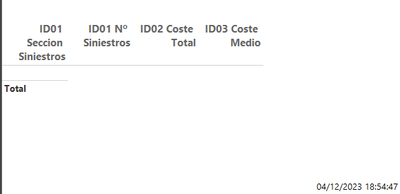
For some reason I cannot undestand, if I enter the query editor and leave it, the query seems to update itself (why does this happen??) and now I get the following:

Again, I am completely new to the topic, and I'm sure I must be missing something very basic. Could someone please point me in the right direction?
Thank you in advance for your time,
Alberto.


