
Join us at FabCon Atlanta from March 16 - 20, 2026, for the ultimate Fabric, Power BI, AI and SQL community-led event. Save $200 with code FABCOMM.
Register now!Get Fabric Certified for FREE during Fabric Data Days. Don't miss your chance! Request now
I have created a report on Power BI Desktop in which the images load up when I execute my report. But when I feed the same data onto my Power BI Report Builder to create a report, the report does not display the images.
This is how my table looks in the creator mode
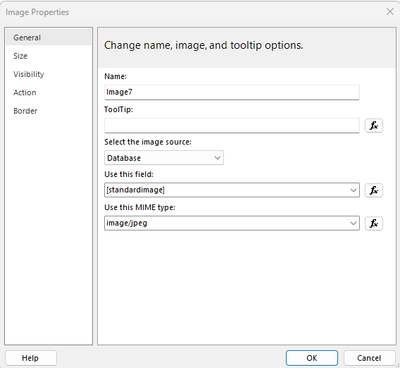
This is the step I have taken to add the url to the image
This is how it executes when i Run it.
There are around 5000 rows for which i need images via the Sharepoint URL to be displayed in every row.
Is there a step that I am missing or is therea a better way where I can get all these images onto the report.
Regards,
Rodri
Solved! Go to Solution.
As per Images in paginated reports - Microsoft Report Builder & Power BI Report Builder | Microsoft Learn
If you are using Report Server to host your reports the service account for Report Server will need access to the location where the images are stored.
If you are publishing to app.powerbi.com then the images need to be publicly available and not require authentication (so a Sharepoint site is not a suitable location for them)
As per Images in paginated reports - Microsoft Report Builder & Power BI Report Builder | Microsoft Learn
If you are using Report Server to host your reports the service account for Report Server will need access to the location where the images are stored.
If you are publishing to app.powerbi.com then the images need to be publicly available and not require authentication (so a Sharepoint site is not a suitable location for them)
Check out the November 2025 Power BI update to learn about new features.
Advance your Data & AI career with 50 days of live learning, contests, hands-on challenges, study groups & certifications and more!
| User | Count |
|---|---|
| 7 | |
| 2 | |
| 1 | |
| 1 | |
| 1 |
| User | Count |
|---|---|
| 12 | |
| 3 | |
| 3 | |
| 3 | |
| 2 |