Join us at FabCon Atlanta from March 16 - 20, 2026, for the ultimate Fabric, Power BI, AI and SQL community-led event. Save $200 with code FABCOMM.
Register now!The Power BI Data Visualization World Championships is back! Get ahead of the game and start preparing now! Learn more
Hello,
I was trying to use the Stored procedure using Direct Query in Power BI on Prem OCT Version
I am getting the below error message while loading the data into Power BI desktop itself
"Incorrect Syntax near the Keyword EXEC. Incorrect Syntax near )".
Steps:
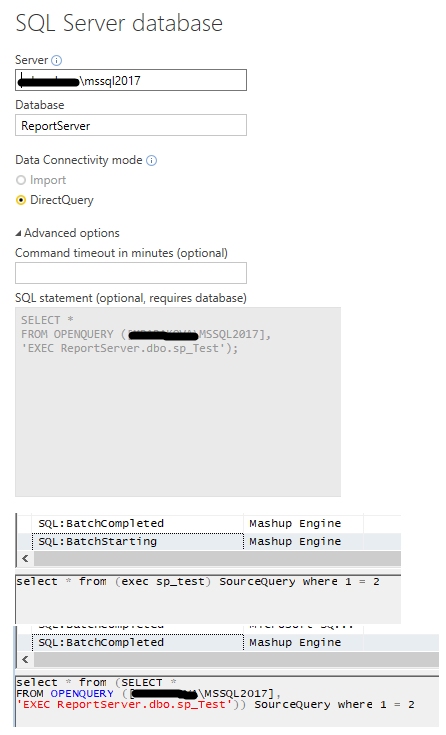
Connected source using GetData-> SQL Server-> DirectQuery ->Advance Option-> EXEC SPName
Power BI Desktop Version: 2.51.4885.1423 64-bit (October, 2017)
http://community.powerbi.com/t5/Desktop/Use-SQL-Store-Procedure-in-Power-BI/td-p/20269
You must be using DirectQuery mode, in which you cannot connect to data with stored procedures. Try again using Import mode or just use a SELECT statement directly.
Hi @arun_1047
I have played a bit with your scenario. Using just 'exec sp_proc' does not work indeed, the statement sent to the SQL Server is not syntactically correct:
select * from (exec sp_test) SourceQuery where 1 = 2
You can use OPENQUERY as mentioned here, however you'll need your SQL Server setup for data access.
Regards,
Maria
The Power BI Data Visualization World Championships is back! Get ahead of the game and start preparing now!
| User | Count |
|---|---|
| 6 | |
| 3 | |
| 3 | |
| 3 | |
| 3 |