cancel
Showing results for 
Search instead for 
Did you mean: 

Next up in the FabCon + SQLCon recap series: The roadmap for Microsoft SQL and Maximizing Developer experiences in Fabric. All sessions are available on-demand after the live show. Register now

Reply
sagar_banakal
Frequent Visitor

Exporting to Pdf in Korean/Chinese/Japanese language Not rendering some characters.

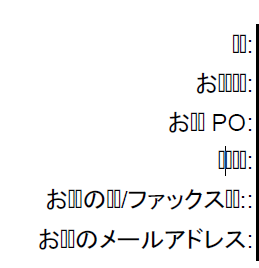
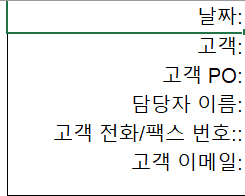
When we are trying to export the report in pdf format in which report contains text of Korean/Chinese/Japanese language, Some characters are not rendering in Pdf Showing the characters as box. While it is working correct when we export to Excel format. 

Attaching the sample pdf output ,Please Let us know the solution for this.

In PDF:

sagar_banakal_1-1644420945331.png

In Excel:

sagar_banakal_2-1644421056808.png


5 REPLIES 5
Anonymous
Not applicable

we solved the same issue by conditional formmating font in Power BI report builder


for korean charcter to show we used 'Malgun Gothic' and for others 'Microsoft YaHei'

hope the below image  helps

srisri1_0-1680122137304.png


Paramjit
Helper II
Helper II

@sagar_banakal  , are you able to correct that or there is still issue?

Karthik_Ram
Helper II
Helper II

@sagar_banakal Did you find solution to your issue?

v-henryk-mstf
Community Support
Community Support

Hi @sagar_banakal ,


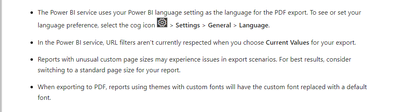
Exporting to pdf in powerbi has the following limitations, which may be caused by the following reasons. Power BI service uses the Power BI language setting as the language for PDF export. To view or set your language preferences, select the gear icon > Settings > General > Language.

vhenrykmstf_0-1644803428025.png

Considerations and limitations


If the problem is still not resolved, please provide detailed error information and let me know immediately. Looking forward to your reply.


Best Regards,
Henry


If this post helps, then please consider Accept it as the solution to help the other members find it more quickly.

Hi @v-henryk-mstf 

The report we are using here is paginated reports developed in Power BI report Builder.

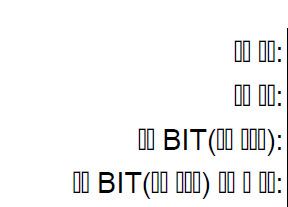
The report contains the text in Korean/Chinese/Japanese these languages, when we try to export the report in PDF the characters in these languages (Korean/Chinese/Japanese) are replaced by boxes as shown in the fig.

Where as, when we export the same report in excel it is working correctly.

This issue is even before publishing it to service. When we are trying to export in report level also we are facing the issue

sagar_banakal_0-1644923300830.png


Helpful resources

Announcements
New to Fabric survey Carousel

New to Fabric Survey

If you have recently started exploring Fabric, we'd love to hear how it's going. Your feedback can help with product improvements.

Power BI DataViz World Championships carousel

Power BI DataViz World Championships - June 2026

A new Power BI DataViz World Championship is coming this June! Don't miss out on submitting your entry.

Join our Fabric User Panel

Join our Fabric User Panel

Share feedback directly with Fabric product managers, participate in targeted research studies and influence the Fabric roadmap.

March Power BI Update Carousel

Power BI Community Update - March 2026

Check out the March 2026 Power BI update to learn about new features.