I'm migrating an existing SSRS 2014 report to Power BI Report Server. The report has an indicator gauge based on a lookup to a second dataset. There's also a toggle to expand a row group that's hidden by default, in which certain rows are highlighted based on a lookup to the dataset mentioned above.
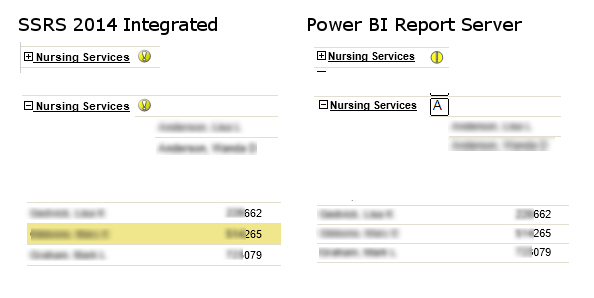 I made no changes to the gauges or the highlighting logic. Can someone explain what's going on here?
Edit: Just in case the image above isn't displaying properly (and for search optimization), what's happening is that 1.) the exclamation mark indicator looks different in PBIRS than in SSRS 2014, then 2.) after I expand the row group under the indicator, it becomes an A in a square -- assumedly some sort of image issue, be it webfonts or missing raster file or something else. Also, 3.) the background highlight color in the detail row group (associated with the indicator) doesn't display at all in Power BI Report Server -- it just shows a normal white background.


