cancel
Showing results for 
Search instead for 
Did you mean: 

Data Days is here! Join us now for 60+ days of learning, challenges, and connection. Learn more

Reply
Mario_Nistal
New Member

Wrong Max date returned

Hello everyone, my data set has these columns:

Capture.JPG


But when I am creating a measure:

MaxDate = MAX(Query1[Soak Start Date])
 
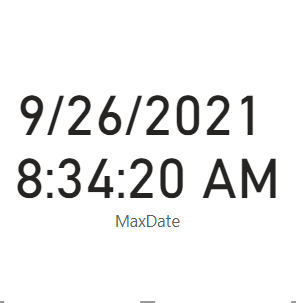
This is what I am getting:
Mario_Nistal_0-1634529272699.png


Any hints and help to help me get the correct Latest date in the data set (1/1/2022) will be greatly appreciated. TIA! ❤️


1 ACCEPTED SOLUTION
v-yingjl
Community Support
Community Support

Hi @Mario_Nistal ,

You can not use DateTime format and Date format at the same time in a column in Power BI Desktop, it would be changed to text type.

You need to change the type to both datetime or both date type, then create the previous measure to get the MaxDate.

let
    Source = Table.FromRows(Json.Document(Binary.Decompress(Binary.FromText("TZBLjsMwDEOvUmQ9gER9aoe7HmCA2Qe5/zXq1COnKwN6FknxODaI7WJqeDhdOd6/3+38OTaTXnNzZjxeNQcmgFGD0NpwgU0SjKTbF4gJnlRj9NJyMV9asRPxRdokOaa0XlohqBVQk7nEUqxMsjGt5k3+laBX3tAbWK+8aYTfwHXFsmGzFxn/o1Z0Z+AGjnIPJ7LAKPc5QaePQ5Y7dNU1gl0VL5er4Jyo0ZPR6vqxgb5I0FcvkI+/bef5Bg==", BinaryEncoding.Base64), Compression.Deflate)), let _t = ((type nullable text) meta [Serialized.Text = true]) in type table [#"Soak Start Date" = _t]),
    #"Changed Type" = Table.TransformColumnTypes(Source,{{"Soak Start Date", type text}}),
    #"Changed Type with Locale" = Table.TransformColumnTypes(#"Changed Type", {{"Soak Start Date", type datetime}}, "en-US")
in
    #"Changed Type with Locale"

If you do not want to show time, you can change the format to short date:

vyingjl_0-1634714276673.png


Best Regards,
Community Support Team _ Yingjie Li
If this post helps, then please consider Accept it as the solution to help the other members find it more quickly.


View solution in original post

2 REPLIES 2
v-yingjl
Community Support
Community Support

Hi @Mario_Nistal ,

You can not use DateTime format and Date format at the same time in a column in Power BI Desktop, it would be changed to text type.

You need to change the type to both datetime or both date type, then create the previous measure to get the MaxDate.

let
    Source = Table.FromRows(Json.Document(Binary.Decompress(Binary.FromText("TZBLjsMwDEOvUmQ9gER9aoe7HmCA2Qe5/zXq1COnKwN6FknxODaI7WJqeDhdOd6/3+38OTaTXnNzZjxeNQcmgFGD0NpwgU0SjKTbF4gJnlRj9NJyMV9asRPxRdokOaa0XlohqBVQk7nEUqxMsjGt5k3+laBX3tAbWK+8aYTfwHXFsmGzFxn/o1Z0Z+AGjnIPJ7LAKPc5QaePQ5Y7dNU1gl0VL5er4Jyo0ZPR6vqxgb5I0FcvkI+/bef5Bg==", BinaryEncoding.Base64), Compression.Deflate)), let _t = ((type nullable text) meta [Serialized.Text = true]) in type table [#"Soak Start Date" = _t]),
    #"Changed Type" = Table.TransformColumnTypes(Source,{{"Soak Start Date", type text}}),
    #"Changed Type with Locale" = Table.TransformColumnTypes(#"Changed Type", {{"Soak Start Date", type datetime}}, "en-US")
in
    #"Changed Type with Locale"

If you do not want to show time, you can change the format to short date:

vyingjl_0-1634714276673.png


Best Regards,
Community Support Team _ Yingjie Li
If this post helps, then please consider Accept it as the solution to help the other members find it more quickly.
 

wdx223_Daniel
Community Champion
Community Champion

please make sure all these column are dates.

Helpful resources

Announcements
Fabric Data Days is here Carousel

Fabric Data Days 2026

Don't miss out on Data Days, June 15 through August 7. Learn Fabric, Power BI, SQL, AI and more.

May Power BI Update Carousel

Power BI Monthly Update - May 2026

Check out the May 2026 Power BI update to learn about new features.

Power BI DataViz World Championships carousel

Power BI DataViz World Championships - June 2026

A new Power BI DataViz World Championship is coming this June! Don't miss out on submitting your entry.