Forum Discussion

Workday ERP connector
Hi all,
I was wondering if anyone has insight into reporting out of Workday on Power BI. It doesn't look like a native connector exists, so is the best workaround to schedule Workday reports to CSV, and load it on a recurring basis automatically? What about a third party connector or custom solution?
Thanks,
Jon
10 Replies
 AnonymousNot applicable
jl20,
Does the Workday ERP system have any backend databases? Or does it have REST API or support OData Service?
In Power BI Desktop, it is possible to connect to database, or use OData feed connector/web connector to connect to OData Service/REST API.
Regards,
Lydia jl20Helper IV
It's a SOAP API. The database is object-oriented, so it's unclear how I'd create the data model within PBI even if I was able to connect. Seems like I'd need to report out of Workday into a flat file and then load that into PBI. What do you think?
- ChihiroSolution Sage
What I'd do is following.
Have some script/code that runs on schedule to grab data from SOAP API. Have db with stored proc or have some process push data to db. This ensures you store it in the format that's easy to handle with PowerBI.
Added benefit is that you can create Views and such for quick consumption by PowerBI.
Do note that you'll need gateway server set up for this.
- ZappySysHelper I
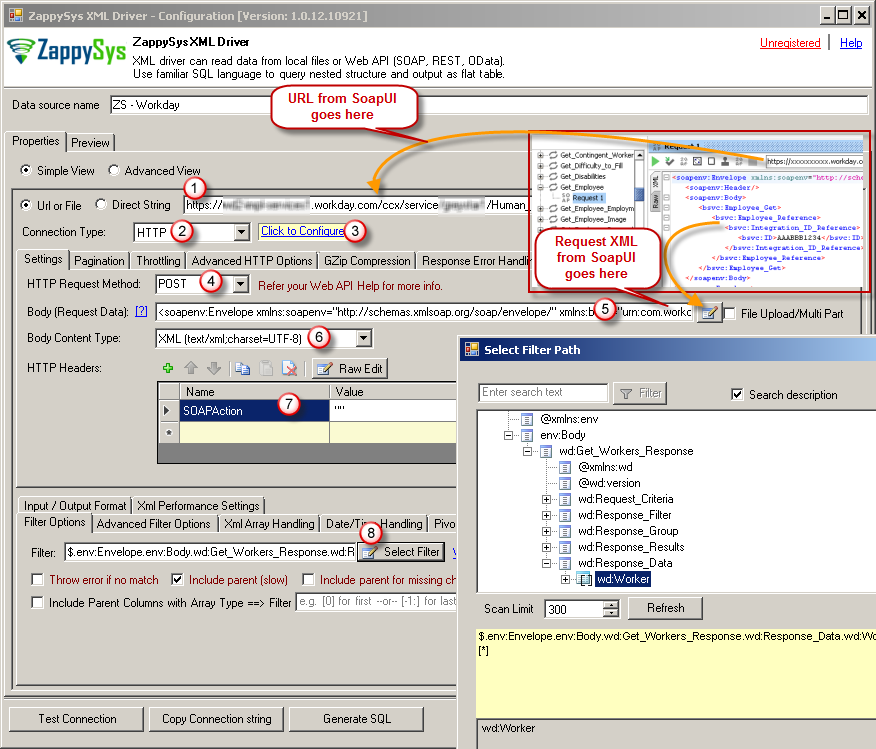
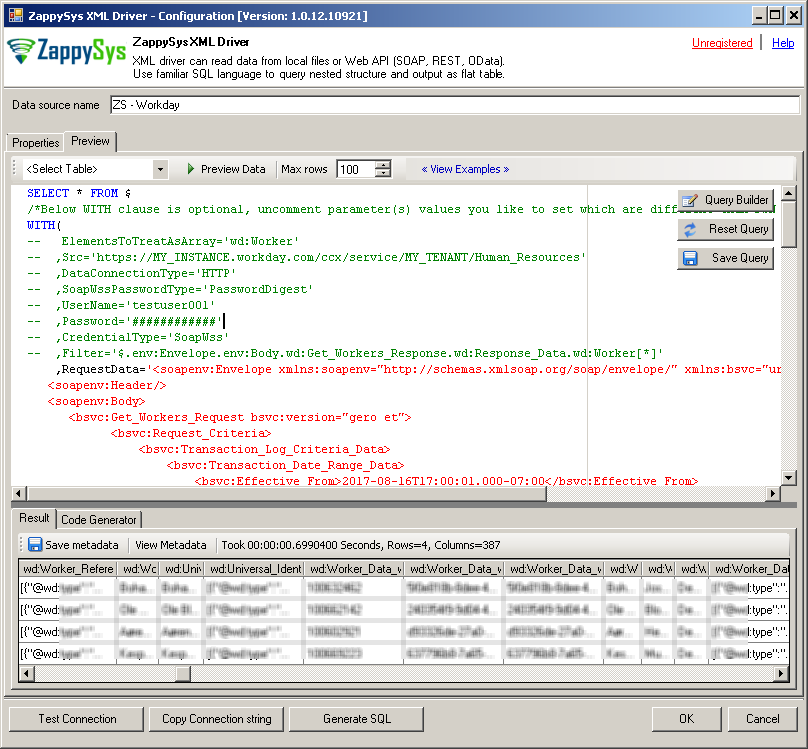
ZappySys has announced Generic XML SOAP / JSON REST API connectors which you can use to pull data from WorkDay SOAP Web Service / REST Service in Power BI or other ODBC tools. Check below link
https://zappysys.com/blog/connect-workday-power-bi-import-soap-data/
Here is how you configure work day connection.
 JPotworaFrequent Visitor
You can use the webservices fuction of advance reports with an intergration user to export data to PowerBI. In PowerBI you would use the web intergration. From there you can refresh from the Power BI service.
- DAronRegular Visitor
JPotwora would you mind elaborating? I've found the webservices function of advance reports but I'm unable to get Power BI to connect using the URL. I get the following error:
Details: "The scheme 'urn' of the input URL isn't supported. The supported schemes are 'http', 'https', 'file', and 'ftp'."
- JPotworaFrequent Visitor
DAron Once you have enabled webservices you will need to go to the action menu for the report select "Web
Services" and select "View URLs". From there you can select the URL option that works for you and put it in the web connection. If you use the CSV option, it will auto recognize it as an incoming CSV. You may need to set up a WD integration user to ingest the data from WD rather than your credentials
- AnonymousNot applicable
jl20 Hey! Wanted to follow up and see if you were able to figure out a way to connect to workday?
- jl20Helper IV
So far the best solution we've found it writing integrations out of WDAY using a web service and dropping to SQL tables/views, then linking PBI up to that.
- karaoanKudo Kingpin
jl20 You could try to complement it with Power BI custom visuals that are build for planning like https://appsource.microsoft.com/en-us/marketplace/apps?search=acterys&;page=1 Acterys also offers to automatically build planning models directly from the ERP source.