Join us at FabCon Vienna from September 15-18, 2025
The ultimate Fabric, Power BI, SQL, and AI community-led learning event. Save €200 with code FABCOMM.
Get registered- Power BI forums
- Get Help with Power BI
- Desktop
- Service
- Report Server
- Power Query
- Mobile Apps
- Developer
- DAX Commands and Tips
- Custom Visuals Development Discussion
- Health and Life Sciences
- Power BI Spanish forums
- Translated Spanish Desktop
- Training and Consulting
- Instructor Led Training
- Dashboard in a Day for Women, by Women
- Galleries
- Data Stories Gallery
- Themes Gallery
- Contests Gallery
- Quick Measures Gallery
- Notebook Gallery
- Translytical Task Flow Gallery
- TMDL Gallery
- R Script Showcase
- Webinars and Video Gallery
- Ideas
- Custom Visuals Ideas (read-only)
- Issues
- Issues
- Events
- Upcoming Events
Compete to become Power BI Data Viz World Champion! First round ends August 18th. Get started.
- Power BI forums
- Forums
- Get Help with Power BI
- Power Query
- Re: Which row will keep Table.Distinct(Table, {"Co...
- Subscribe to RSS Feed
- Mark Topic as New
- Mark Topic as Read
- Float this Topic for Current User
- Bookmark
- Subscribe
- Printer Friendly Page

- Mark as New
- Bookmark
- Subscribe
- Mute
- Subscribe to RSS Feed
- Permalink
- Report Inappropriate Content
Which row will keep Table.Distinct(Table, {"Column"})
Hi colleagues,
Which row will keep Table.Distinct(Table, {"Column"}) for the rows with the same values in the "Column":
- First row?
- Last row?
- Random row?
MS documentation has no explanation about it (https://docs.microsoft.com/en-us/powerquery-m/table-distinct)


- Mark as New
- Bookmark
- Subscribe
- Mute
- Subscribe to RSS Feed
- Permalink
- Report Inappropriate Content
Hi @Belin ,
did you buffer the sort operation? (see here: Bug warning for Table.Sort and removing duplicates... - Microsoft Power BI Community )
Imke Feldmann (The BIccountant)
If you liked my solution, please give it a thumbs up. And if I did answer your question, please mark this post as a solution. Thanks!
How to integrate M-code into your solution -- How to get your questions answered quickly -- How to provide sample data -- Check out more PBI- learning resources here -- Performance Tipps for M-queries

- Mark as New
- Bookmark
- Subscribe
- Mute
- Subscribe to RSS Feed
- Permalink
- Report Inappropriate Content
that's interesting, thank you.
At the end I used this
https://www.youtube.com/watch?v=hidJ5T_DYQ0
works like a charm
but I jsut noticed that in the notes she added a second better method, which I didn't have the time to try yet

- Mark as New
- Bookmark
- Subscribe
- Mute
- Subscribe to RSS Feed
- Permalink
- Report Inappropriate Content
Hello,
Just to notice that using grouping might lead to a huge computation time. Furthermore, if you want to keep only one row, using Max as the aggregation function might not work if there are multiple rows with the max value. Therefore you may think to use Table.FirstN as an aggregation function: same issue, it would burst your memory.
Therefore I think using Table.Buffer is the best idea when it comes to sorting
Best
- Mark as New
- Bookmark
- Subscribe
- Mute
- Subscribe to RSS Feed
- Permalink
- Report Inappropriate Content
I just found out the hard way.
the algorithm goies top to bottom, so I having a set like this
number updated_on
inc0001 01/01/22
inc0001 02/01/22
would remove the second occurrence from the top.
I wanted to keep the most updated record, so i sorted the data first, but still the algorithm remove the same record, ignoring any sorting
At the end I'm 99% positive that eliminate from top to bottom every reoccurrence...hoping that is not using a something faster and more difficult to predict and control.
In the past the same function in excel worked this way, so I hope is still the same
Cheers

- Mark as New
- Bookmark
- Subscribe
- Mute
- Subscribe to RSS Feed
- Permalink
- Report Inappropriate Content
Here's another article about this topic you might find helpful.
https://docs.microsoft.com/en-us/power-query/commonissues#preserving-sort
- Mark as New
- Bookmark
- Subscribe
- Mute
- Subscribe to RSS Feed
- Permalink
- Report Inappropriate Content
I just wanted to let you know I've updated the docs page above based on this thread. Hopefully it's more relevant/helpful now.

- Mark as New
- Bookmark
- Subscribe
- Mute
- Subscribe to RSS Feed
- Permalink
- Report Inappropriate Content
[SOLUTION]
After googling a lot, I fount this site explaining exactly what happened, and how to solve.
It’s simple, you just need add the buffer of the column you want to sort.
just add this step:
= Table.Buffer(Table.Sort( #"Linhas Classificadas",{{"data_lancamento", Order.Descending}}))
Source: https://exceleratorbi.com.au/remove-duplicates-keep-last-record-power-query/

- Mark as New
- Bookmark
- Subscribe
- Mute
- Subscribe to RSS Feed
- Permalink
- Report Inappropriate Content
You are forgetting that if you want to remove distinct letters that are different cases (A/a) then you need to add the optional parameter Comparer.OrdinalIgnoreCase
Table.Distinct(Table, {{“b”,Comparer.OrdinalIgnoreCase}})
This will treat A and a as duplicates. Otherwise, A/a are not the same in this function.
--Nate

- Mark as New
- Bookmark
- Subscribe
- Mute
- Subscribe to RSS Feed
- Permalink
- Report Inappropriate Content
Ok, this is pretty weird.
I ran the tests again, but instead of reordering the table using Table.Sort I just entered the data in a different order from the start.
Here are the results:
(For some reason I can't embed images even though I had no such problem yesterday. Sorry if this is harder to follow or the images eventually go down)
Code:
let
    Source = Table.FromRows(Json.Document(Binary.Decompress(Binary.FromText("i45WclLSUUpUitWJVnJEYSUpxcYCAA==", BinaryEncoding.Base64), Compression.Deflate)), let _t = ((type nullable text) meta [Serialized.Text = true]) in type table [a = _t, b = _t]),
    Example = Table.TransformColumnTypes(Source,{{"a", type text}, {"b", type text}}),
    ExampleResult = Table.Distinct(Example, {"b"}),
    ReorderedExample = Table.Sort(Example,{{"a", Order.Ascending}}),
    ReorderedExampleResult = Table.Distinct(ReorderedExample, {"b"})
in
    ReorderedExampleResult
We can easily see that order is indeed important, but that for some reason reordering the table using Table.Sort doesn't make a difference. I found that if we need to, we can use Table.Buffer to make Table.Distinct take into account the changes made by Table.Sort. Here's my third and final test:
Code:
let
    Source = Table.FromRows(Json.Document(Binary.Decompress(Binary.FromText("i45WclTSUUpUitWJVnKCs0BiSUqxsQA=", BinaryEncoding.Base64), Compression.Deflate)), let _t = ((type nullable text) meta [Serialized.Text = true]) in type table [a = _t, b = _t]),
    Example = Table.TransformColumnTypes(Source,{{"a", type text}, {"b", type text}}),
    ExampleResult = Table.Distinct(Example, {"b"}),
    ReorderedExample = Table.Buffer( Table.Sort(Example,{{"a", Order.Descending}}) ),
    ReorderedExampleResult = Table.Distinct(ReorderedExample, {"b"})
in
    ReorderedExampleResult

- Mark as New
- Bookmark
- Subscribe
- Mute
- Subscribe to RSS Feed
- Permalink
- Report Inappropriate Content
Thanks! This was a big help.

- Mark as New
- Bookmark
- Subscribe
- Mute
- Subscribe to RSS Feed
- Permalink
- Report Inappropriate Content
Thank you for doing the work of looking into this and identifying a solution to this frustrating issue.
- Mark as New
- Bookmark
- Subscribe
- Mute
- Subscribe to RSS Feed
- Permalink
- Report Inappropriate Content
it seems as if the sort operation doesn't change the table from the point of view of the table.distinct function and uses the same result as before.(*)
The operations that "change" the table (manual reordering, table.buffer, adding an index column, replacing any value in the table - even if the new value is the same as the old one -, changing the type of a column) do " start " the procedure of the table.distinct function all over again
(*) if between the call to the table.distinct function and the definition of the table to which it is applied, only table.sort functions act, the table distinct function is applied to the original table "saving" the sorting operation which is generally heavy.
Maybe 😁
- Mark as New
- Bookmark
- Subscribe
- Mute
- Subscribe to RSS Feed
- Permalink
- Report Inappropriate Content
table.group also appears to have similar behavior to table.distinct.
After all, a possible algorithm to eliminate duplicates in pseudocode could be like this:
Table.Group (tab, "col", each Table.First (_) [all columns but "col"])
let
    Source = Table.FromRows(Json.Document(Binary.Decompress(Binary.FromText("i45WMlTSUUpUitWJVjJCYSWBWcZwMUOIWCwA", BinaryEncoding.Base64), Compression.Deflate)), let _t = ((type nullable text) meta [Serialized.Text = true]) in type table [a = _t, b = _t]),
    Example = Table.TransformColumnTypes(Source,{{"a", type text}, {"b", type text}}),
    #"Raggruppate righe" = Table.Group(Example, {"b"}, {{"all", each Table.First(_)[a]}}),
    Example1 = Table.TransformColumnTypes(Source,{{"a", type text}, {"b", type text}}),
    #"Ordinate righe" = Table.Sort(Example1,{{"a", Order.Descending}}),
    #"Raggruppate righe1" = Table.Group(#"Ordinate righe", {"b"}, {{"all", each List.First(_[a]) }})
in
    #"Raggruppate righe1"
in the following form the "problem" doesn't arise:
let
    Source = Table.FromRows(Json.Document(Binary.Decompress(Binary.FromText("i45WMlTSUUpUitWJVjJCYSWBWcZwMUOIWCwA", BinaryEncoding.Base64), Compression.Deflate)), let _t = ((type nullable text) meta [Serialized.Text = true]) in type table [a = _t, b = _t]),
    Example = Table.TransformColumnTypes(Source,{{"a", type text}, {"b", type text}}),
    #"Raggruppate righe" = Table.Group(Example, {"b"}, {{"all", each _}}),
    Example1 = Table.TransformColumnTypes(Source,{{"a", type text}, {"b", type text}}),
    #"Ordinate righe" = Table.Sort(Example1,{{"a", Order.Descending}}),
    #"Raggruppate righe1" = Table.Group(#"Ordinate righe", {"b"}, {{"all", each _ }})
in
    #"Raggruppate righe1"
and not even like this
let
    Source = Table.FromRows(Json.Document(Binary.Decompress(Binary.FromText("i45WMlTSUUpUitWJVjJCYSWBWcZwMUOIWCwA", BinaryEncoding.Base64), Compression.Deflate)), let _t = ((type nullable text) meta [Serialized.Text = true]) in type table [a = _t, b = _t]),
    Example = Table.TransformColumnTypes(Source,{{"a", type text}, {"b", type text}}),
    #"Raggruppate righe" = Table.Group(Example, {"b"}, {{"all", each _[a]{0}}}),
    Example1 = Table.TransformColumnTypes(Source,{{"a", type text}, {"b", type text}}),
    #"Ordinate righe" = Table.Sort(Example1,{{"a", Order.Descending}}),
    #"Raggruppate righe1" = Table.Group(#"Ordinate righe", {"b"}, {{"all", each _[a]{0} }})
in
    #"Raggruppate righe1"
- Mark as New
- Bookmark
- Subscribe
- Mute
- Subscribe to RSS Feed
- Permalink
- Report Inappropriate Content
About table.sort ...
Suppose you have this table:

if you sort by column a, you get this:
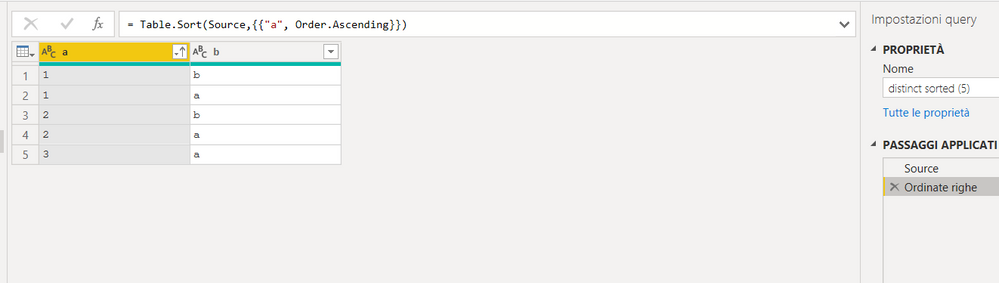
but even this different situation would have been valid (third and fourth row are reversed):

This, I believe, depends on the internal algorithm used to do the sorting.
If, as plausible as it may be, the table.distinct algorithm first does a sort of rows to "group" the rows that have duplicate values in the control columns, the ordering of the remaining columns, as we have seen, is not determined.
So if the algorithm also takes the first row of the group, it is not necessarily the "first" row you encounter the source table.


- Mark as New
- Bookmark
- Subscribe
- Mute
- Subscribe to RSS Feed
- Permalink
- Report Inappropriate Content
Hello,
I think this is similar to my issue:
It is intended behaviour - Power query steps are not always performed one-by-one. You can force one-by-one by using Table.Buffer

- Mark as New
- Bookmark
- Subscribe
- Mute
- Subscribe to RSS Feed
- Permalink
- Report Inappropriate Content
I believe it keeps the first one. You can do quick try to confirm. You can add a sort step just before that step to keep the one you want.
If this works for you, please mark it as the solution. Kudos are appreciated too. Please let me know if not.
Regards,
Pat
Did I answer your question? Mark my post as a solution! Kudos are also appreciated!
To learn more about Power BI, follow me on Twitter or subscribe on YouTube.
@mahoneypa HoosierBI on YouTube
- Mark as New
- Bookmark
- Subscribe
- Mute
- Subscribe to RSS Feed
- Permalink
- Report Inappropriate Content
Hi @mahoneypatI, I also "believe" in "First row", but it is good to have official confirmation from MS. Isn't it? 🙂
- Mark as New
- Bookmark
- Subscribe
- Mute
- Subscribe to RSS Feed
- Permalink
- Report Inappropriate Content
Just be aware that if you have to sort your table to define the desired logic, you have to use a Table.Buffer with it, as the sort order might not stick without it (mostly relevant for large tables): Bug warning for Table.Sort and removing duplicates... - Microsoft Power BI Community
Imke Feldmann (The BIccountant)
If you liked my solution, please give it a thumbs up. And if I did answer your question, please mark this post as a solution. Thanks!
How to integrate M-code into your solution -- How to get your questions answered quickly -- How to provide sample data -- Check out more PBI- learning resources here -- Performance Tipps for M-queries

- Mark as New
- Bookmark
- Subscribe
- Mute
- Subscribe to RSS Feed
- Permalink
- Report Inappropriate Content
Hi @pavel_severov ,
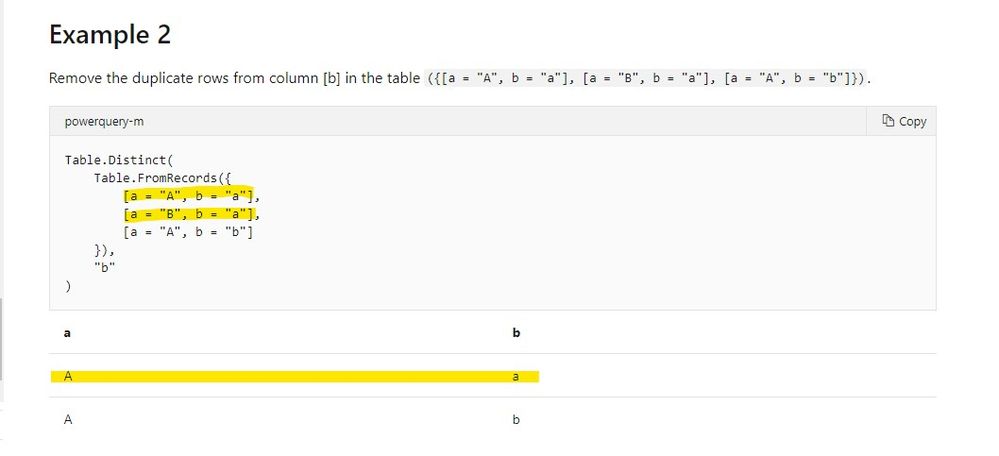
Sorry for that, but we did not find any logic definition of this function in official document. But you can confirm it by the Example 2 of the function document, it will keep the first row.
Best regards,
If this post helps, then please consider Accept it as the solution to help the other members find it more quickly.
- Mark as New
- Bookmark
- Subscribe
- Mute
- Subscribe to RSS Feed
- Permalink
- Report Inappropriate Content
Hey @v-lid-msft , I did a quick test and that does not seem to be the case.
First, I entered the data from that example
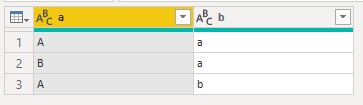
and used 'Remove duplicates' on b
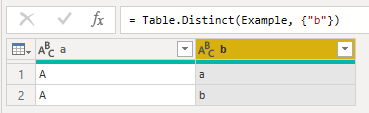
This is what we expected from the documentation and from the assumption that it keeps the first row.
Now to the real test. I altered the order of the first table so that it looks like this:

Under the assumption that it keeps the first row, we expect to get the following table:
| a | b |
| B | a |
| A | b |
but instead we get this:

Here's the code for the tests in case anyone wants to check
let
    Source = Table.FromRows(Json.Document(Binary.Decompress(Binary.FromText("i45WclTSUUpUitWJVnKCs0BiSUqxsQA=", BinaryEncoding.Base64), Compression.Deflate)), let _t = ((type nullable text) meta [Serialized.Text = true]) in type table [a = _t, b = _t]),
    Example = Table.TransformColumnTypes(Source,{{"a", type text}, {"b", type text}}),
    ExampleResult = Table.Distinct(Example, {"b"}),
    ReorderedExample = Table.Sort(Example,{{"a", Order.Descending}}),
    ReorderedExampleResult = Table.Distinct(ReorderedExample, {"b"})
in
    ReorderedExampleResult
Helpful resources

Power BI Monthly Update - August 2025
Check out the August 2025 Power BI update to learn about new features.

Fabric Community Update - August 2025
Find out what's new and trending in the Fabric community.


