cancel
Showing results for 
Search instead for 
Did you mean: 

We've captured the moments from FabCon & SQLCon that everyone is talking about, and we are bringing them to the community, live and on-demand. Starts on April 14th. Register now

Reply
Junaid11
Helper V
Helper V

Timestamp based on specific criteria

Hello,

I have requirement regarding Power Query for creating time stamp and a new table having all the times.


I have a variable with numbers of seconds after midnight. But it exceeds 24:00 (e.g. 95000/3600 = 26.389). The value after 24 needs to be retained. So based on the current variable, a new variable should be created, which contains the timestamp in text, like: 26:23.


Format would be hh:mm. So the values need to have zeros if necessary necessary. E.g. 2:2 should be 02:02.


Anothe example

35100 / 3600 = 9.75

9.75 should be 09:45


I have attached sample query for the data set below as well:

let
Source = Table.FromRows(Json.Document(Binary.Decompress(Binary.FromText("i45WMjY1NDBQUNJRUorViVayNDcyMIBxzI2MzcDsWAA=", BinaryEncoding.Base64), Compression.Deflate)), let _t = ((type nullable text) meta [Serialized.Text = true]) in type table [time = _t, timestamp = _t]),
#"Changed Type" = Table.TransformColumnTypes(Source,{{"time", Int64.Type}, {"timestamp", type text}})
in
#"Changed Type"


A new table query that should contain all times between 00:00 and 30:00. Variables: timestamp (e.g. 12:33), hours (e.g. 12), minutes (e.g. 33) and timerange in hours: (e.g. 12:00 - 12:59). 

The other requirement for a table with all minutes between 00:00 and 30:00 (automatically generated in Power BI). E.g.
00:00
00:01
00:02
... up to ...
29:58
29:59
30:00

Your help would be highly appreciated.

Thank you

1 ACCEPTED SOLUTION
Vijay_A_Verma
Most Valuable Professional

1. Use below

let
Source = Table.FromRows(Json.Document(Binary.Decompress(Binary.FromText("i45WMjY1NDBQUIrViVayNDcyMACzzI2MzSBCpgYgoVgA", BinaryEncoding.Base64), Compression.Deflate)), let _t = ((type nullable text) meta [Serialized.Text = true]) in type table [time = _t]),
    #"Changed Type" = Table.TransformColumnTypes(Source,{{"time", Int64.Type}}),
    #"Added Custom" = Table.AddColumn(#"Changed Type", "timestamp", each [t=[time]/3600, h=Text.PadStart(Text.From(Number.IntegerDivide(t,1)),2,"0"), m=Text.PadStart(Text.From(Number.Round(60*Number.Mod(t,1),0)),2,"0"), T=h&":"&m][T])
in
    #"Added Custom"

2. A table with all minutes between 00:00 and 30:00 (though I have used minutes and second to generate the table but its output is 00:00 to 30:00 only which you want)

let
    ListOfTimes = Table.FromList(List.Transform(List.Times(#time(0,0,0),1801,#duration(0,0,0,1)),(x)=>Time.ToText(x,"mm:ss")), null, {"Time"})
in
    ListOfTimes


View solution in original post

2 REPLIES 2
collinsg
Super User
Super User

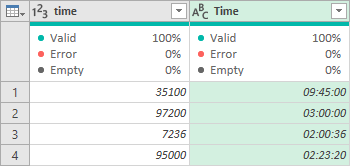
This alternative,

1) Uses Number.Mod to find the number of seconds left after removing the days.

2) Uses #duration to convert that number of seconds into a duration.

3) Adds that duration to 00:00:00 to get a time.

4) Returns as type text (as required by the original post – but could be returned as a type time).


= Table.AddColumn(
#"Name of Previous Step",
"Time",
each #time(0,0,0) + #duration( 0, 0, 0, Number.Mod([time],86400) ),
type text
)

collinsg_0-1684531527860.png


Vijay_A_Verma
Most Valuable Professional

1. Use below

let
Source = Table.FromRows(Json.Document(Binary.Decompress(Binary.FromText("i45WMjY1NDBQUIrViVayNDcyMACzzI2MzSBCpgYgoVgA", BinaryEncoding.Base64), Compression.Deflate)), let _t = ((type nullable text) meta [Serialized.Text = true]) in type table [time = _t]),
    #"Changed Type" = Table.TransformColumnTypes(Source,{{"time", Int64.Type}}),
    #"Added Custom" = Table.AddColumn(#"Changed Type", "timestamp", each [t=[time]/3600, h=Text.PadStart(Text.From(Number.IntegerDivide(t,1)),2,"0"), m=Text.PadStart(Text.From(Number.Round(60*Number.Mod(t,1),0)),2,"0"), T=h&":"&m][T])
in
    #"Added Custom"

2. A table with all minutes between 00:00 and 30:00 (though I have used minutes and second to generate the table but its output is 00:00 to 30:00 only which you want)

let
    ListOfTimes = Table.FromList(List.Transform(List.Times(#time(0,0,0),1801,#duration(0,0,0,1)),(x)=>Time.ToText(x,"mm:ss")), null, {"Time"})
in
    ListOfTimes


Helpful resources

Announcements
New to Fabric survey Carousel

New to Fabric Survey

If you have recently started exploring Fabric, we'd love to hear how it's going. Your feedback can help with product improvements.

Power BI DataViz World Championships carousel

Power BI DataViz World Championships - June 2026

A new Power BI DataViz World Championship is coming this June! Don't miss out on submitting your entry.

Join our Fabric User Panel

Join our Fabric User Panel

Share feedback directly with Fabric product managers, participate in targeted research studies and influence the Fabric roadmap.