cancel
Showing results for 
Search instead for 
Did you mean: 

We've captured the moments from FabCon & SQLCon that everyone is talking about, and we are bringing them to the community, live and on-demand. Starts on April 14th. Register now

Reply
jxmme13
New Member

Sharepoint online list deleted entries still showing up on Power BI report

Hi there,


I've recently created a power BI report with data coming from an online sharepoint list, however, when entries are deleted from the sharepoint list, they still show up on the power BI visuals even after i've refreshed the data set numerous times. How do I stop that as I no longer want the deleted items to appear in my Power BI report. Thanks!


Best Regards,

Jamie 

3 REPLIES 3
discogeo
New Member

I'm having the exact same issue.  Now I'm wondering if I should just delete the list and completely start over?
The powerbi visual is "stuck" on the bad old original sharepoint list.


v-jingzhang
Community Support
Community Support

Hi @jxmme13 


Does my reply solve your problem? If yes, kindly accept it as the solution. If this issue still occurs, please provide more details about it so that we can work on it further. Thanks.


Regards,
Community Support Team _ Jing

v-jingzhang
Community Support
Community Support

Hi @jxmme13 


Where does this problem occur? In Power BI Desktop or Service?


Based on my test, the deleted items were removed from the report immediately after I refreshed the data in Power BI Desktop. In Power BI Service, after I refreshed the dataset and opened the report, the deleted items didn't display either. 


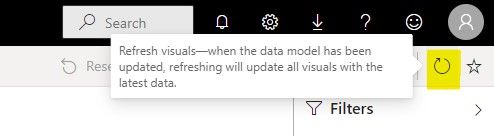
If this problem occurred in the Service, it is probably because that the report wasn't refreshed after the dataset refresh. It would take some time for the report to be refreshed in the backend after its dataset has been refreshed. Usually the time is short but when the service resource is busy, it would be longer. If the report isn't refreshed, make sure the dataset refresh is completed, then open the report and click the refresh icon in the top right corner to refresh the report manually.
060901.jpg


Regards,
Community Support Team _ Jing
If this post helps, please Accept it as the solution to help other members find it.

Helpful resources

Announcements
New to Fabric survey Carousel

New to Fabric Survey

If you have recently started exploring Fabric, we'd love to hear how it's going. Your feedback can help with product improvements.

Power BI DataViz World Championships carousel

Power BI DataViz World Championships - June 2026

A new Power BI DataViz World Championship is coming this June! Don't miss out on submitting your entry.

Join our Fabric User Panel

Join our Fabric User Panel

Share feedback directly with Fabric product managers, participate in targeted research studies and influence the Fabric roadmap.

March Power BI Update Carousel

Power BI Community Update - March 2026

Check out the March 2026 Power BI update to learn about new features.