cancel
Showing results for 
Search instead for 
Did you mean: 

The Power BI Data Visualization World Championships is back! Get ahead of the game and start preparing now! Learn more

Reply
euthor
Frequent Visitor

Refresh issues: editing excel data source

Hi all,

as I am trying to refresh PowBI after having incremented the number of rows over 1 excel file (currently using 32 different files on this PowBI file), but since I did I can no longer have an appropriate refresh. Here's the error message I am getting:

"Load was canceled by an error in loading a previous table".


I already tried with changing data source (data source settings) but the error keeps top pop out.


Is there any viable solution which does not require to completely re-upload all the 32 files? 


Thanks for your help

1 ACCEPTED SOLUTION
Anonymous
Not applicable

@euthor,


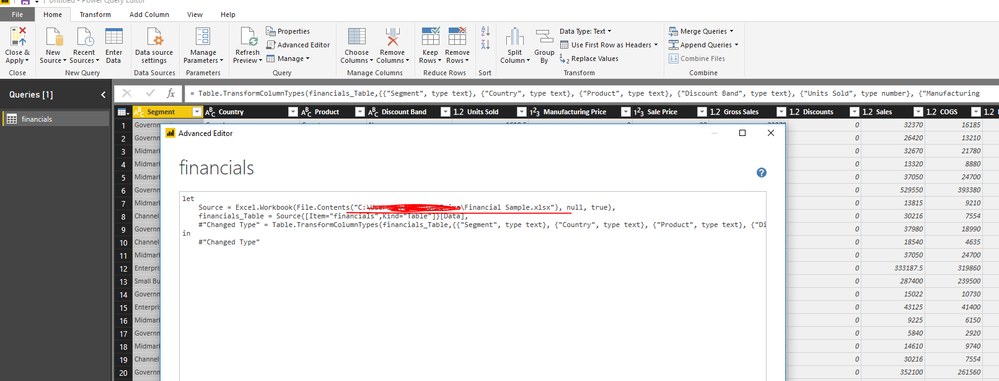
I suspect that all the queries in your PBIX file use data from the deleted Excel file, please go to Advanced Editor of your queries, replace the old Excel file with new Excel file in the code.

1.PNG

Regards,
Lydia

View solution in original post

4 REPLIES 4
Anonymous
Not applicable

@euthor,

When you add rows in source Excel files, it doesn't require to change data source in Power BI Desktop.

You should give other detailed error messages except the above error message in Power BI Desktop during the refresh, please post all error messages here for us to troubleshoot.  

Regards,
Lydia

@v-yuezhe-msft


Here's the complete list of errors which occur when I try to refresh the PowBI file:


Could not find file 'F:\CrossOrg\Sales_and_Marketing\Business Intelligence\ENTRY POINT 2011\NPD\Scarico weekly BI\Weekly Master Report_PowBI [light version].xlsx'.


Load was cancelled by an error in loading a previous table.


The first one is about a file which is no longer needed to be a data source for the PowBI file, so I deleted it. Although the error message for the rest of the 33 excel files loaded keeps the same.


Let me please know what can I do to fix it.


Regards

Anonymous
Not applicable

@euthor,


I suspect that all the queries in your PBIX file use data from the deleted Excel file, please go to Advanced Editor of your queries, replace the old Excel file with new Excel file in the code.

1.PNG

Regards,
Lydia

@Anonymous


Thank you very much Lydia,


now everything is working fine and all reports are updated!

As I am new to PBI I am a bit lost, but now I am starting to figure it out how it works 🙂


Thanks for your precious help!


Best Regards,


Euthor

Helpful resources

Announcements
Power BI DataViz World Championships

Power BI Dataviz World Championships

The Power BI Data Visualization World Championships is back! Get ahead of the game and start preparing now!

December 2025 Power BI Update Carousel

Power BI Monthly Update - December 2025

Check out the December 2025 Power BI Holiday Recap!

FabCon Atlanta 2026 carousel

FabCon Atlanta 2026

Join us at FabCon Atlanta, March 16-20, for the ultimate Fabric, Power BI, AI and SQL community-led event. Save $200 with code FABCOMM.