Join us at FabCon Atlanta from March 16 - 20, 2026, for the ultimate Fabric, Power BI, AI and SQL community-led event. Save $200 with code FABCOMM.
Register now!The Power BI Data Visualization World Championships is back! Get ahead of the game and start preparing now! Learn more
Hi Everyone,
I have a series of list hosted in Sharepoint that im connected to in PowerBi. Im having a couple of issues with one of the lists:
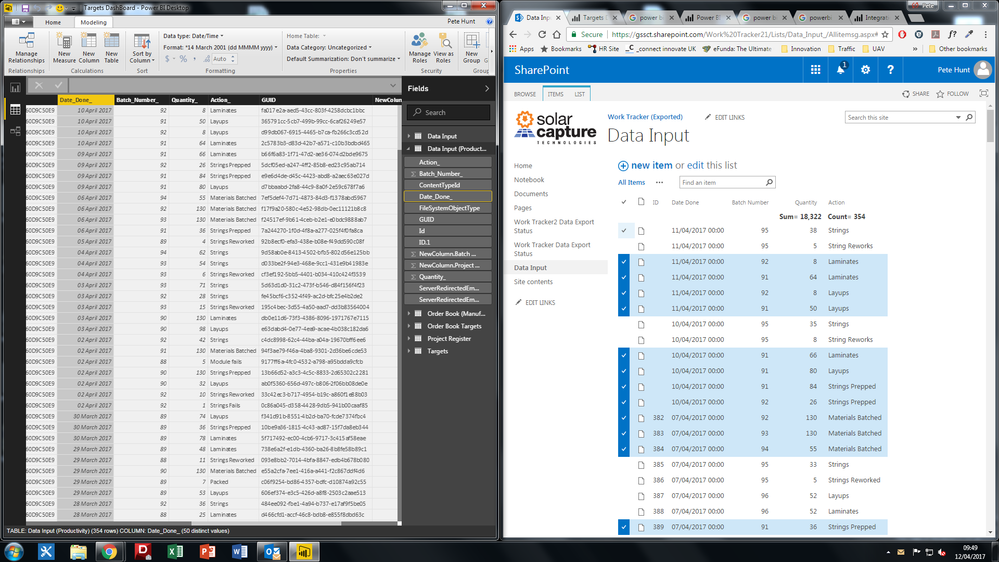
Firstly, I have a date column in the sharepoint list, when this is connected to powerBi (with no filters etc) the dates appear one day before the dates that were entered in the sharepoint list. For example, 12/04/2017 in Sharepoint becomes 11/04/2017 in PowerBI.
Secondly. Not all of the data is imported. PowerBi seems to only display 4 sets of data for each day. I have attached a screenshot to explain this better.
Has anyone experienced similar issues to this? Or know how to fix this, im completely lost!
Thanks in advance for all of your help.
Pete
Hi Pete - on your dates issue, the regional settings on your developer workstation could affect the interpretation and use of dates and their related functions. What time zone is your workstation in and is the sharepoint list hosted in a region different from where you are physically?
For the SharePoint connector, I've experienced problems with the SQL 2016 SSIS connector for SharePoint lists (they may be related components). Unfortunately I was not able to get any help with this from the community nor Microsoft and we ended up building a custom connector for the client. Are you fixed on using SharePoint as a source?
Sean
The Power BI Data Visualization World Championships is back! Get ahead of the game and start preparing now!
| User | Count |
|---|---|
| 19 | |
| 10 | |
| 9 | |
| 7 | |
| 6 |