

cancel
Showing results for 
Search instead for 
Did you mean: 

Learn from the best! Meet the four finalists headed to the FINALS of the Power BI Dataviz World Championships! Register now

Reply
BDB
Frequent Visitor

Missing Columns

Hello All.  I am new to Power BI and having a little trouble getting started.  I am trying to import 1,500 xml files from a folder stored locally but I am missing columns.


When I load the data, these cloumns get picked up (The first 2).


image.png


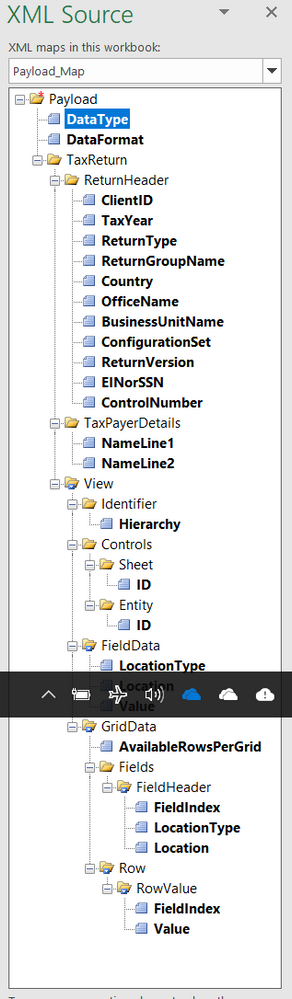
However, I need 27 columns picked up so I can run anaysis by the Location field 


image.png


image.png


Any suggestions?  Thanks for the help.

1 ACCEPTED SOLUTION
Anonymous
Not applicable

@BDB,

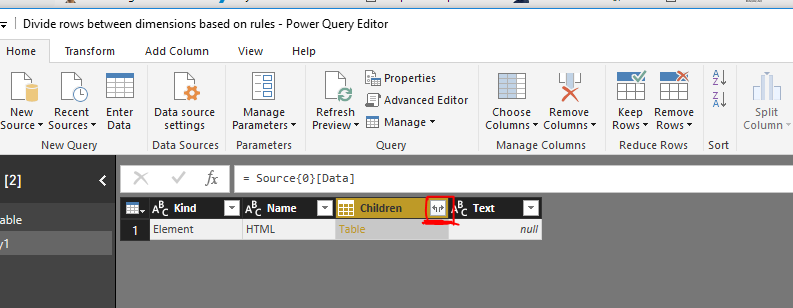
Based on the above screenshots, you get nested table in the TaxReturn column. Please load the xml data in Query Editor, and expand  the TaxReturn column by clicking the highlighted button as shown in the following similar screenshot, then check if all the columns appear.

1.PNG

Regards,
Lydia

View solution in original post

2 REPLIES 2
Anonymous
Not applicable

@BDB,

Based on the above screenshots, you get nested table in the TaxReturn column. Please load the xml data in Query Editor, and expand  the TaxReturn column by clicking the highlighted button as shown in the following similar screenshot, then check if all the columns appear.

1.PNG

Regards,
Lydia

BDB
Frequent Visitor

Thank you!  

Helpful resources

Announcements
Join our Fabric User Panel

Join our Fabric User Panel

Share feedback directly with Fabric product managers, participate in targeted research studies and influence the Fabric roadmap.

February Power BI Update Carousel

Power BI Monthly Update - February 2026

Check out the February 2026 Power BI update to learn about new features.

FabCon Atlanta 2026 carousel

FabCon Atlanta 2026

Join us at FabCon Atlanta, March 16-20, for the ultimate Fabric, Power BI, AI and SQL community-led event. Save $200 with code FABCOMM.