Get Fabric or SQL Certified for Free.
Get certified for free when you join Fabric Data Days 2026 and dive into Fabric, Power BI, SQL, AI, and other essential data skills.
Join now- Power BI forums
- Get Help with Power BI
- Desktop
- Service
- Report Server
- Power Query
- Mobile Apps
- Developer
- DAX Commands and Tips
- Custom Visuals Development Discussion
- Health and Life Sciences
- Power BI Spanish forums
- Translated Spanish Desktop
- Training and Consulting
- Instructor Led Training
- Dashboard in a Day for Women, by Women
- Galleries
- Data Stories Gallery
- Themes Gallery
- Contests Gallery
- QuickViz Gallery
- Quick Measures Gallery
- Visual Calculations Gallery
- Fabric Apps Gallery
- Notebook Gallery
- Translytical Task Flow Gallery
- TMDL Gallery
- R Script Showcase
- Webinars and Video Gallery
- Ideas
- Custom Visuals Ideas (read-only)
- Issues
- Issues
- Events
- Upcoming Events
July 28 - August 9 | Final Round of the Power BI Dataviz World Championships. This is your chance. Learn more
- Power BI forums
- Forums
- Get Help with Power BI
- Power Query
- How can i manage csv files from python query
- Subscribe to RSS Feed
- Mark Topic as New
- Mark Topic as Read
- Float this Topic for Current User
- Bookmark
- Subscribe
- Printer Friendly Page

- Mark as New
- Bookmark
- Subscribe
- Mute
- Subscribe to RSS Feed
- Permalink
- Report Inappropriate Content
How can i manage csv files from python query
Hi:
I import csv files using python script but data uses semicolon delimiters and power bi is configuerd with comma. In source properties only edit the script and can`t configure that condition. How can i do?
Than you.
Solved! Go to Solution.
- Mark as New
- Bookmark
- Subscribe
- Mute
- Subscribe to RSS Feed
- Permalink
- Report Inappropriate Content
Ok, thank you.
Finally i resolve with comma delimiters. Works ok:
..............................

		for row in csvfiler:
			if row['PAIS'] != 'Total':
				row['TARIC'] = files[files_index]['CODPROD']
				row['ACCION'] = files[files_index]['IE']
				csvfilew.writerow(row)


		filew.close()
		filer.close()

#Convertir a lista
	with open('inputData.csv', 'r') as f:
		filer = csv.reader(f,delimiter=';',lineterminator='\n')
		filelist = list(filer)
		f.close()

	with open('inputData.csv', 'w') as f:
		filew = csv.writer(f,delimiter=',',lineterminator='\n')
		filew.writerows(filelist)
		f.close()
Thank you so much.
Regards
Álvaro
- Mark as New
- Bookmark
- Subscribe
- Mute
- Subscribe to RSS Feed
- Permalink
- Report Inappropriate Content
@Anonymous,
Could you please share a csv example and post the Python query so that I can test?
Also why not directly use the built-in CSV connector in Power BI Desktop? If you want to import multiple CSV files with same structure at a time, you can put these files in a folder and use Folder connector in Power BI Desktop.
Regards,
Lydia
- Mark as New
- Bookmark
- Subscribe
- Mute
- Subscribe to RSS Feed
- Permalink
- Report Inappropriate Content
Hi:
This is the code that i use. Try it:
import csv
import requests

URL = 'http://aduanas.camaras.org/downieespannola.php'

#[IE,ANNO,MONTH,MONTHS,PRODUCT,CODPROD,NACAREA,NACAREACOD,INTAREA,INTAREACOD,LOGIN,PASS]
my_pets = [['E','18','00','%2200%22','TA','0701','PR','','PS','','',''],
['I','18','00','%2200%22','TA','07032000','PR','','PS','','','']]
pet_index = 0

files = []
files_index = 0

for pet in my_pets:
	IE = my_pets[pet_index][0]
	ANNO = my_pets[pet_index][1]
	MONTH = my_pets[pet_index][2]
	MONTHS = my_pets[pet_index][3]
	PRODUCT = my_pets[pet_index][4]
	CODPROD = my_pets[pet_index][5]
	NACAREA = my_pets[pet_index][6]
	NACAREACOD = my_pets[pet_index][7]
	INTAREA = my_pets[pet_index][8]
	INTAREACOD = my_pets[pet_index][9]
	LOGIN = my_pets[pet_index][10]
	PASS = my_pets[pet_index][11]

	CSV_URL = URL
	CSV_URL += '?'
	CSV_URL += 'impexp=' + IE
	CSV_URL += '&anno=' + ANNO
	CSV_URL += '&mes=' + MONTH
	CSV_URL += '&tipo=ORGDES'
	CSV_URL += '&meses=' + MONTHS
	CSV_URL += '&producto=' + PRODUCT
	CSV_URL += '&codprod=' + CODPROD
	CSV_URL += '&result=DOWN_PS'
	CSV_URL += '&orden=LOCAL'
	CSV_URL += '&areanacional=' + NACAREA
	CSV_URL += '&codareanac=' + NACAREACOD
	CSV_URL += '&areainternac=' + INTAREA
	CSV_URL += '&codareainter=' + INTAREACOD
	CSV_URL += '&login=' + LOGIN
	CSV_URL += '&pass=' + PASS


	with requests.Session() as s:

		download = s.get(CSV_URL)

		if download.headers['Content-type'] == 'application/csv':

			decoded_content = download.content.decode('utf-8')

			cr = csv.reader(decoded_content.splitlines(), delimiter=';')
			next(cr) 		#Ignoramos la primera linea en blanco

			file_name = IE + ANNO + MONTH + PRODUCT + CODPROD + NACAREA + NACAREACOD + INTAREA + INTAREACOD + ".csv"
			f = open(file_name,"w")


			files.append({'name': file_name, 'IE': IE, 'ANNO': ANNO, 'MONTH': MONTH, 'PRODUCT': PRODUCT, 'CODPROD': CODPROD, 'NACAREA': NACAREA, 'NACAREACOD': NACAREACOD, 'INTAREA': INTAREA, 'INTAREACOD': INTAREACOD})
			files_index += 1

			crw = csv.writer(f,delimiter=';',lineterminator='\n')
			crw.writerows(cr)

			f.close()

		pet_index += 1

if files_index > 0:
	filew = open('inputData.csv','w')

	headers = ['PAIS','PESO','VALOR','NUM_OPERACIONES','UNIDADES','TARIC','ACCION']

	csvfilew = csv.DictWriter(filew,headers,delimiter=';',lineterminator='\n')
	csvfilew.writeheader()

	filew.close()

	while files_index > 0:
		files_index -= 1
		filer = open(files[files_index]['name'],'r')
		filew = open('inputData.csv','a')

		csvfiler = csv.DictReader(filer,delimiter=';',lineterminator='\n')
		csvfilew = csv.DictWriter(filew,headers,delimiter=';',lineterminator='\n')

		for row in csvfiler:
			if row['PAIS'] != 'Total':
				row['TARIC'] = files[files_index]['CODPROD']
				row['ACCION'] = files[files_index]['IE']
				csvfilew.writerow(row)


		filew.close()
		filer.close()
- Mark as New
- Bookmark
- Subscribe
- Mute
- Subscribe to RSS Feed
- Permalink
- Report Inappropriate Content
@Anonymous,
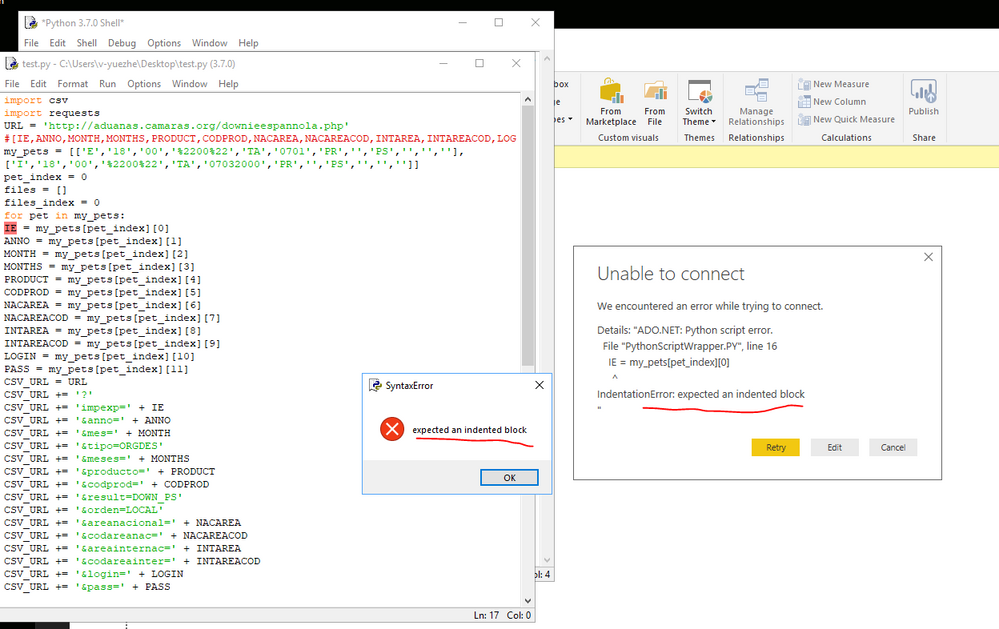
Are you able to run the above python file in Python Shell? I get same error in Python Shell and Power BI Desktop.
Regards,
Lydia
- Mark as New
- Bookmark
- Subscribe
- Mute
- Subscribe to RSS Feed
- Permalink
- Report Inappropriate Content
Sorry, i put code without the correct tool.
import csv
import requests
URL = 'http://aduanas.camaras.org/downieespannola.php'
#[IE,ANNO,MONTH,MONTHS,PRODUCT,CODPROD,NACAREA,NACAREACOD,INTAREA,INTAREACOD,LOGIN,PASS]
my_pets = [['E','18','00','%2200%22','TA','0701','PR','','PS','','',''],
['I','18','00','%2200%22','TA','07032000','PR','','PS','','','']]
pet_index = 0
files = []
files_index = 0
for pet in my_pets:
IE = my_pets[pet_index][0]
ANNO = my_pets[pet_index][1]
MONTH = my_pets[pet_index][2]
MONTHS = my_pets[pet_index][3]
PRODUCT = my_pets[pet_index][4]
CODPROD = my_pets[pet_index][5]
NACAREA = my_pets[pet_index][6]
NACAREACOD = my_pets[pet_index][7]
INTAREA = my_pets[pet_index][8]
INTAREACOD = my_pets[pet_index][9]
LOGIN = my_pets[pet_index][10]
PASS = my_pets[pet_index][11]
CSV_URL = URL
CSV_URL += '?'
CSV_URL += 'impexp=' + IE
CSV_URL += '&anno=' + ANNO
CSV_URL += '&mes=' + MONTH
CSV_URL += '&tipo=ORGDES'
CSV_URL += '&meses=' + MONTHS
CSV_URL += '&producto=' + PRODUCT
CSV_URL += '&codprod=' + CODPROD
CSV_URL += '&result=DOWN_PS'
CSV_URL += '&orden=LOCAL'
CSV_URL += '&areanacional=' + NACAREA
CSV_URL += '&codareanac=' + NACAREACOD
CSV_URL += '&areainternac=' + INTAREA
CSV_URL += '&codareainter=' + INTAREACOD
CSV_URL += '&login=' + LOGIN
CSV_URL += '&pass=' + PASS
with requests.Session() as s:
download = s.get(CSV_URL)
if download.headers['Content-type'] == 'application/csv':
decoded_content = download.content.decode('utf-8')
cr = csv.reader(decoded_content.splitlines(), delimiter=';')
next(cr) #Ignoramos la primera linea en blanco
file_name = IE + ANNO + MONTH + PRODUCT + CODPROD + NACAREA + NACAREACOD + INTAREA + INTAREACOD + ".csv"
f = open(file_name,"w")
files.append({'name': file_name, 'IE': IE, 'ANNO': ANNO, 'MONTH': MONTH, 'PRODUCT': PRODUCT, 'CODPROD': CODPROD, 'NACAREA': NACAREA, 'NACAREACOD': NACAREACOD, 'INTAREA': INTAREA, 'INTAREACOD': INTAREACOD})
files_index += 1
crw = csv.writer(f,delimiter=';',lineterminator='\n')
crw.writerows(cr)
f.close()
pet_index += 1
if files_index > 0:
filew = open('inputData.csv','w')
headers = ['PAIS','PESO','VALOR','NUM_OPERACIONES','UNIDADES','TARIC','ACCION']
csvfilew = csv.DictWriter(filew,headers,delimiter=';',lineterminator='\n')
csvfilew.writeheader()
filew.close()
while files_index > 0:
files_index -= 1
filer = open(files[files_index]['name'],'r')
filew = open('inputData.csv','a')
csvfiler = csv.DictReader(filer,delimiter=';',lineterminator='\n')
csvfilew = csv.DictWriter(filew,headers,delimiter=';',lineterminator='\n')
for row in csvfiler:
if row['PAIS'] != 'Total':
row['TARIC'] = files[files_index]['CODPROD']
row['ACCION'] = files[files_index]['IE']
csvfilew.writerow(row)
filew.close()
filer.close()Run it and introduce code:
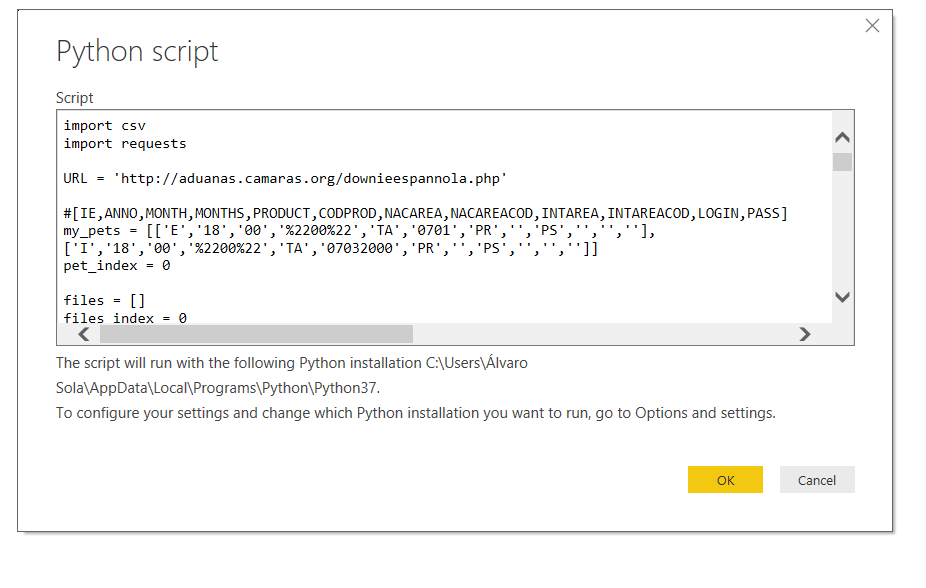
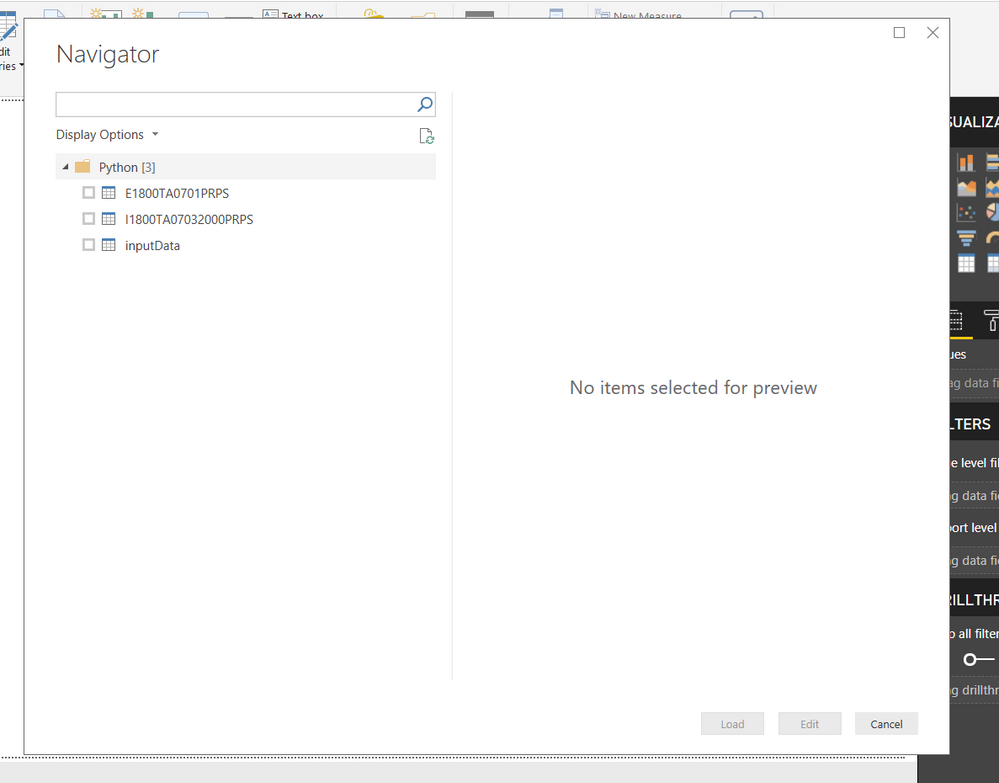
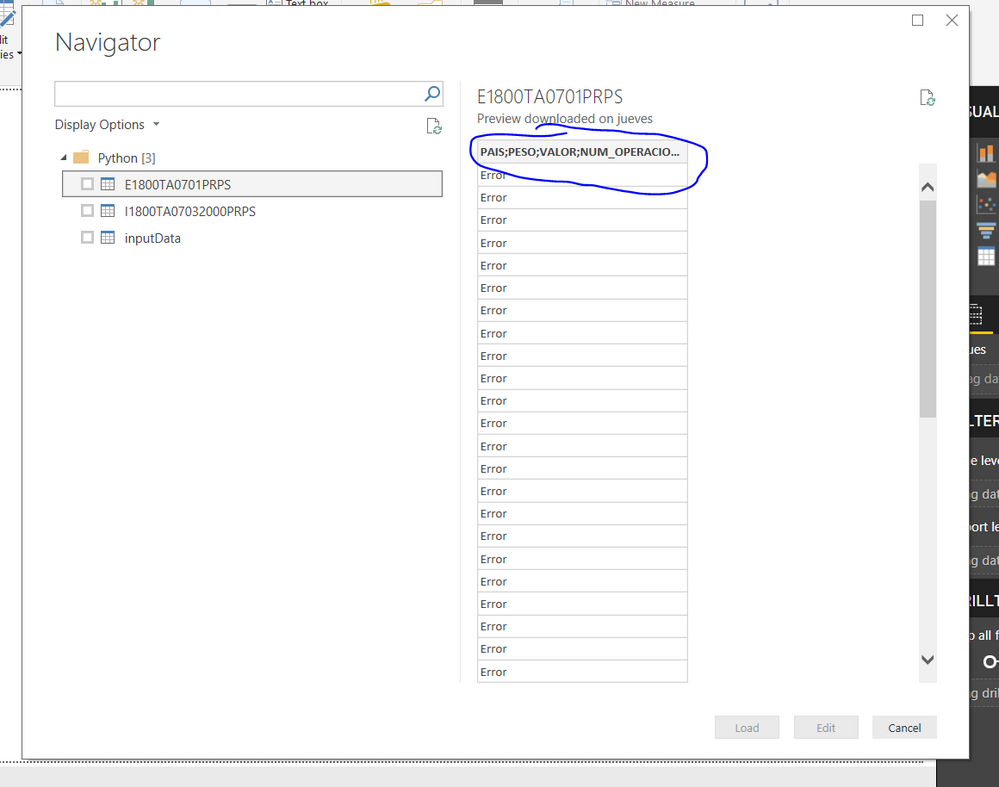
Finally, downloaded files can`t detect semicolon delimiters.
- Mark as New
- Bookmark
- Subscribe
- Mute
- Subscribe to RSS Feed
- Permalink
- Report Inappropriate Content
@Anonymous,
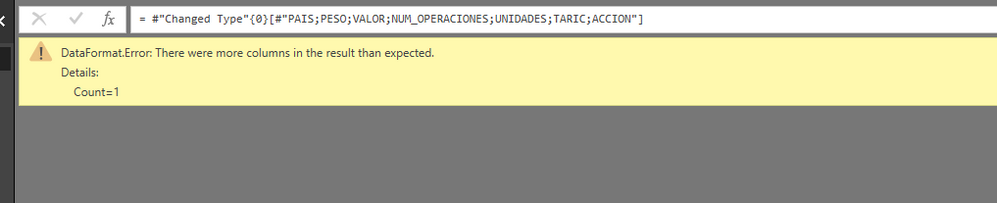
I import the table into Power BI using your python script and get the following error.
I suspect the issue is caused by the special format of the CSV file, you can take a look at the following similar thread.
https://social.technet.microsoft.com/Forums/en-US/1170ca42-695c-491b-9401-4c1cefe92a7b/how-to-ignore...
As a workaround, I would recommend you directly connect to these csv files in Power BI Desktop, or convert the csv files to Excel in Python script, then check if the issue still persists.
Regards,
Lydia
- Mark as New
- Bookmark
- Subscribe
- Mute
- Subscribe to RSS Feed
- Permalink
- Report Inappropriate Content
Ok, thank you.
Finally i resolve with comma delimiters. Works ok:
..............................

		for row in csvfiler:
			if row['PAIS'] != 'Total':
				row['TARIC'] = files[files_index]['CODPROD']
				row['ACCION'] = files[files_index]['IE']
				csvfilew.writerow(row)


		filew.close()
		filer.close()

#Convertir a lista
	with open('inputData.csv', 'r') as f:
		filer = csv.reader(f,delimiter=';',lineterminator='\n')
		filelist = list(filer)
		f.close()

	with open('inputData.csv', 'w') as f:
		filew = csv.writer(f,delimiter=',',lineterminator='\n')
		filew.writerows(filelist)
		f.close()
Thank you so much.
Regards
Álvaro
- Mark as New
- Bookmark
- Subscribe
- Mute
- Subscribe to RSS Feed
- Permalink
- Report Inappropriate Content
@Anonymous,
Glad to hear the the issue is solved. You can accept your reply as answer as solution to close this thread.
Regards,
Lydia
Helpful resources

Fabric Community Sticker Challenge - Barcelona 2026
If you love stickers, then you will definitely want to check out our community sticker challenge, Barcelona edition!

Power BI Monthly Update - July 2026
Check out the July 2026 Power BI update to learn about new features.

Power BI DataViz World Championships - June 2026
A new Power BI DataViz World Championship is coming this June! Don't miss out on submitting your entry.


