

Join us at FabCon Atlanta from March 16 - 20, 2026, for the ultimate Fabric, Power BI, AI and SQL community-led event. Save $200 with code FABCOMM.
Register now!The Power BI Data Visualization World Championships is back! Get ahead of the game and start preparing now! Learn more
How can I make sure specific transformations such as remove top 3 rows and promote first row to header is applied to all source files when sourcing to a onedrive folder. I’ve successfully removed the top three rows by transforming the “Transform Sample File” but whenever I promote the top row to Column headers I get an error message stating “column 1” of the table wasn’t found.
This has been so frustrating. I can’t seem to get it to work. Any insight, tips, tricks, help ?
Solved! Go to Solution.
Hi @Marza1991 ,
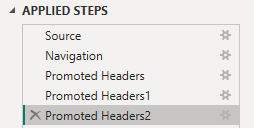
Try first removing the change type step each time you promoted the headers:
then Remove changed type steps under other queries.
Best Regards,
Gao
Community Support Team
If there is any post helps, then please consider Accept it as the solution to help the other members find it more quickly.
If I misunderstand your needs or you still have problems on it, please feel free to let us know. Thanks a lot!
How to get your questions answered quickly -- How to provide sample data in the Power BI Forum -- China Power BI User Group
Hi @Marza1991 ,
Try first removing the change type step each time you promoted the headers:
then Remove changed type steps under other queries.
Best Regards,
Gao
Community Support Team
If there is any post helps, then please consider Accept it as the solution to help the other members find it more quickly.
If I misunderstand your needs or you still have problems on it, please feel free to let us know. Thanks a lot!
How to get your questions answered quickly -- How to provide sample data in the Power BI Forum -- China Power BI User Group
The Power BI Data Visualization World Championships is back! Get ahead of the game and start preparing now!
| User | Count |
|---|---|
| 19 | |
| 10 | |
| 9 | |
| 8 | |
| 7 |