cancel
Showing results for 
Search instead for 
Did you mean: 

Vote for your favorite vizzies from the Power BI Dataviz World Championship submissions. Vote now!

Reply
klehar
Helper V
Helper V

Expand a number in a cell to the number of rows

Hi,


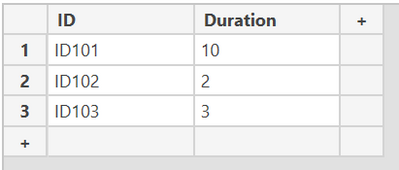
I have a table

klehar_0-1630075259159.png


I want to expand the duration column such that if it is 10, then I should get 11 rows starting from 0 to 10 for my column period

If duration = 2 then my period column should have 3 rows 0,1,2


See expected output below.

IDDurationPeriod
ID101100
ID101101
ID101102
ID101103
ID101104
ID101105
ID101106
ID101107
ID101108
ID101109
ID1011010
ID10220
ID10221
ID10222
ID10330
ID10331
ID10332
ID10333


I want this in M code


1 ACCEPTED SOLUTION
Jakinta
Solution Sage
Solution Sage

let
    Source = Table.FromRows(Json.Document(Binary.Decompress(Binary.FromText("i45WMjQwVNJRMlWK1QGxjYBsIyjbGMg2h7JNgGxDpdhYAA==", BinaryEncoding.Base64), Compression.Deflate)), let _t = ((type nullable text) meta [Serialized.Text = true]) in type table [ID = _t, Duration = _t]),
    #"Added Custom" = Table.AddColumn(Source, "Custom", each {0..Number.From([Duration])}),
    #"Expanded Custom" = Table.ExpandListColumn(#"Added Custom", "Custom")
in
    #"Expanded Custom"

View solution in original post

1 REPLY 1
Jakinta
Solution Sage
Solution Sage

let
    Source = Table.FromRows(Json.Document(Binary.Decompress(Binary.FromText("i45WMjQwVNJRMlWK1QGxjYBsIyjbGMg2h7JNgGxDpdhYAA==", BinaryEncoding.Base64), Compression.Deflate)), let _t = ((type nullable text) meta [Serialized.Text = true]) in type table [ID = _t, Duration = _t]),
    #"Added Custom" = Table.AddColumn(Source, "Custom", each {0..Number.From([Duration])}),
    #"Expanded Custom" = Table.ExpandListColumn(#"Added Custom", "Custom")
in
    #"Expanded Custom"

Helpful resources

Announcements
Power BI DataViz World Championships

Power BI Dataviz World Championships

Vote for your favorite vizzies from the Power BI World Championship submissions!

Sticker Challenge 2026 Carousel

Join our Community Sticker Challenge 2026

If you love stickers, then you will definitely want to check out our Community Sticker Challenge!

January Power BI Update Carousel

Power BI Monthly Update - January 2026

Check out the January 2026 Power BI update to learn about new features.

FabCon Atlanta 2026 carousel

FabCon Atlanta 2026

Join us at FabCon Atlanta, March 16-20, for the ultimate Fabric, Power BI, AI and SQL community-led event. Save $200 with code FABCOMM.