cancel
Showing results for 
Search instead for 
Did you mean: 

The Power BI Data Visualization World Championships is back! Get ahead of the game and start preparing now! Learn more

Reply
Joseph_11
Frequent Visitor

Error in Incremental load

Hello All,

I was trying to implement Incremental load. But I wasn't sure where Iam going wrong

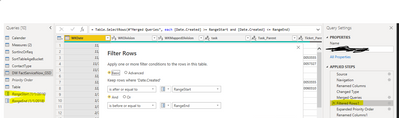
I have created parameter(RangeStart and RangeEnd) and filtered the date column based on the parameter.
Joseph_11_1-1669181566443.png


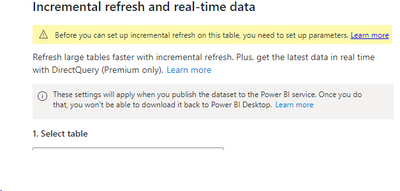
But Iam getting the error like this

Joseph_11_0-1669181421669.png

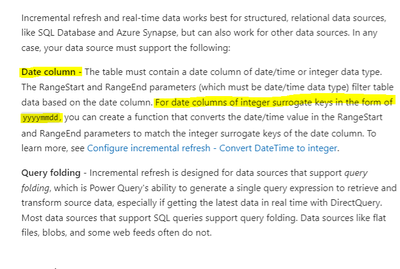
Checked the article related to incremental load where they have mentioned.
Joseph_11_2-1669181648840.png

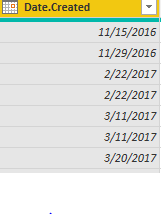
But my date table format is in MMDDYYY
Joseph_11_3-1669181729529.png

So is this the reason why Iam facing error or I have missed the steps?

If date format is the reason for failure .Kindly let me know how to change the format from MMDDYYYY to YYYYMMDD(I have tried by seperating using delimeter and meriging it and while changing format from text to date the format is getting changed )

Kindly let me know the solution


1 ACCEPTED SOLUTION
v-jialluo-msft
Community Support
Community Support

Hi @Joseph_11  ,


There can be only one equal to.

vjialluomsft_0-1669189756443.png

The type of the parameter should be Date/Time, please fix and then test.


vjialluomsft_0-1669190370163.png


Best Regards,

Gallen Luo

If this post helps, then please consider Accept it as the solution to help the other members find it more quickly.

View solution in original post

5 REPLIES 5
v-jialluo-msft
Community Support
Community Support

Hi @Joseph_11 ,


Whether query folding is supported is determined by the type of data source you select and cannot be changed.

If you have more relevant questions, you can create a new post in the forum so that we can pay attention to it and solve it.


Best Regards,

Gallen Luo

v-jialluo-msft
Community Support
Community Support

Hi @Joseph_11 ,


If a table configured with incremental refresh does not support query folding, the goal of incremental refresh cannot be achieved.

Most data sources that have the concept of a query language support query folding. These data sources can include relational databases, OData feeds (including SharePoint lists), Exchange, and Active Directory. However, data sources like flat files, blobs, and web typically do not.
Query folding - Power Query | Microsoft Learn


Best Regards,

Gallen Luo

Hi @v-jialluo-msft 

Got your point..Thanks for sharing your content.

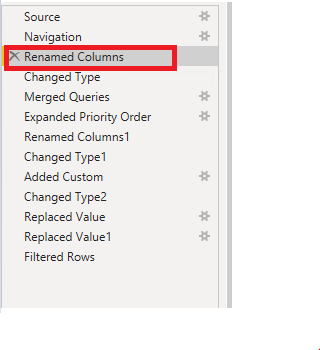
In the below screenshot till renamed columns query folding is available and it got broken after the following steps

Joseph_11_0-1669292578709.png

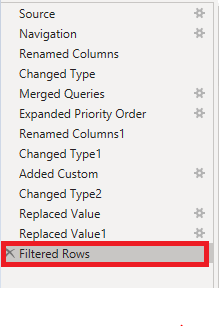
Is it possible to enable query folding for this step(Filtered rows), Since the above steps are created by my senior colleagues I don't want to make any changes it the steps.

Joseph_11_1-1669292785069.png

Regards,
Joseph


v-jialluo-msft
Community Support
Community Support

Hi @Joseph_11  ,


There can be only one equal to.

vjialluomsft_0-1669189756443.png

The type of the parameter should be Date/Time, please fix and then test.


vjialluomsft_0-1669190370163.png


Best Regards,

Gallen Luo

If this post helps, then please consider Accept it as the solution to help the other members find it more quickly.

Hi @v-jialluo-msft 

Thanks for the quick response.

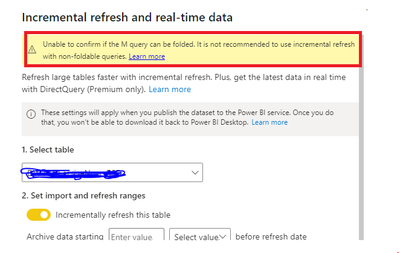
As per your instruction I have followed it and now Iam able to enbale the incremental load but I get this error message

Joseph_11_0-1669199912462.png

Is this error was reported since the query folding is not happening? and will it cause any issue If I proceed with incremental load.

Regards,
Joseph

Helpful resources

Announcements
Power BI DataViz World Championships

Power BI Dataviz World Championships

The Power BI Data Visualization World Championships is back! Get ahead of the game and start preparing now!

December 2025 Power BI Update Carousel

Power BI Monthly Update - December 2025

Check out the December 2025 Power BI Holiday Recap!

FabCon Atlanta 2026 carousel

FabCon Atlanta 2026

Join us at FabCon Atlanta, March 16-20, for the ultimate Fabric, Power BI, AI and SQL community-led event. Save $200 with code FABCOMM.

Top Solution Authors