cancel
Showing results for 
Search instead for 
Did you mean: 

The Power BI Data Visualization World Championships is back! Get ahead of the game and start preparing now! Learn more

Reply
Mark1982
Helper I
Helper I

Conundrum Power Query

Hi everyone,


I am a bit new to Power Query and have a requirement which i am unable to figure out with my limited knowledge. Got a simple table with multiple records which I require to "explode" into a new table based on some text based conditions.


The source data (pretty simple);

NoTotalling
10001 
10002

10001|10004..10005

1000310001|10002
1000410002..10003


The aim is to create a sub table in support of generating DAX measures totaling related entries within another related table. As DAX has limited functonality in relation to creating tables and rows I am investigating generating a new table within M.


The aim would be creating a second table within M. This second table will then we be referenced to the first table.

NoTotalFromTotalTo
100021000110001
100021000410005
100031000110001
100031000210002
100041000210003


The key is here the use of the "|" in combination with ".." characters use. The challenging bit for me how i am able to drive the Table.InsertRows following such condition(s). The "|" means a new row whilst the use of ".." would need to drive the value within the TotalTo column.  


From reading the interwebs, forums and available documentation it should be possible to loop through the source table using a list. This loop then could drive the required conditions. Is this something that should be possible? Maybe someone has solved this requirement already? No iam not asking for a final solution, would like to enage with you guys to get some idea how to solve this.


Thanks..

1 ACCEPTED SOLUTION
camargos88
Community Champion
Community Champion

Hi @Mark1982 ,


Use this mcode:

let
    Source = Table.FromRows(Json.Document(Binary.Decompress(Binary.FromText("i45WMjQwMDBU0lFSUIrVgfCMgDywaA2INNHTA1GmcGljFGkjuLgJVNwIosFYKTYWAA==", BinaryEncoding.Base64), Compression.Deflate)), let _t = ((type nullable text) meta [Serialized.Text = true]) in type table [No = _t, Totalling = _t]),
    #"Changed Type" = Table.TransformColumnTypes(Source,{{"No", Int64.Type}, {"Totalling", type text}}),
    #"Added Custom" = Table.AddColumn(#"Changed Type", "Custom", each Text.Split([Totalling], "|")),
    #"Expanded Custom" = Table.ExpandListColumn(#"Added Custom", "Custom"),
    #"Split Column by Delimiter" = Table.SplitColumn(#"Expanded Custom", "Custom", Splitter.SplitTextByDelimiter("..", QuoteStyle.Csv), {"Custom.1", "Custom.2"}),
    #"Changed Type1" = Table.TransformColumnTypes(#"Split Column by Delimiter",{{"Custom.1", Int64.Type}, {"Custom.2", type text}}),
    #"Added Custom1" = Table.AddColumn(#"Changed Type1", "Custom", each if [Custom.2] = null then [Custom.1] else [Custom.2]),
    #"Removed Columns" = Table.RemoveColumns(#"Added Custom1",{"Custom.2"}),
    #"Filtered Rows" = Table.SelectRows(#"Removed Columns", each ([Totalling] <> " ")),
    #"Removed Columns1" = Table.RemoveColumns(#"Filtered Rows",{"Totalling"}),
    #"Renamed Columns" = Table.RenameColumns(#"Removed Columns1",{{"Custom.1", "TotalFrom"}, {"Custom", "TotalTo"}}),
    #"Changed Type2" = Table.TransformColumnTypes(#"Renamed Columns",{{"TotalTo", Int64.Type}})
in
    #"Changed Type2"
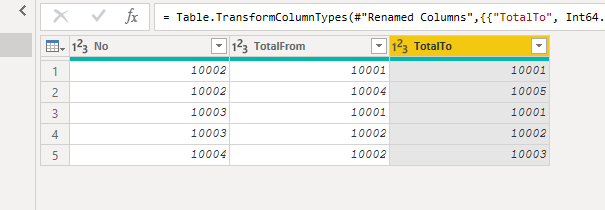
 

Capture.PNG


Did I answer your question? Mark my post as a solution!

Proud to be a Super User!


View solution in original post

3 REPLIES 3
Anonymous
Not applicable

I tried to guess what the input table looks like.


You try this:


let
    Source = Table.FromRows(Json.Document(Binary.Decompress(Binary.FromText("i45WMjQwMDBU0lFSUIrVgfCMgDywaA2INNHTA1GmcGljFGkjuLgJVNwIosFYKTYWAA==", BinaryEncoding.Base64), Compression.Deflate)), let _t = ((type nullable text) meta [Serialized.Text = true]) in type table [No = _t, Totalling = _t]),
    #"Changed Type" = Table.TransformColumnTypes(Source,{{"No", Int64.Type}, {"Totalling", type text}}),
    #"Added Custom" = Table.AddColumn(#"Changed Type", "tot fromto", each Text.Split([Totalling],"|")),
    #"Expanded tot fromto" = Table.ExpandListColumn(#"Added Custom", "tot fromto"),
    #"Split Column by Delimiter" = Table.SplitColumn(#"Expanded tot fromto", "tot fromto", Splitter.SplitTextByDelimiter("..", QuoteStyle.Csv), {"tot fromto.1", "tot fromto.2"}),
    #"Changed Type1" = Table.FromRecords(Table.TransformRows(#"Split Column by Delimiter", each _& [#"tot fromto.2"=_[tot fromto.2]? ??[tot fromto.1]] ))
in
    #"Changed Type1"


image.png

camargos88
Community Champion
Community Champion

Hi @Mark1982 ,


Use this mcode:

let
    Source = Table.FromRows(Json.Document(Binary.Decompress(Binary.FromText("i45WMjQwMDBU0lFSUIrVgfCMgDywaA2INNHTA1GmcGljFGkjuLgJVNwIosFYKTYWAA==", BinaryEncoding.Base64), Compression.Deflate)), let _t = ((type nullable text) meta [Serialized.Text = true]) in type table [No = _t, Totalling = _t]),
    #"Changed Type" = Table.TransformColumnTypes(Source,{{"No", Int64.Type}, {"Totalling", type text}}),
    #"Added Custom" = Table.AddColumn(#"Changed Type", "Custom", each Text.Split([Totalling], "|")),
    #"Expanded Custom" = Table.ExpandListColumn(#"Added Custom", "Custom"),
    #"Split Column by Delimiter" = Table.SplitColumn(#"Expanded Custom", "Custom", Splitter.SplitTextByDelimiter("..", QuoteStyle.Csv), {"Custom.1", "Custom.2"}),
    #"Changed Type1" = Table.TransformColumnTypes(#"Split Column by Delimiter",{{"Custom.1", Int64.Type}, {"Custom.2", type text}}),
    #"Added Custom1" = Table.AddColumn(#"Changed Type1", "Custom", each if [Custom.2] = null then [Custom.1] else [Custom.2]),
    #"Removed Columns" = Table.RemoveColumns(#"Added Custom1",{"Custom.2"}),
    #"Filtered Rows" = Table.SelectRows(#"Removed Columns", each ([Totalling] <> " ")),
    #"Removed Columns1" = Table.RemoveColumns(#"Filtered Rows",{"Totalling"}),
    #"Renamed Columns" = Table.RenameColumns(#"Removed Columns1",{{"Custom.1", "TotalFrom"}, {"Custom", "TotalTo"}}),
    #"Changed Type2" = Table.TransformColumnTypes(#"Renamed Columns",{{"TotalTo", Int64.Type}})
in
    #"Changed Type2"


Capture.PNG


Did I answer your question? Mark my post as a solution!

Proud to be a Super User!


I've spend some time disecting your proposed solution. The = Table.AddColumn(#"Changed Type", "Custom", each Text.Split([Totaling], "|")) and = Table.SplitColumn(#"Expanded Custom", "Custom", Splitter.SplitTextByDelimiter("..", QuoteStyle.Csv), {"Custom.1", "Custom.2"}) are the holy grail.


Thank you very much.

Helpful resources

Announcements
Power BI DataViz World Championships

Power BI Dataviz World Championships

The Power BI Data Visualization World Championships is back! Get ahead of the game and start preparing now!

December 2025 Power BI Update Carousel

Power BI Monthly Update - December 2025

Check out the December 2025 Power BI Holiday Recap!

FabCon Atlanta 2026 carousel

FabCon Atlanta 2026

Join us at FabCon Atlanta, March 16-20, for the ultimate Fabric, Power BI, AI and SQL community-led event. Save $200 with code FABCOMM.

Top Solution Authors