Hello Teams,
the application I'm currently working on will allow us to manage corporate purchases. Initially, I have a window that allows me to create an expression, the latter will subsequently turn into a purchase request.
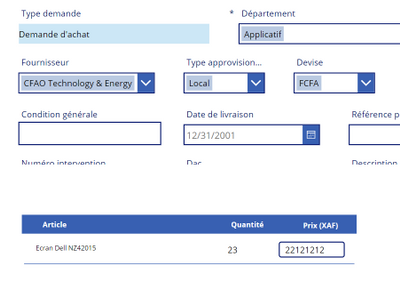
this process involves two lists: the "DemandeAchat " list and the "DemandeAchatArticleFournisseur" list because a purchase request or an expressinn of requirements relates to the lines of articles.
When creating the needs expression, the user describes the need, fills in the items and the quantities requested.
When creating the purchase requisition, the purchasing manager must choose a supplier, fill in the prices for the items mentioned in order to generate a purchase order.
I would like to clarify here that the supplier's identifier is in the "DemandeAchat" list, the quantities and prices and the items are in the "DemandeAchatArticleFournisseur " list
For the moment everything is working perfectly; but the problem that I encounter is at the level of the V.A.T. because I wanted to apply it directly as the order form but my boss tells me that I must apply it to each line of article.
And before applying it I must first check whether the chosen Supplier is exempt from VAT or not: if it is exempt from VAT, no VAT will be applied to the item lines; If not, I must also check if the item is taxable or not before applying the VAT
I especially want to remind here that during the creation of a supplier, and even articles we specify whether it will be exempt from VAT or not
an overview of my code
///Gestion de la mise jour des lignes de la demande d'achat : Paulin
If(
    Form1_10.Valid,
    ForAll(
        Gallery1_7.AllItems As GG,
        Patch(
            DemandeAchatArticleFournisseur,
            LookUp(
                DemandeAchatArticleFournisseur,
                DemandeAchatArticleFournisseurId = GG.DemandeAchatArticleFournisseurId
            ),
            {
                Prix: Value(GG.TextInput3.Text),
                Quantite: Value(GG.TextInput2.Text),
                MontantLigne: Value(GG.TextInput3.Text) * Value(GG.TextInput2.Text)
            }
        )
    );
    Patch(
        DemandeAchat,
        LookUp(
            DemandeAchat,
            DemandeAchatId = tableEntites_7.Selected.DemandeAchatId
        ),
        {
            Montant: Sum(
                Gallery1_7.AllItems,
                Value(TextInput3.Text) * Value(TextInput2.Text)
            )
        }
    );
    UpdateContext({modalGroupEntiteVisibility: false}),
    Notify(
        "donné?!",
        NotificationType.Information
    )
);
SubmitForm(Form1_10);
ZulaaValidationDA.Run(tableEntites_7.Selected.DemandeAchatId)
Thanks for your help


