Join us in Barcelona for FabCon and SQLCon, September 28 - October 1, 2026.
This is best Fabric, Power BI, SQL and AI community event. How do we know? The last event sold out! Save €200 with code FABCMTY200.
Register nowA new Data Days event is coming soon! This time we’re going bigger than ever. Fabric, Power BI, SQL, AI and more. Don't miss out.
- Microsoft Fabric Community
- Fabric community blogs
- Power BI Community Blog
- Decoding DirectQuery in Power BI Part 5: Time Inte...
- Subscribe to RSS Feed
- Mark as New
- Mark as Read
- Bookmark
- Subscribe
- Printer Friendly Page
- Report Inappropriate Content

Decoding DirectQuery in Power BI Part 5: Time Intelligence with Date Table in Power BI
- Subscribe to RSS Feed
- Mark as New
- Mark as Read
- Bookmark
- Subscribe
- Printer Friendly Page
- Report Inappropriate Content
Problem description:
Can we use a date table in Power BI for getting time intelligence, when a DirectQuery database does not have a date table?
Setup:
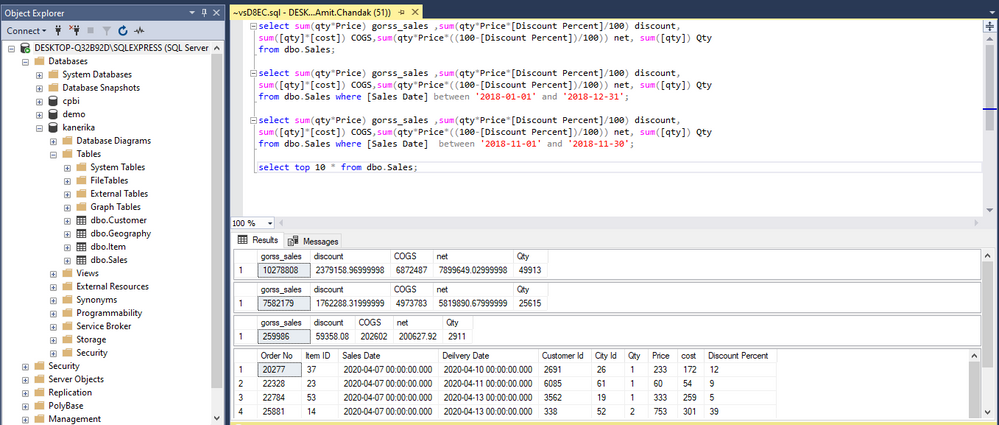
I installed SQL Server Express edition on my machine and uploaded four tables - customer, geography, item, and sales.
Data Loading:
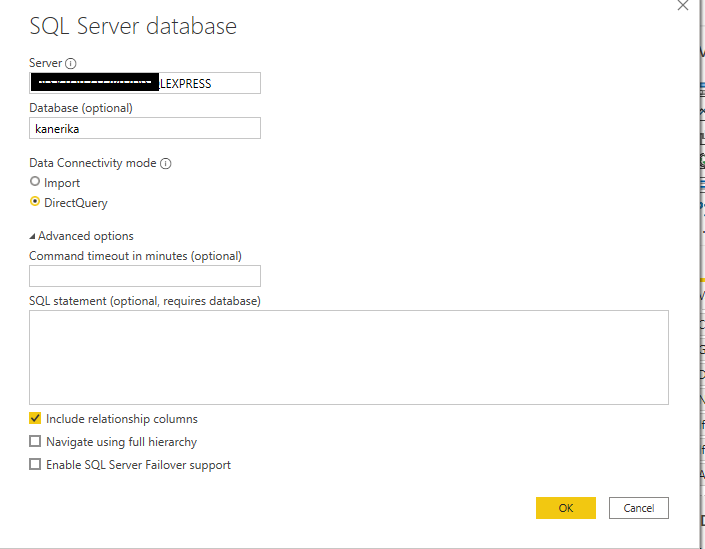
Connected to SQL server in DirectQuery mode and edited all these 4 tables.
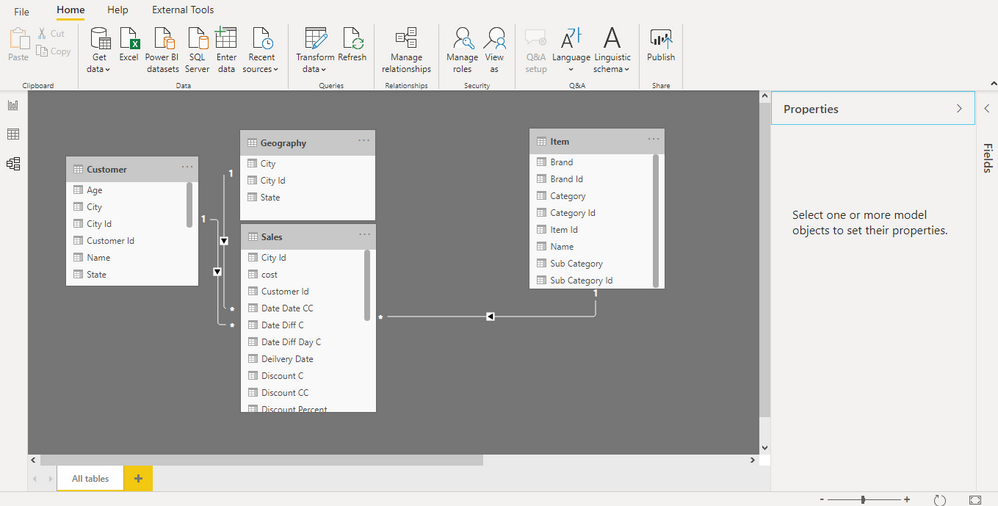
We created the required joins between Sales and Customer, Sales and Geography, and Sales and Item. All joins have one-to-many relationships from the dimension table to the fact table.
Date Table in Power BI
Create a date table in Power BI, as the data source does not have a date table.
Date = CALENDAR(date(2017,01,01),date(2020,12,31))
Month Year = FORMAT([Date],"MMM-YYYY")
Month Year Sort = FORMAT([Date],"YYYYMM")
Year = YEAR([Date])

Join it with the sales table:

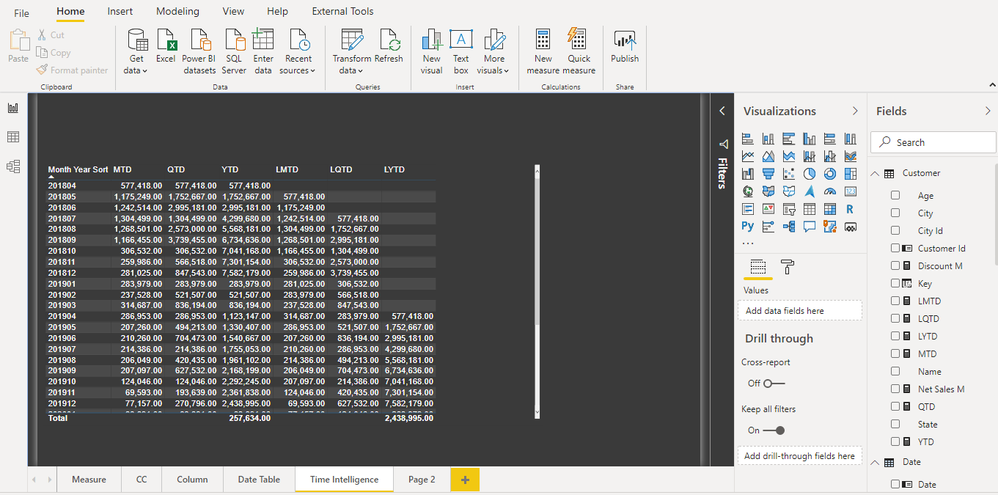
Create Time Intelligence formulas:
MTD = CALCULATE([Gross Sales M],DATESMTD('Date'[Date]) )
QTD = CALCULATE([Gross Sales M],DATESQTD('Date'[Date]))
YTD = CALCULATE([Gross Sales M],DATESYTD('Date'[Date]))
LMTD = CALCULATE([Gross Sales M],DATESMTD(DATEADD('Date'[Date],-1,MONTH) ))
LQTD = CALCULATE([Gross Sales M],DATESQTD(DATEADD('Date'[Date],-1,QUARTER)))
LYTD = CALCULATE([Gross Sales M],DATESYTD(DATEADD('Date'[Date],-1,YEAR)) )
Conclusion
So, the conclusion is that we can use a date table created in Power BI for time intelligence.
Do share your experience with DirectQuery and let us know if you want to check out something different in DirectQuery mode.
You can get all my posts at https://community.powerbi.com/t5/Data-Stories-Gallery/Blog-Analysis/m-p/1265567#M4403
You must be a registered user to add a comment. If you've already registered, sign in. Otherwise, register and sign in.
- Distinct is not the same for Power Query and DAX –...
- Power BI load-testing notebook that won Microsoft ...
- Accessibility as a Design Framework in Power BI
- 📢 Announcing the Winners of the Fabric Semantic L...
- Turning a Real‑World Lesson into PBIX A11y for Pow...
- Designing a Reusable Power BI Semantic Model for M...
- What really happens when you publish a Power BI re...
- Migrating From Power Pivot For Excel Data to Power...
- Microsoft Fabric: A Complete Guide to Item-Level S...
- pbi-cli Gi Claude Code the Power BI Skills It Need...
-
oussamahaimoud
 on:
Accessibility as a Design Framework in Power BI
on:
Accessibility as a Design Framework in Power BI
-
 SamsonTruong
on:
📢 Announcing the Winners of the Fabric Semantic L...
SamsonTruong
on:
📢 Announcing the Winners of the Fabric Semantic L...
-
Juless
 on:
Turning a Real‑World Lesson into PBIX A11y for Pow...
on:
Turning a Real‑World Lesson into PBIX A11y for Pow...
- adminomar on: 5 Things I Wish I Knew Before Using Microsoft Powe...
-
Rufyda
on:
📢 Announcing the Fabric Semantic Link Developer E...
-
Aarti_Zikre
on:
📢Announcing our first Data Factory & Data Integra...
-
bariscihan
 on:
Understanding Modern Data File Formats: Why Parque...
on:
Understanding Modern Data File Formats: Why Parque...
- iorantes on: Use Cases of Remote Power BI MCP Server
-
bariscihan
on:
Common Power BI + Snowflake headache that kept me ...
- Smartvpro10 on: What Is a Power BI MCP Server? (Explained for Begi...
-
How To
782 -
Tips & Tricks
770 -
Events
200 -
Support insights
121 -
Opinion
112 -
DAX
66 -
Power BI
65 -
Power Query
62 -
Power BI Dev Camp
45 -
Roundup
40 -
Power BI Desktop
40 -
Dataflow
33 -
Featured User Group Leader
29 -
Data Protection
22 -
Power BI Embedded
20 -
Time Intelligence
19 -
Tips&Tricks
18 -
PowerBI REST API
12 -
Power BI Service
8 -
Power Query Tips & Tricks
8 -
finance
8 -
Direct Query
7 -
Data Visualization
6 -
Python
6 -
Tips and Tricks
6 -
Power BI REST API
6 -
Auto ML
6 -
financial reporting
6 -
Data Analysis
6 -
Power Automate
6 -
Machine Learning
5 -
Income Statement
5 -
Dax studio
5 -
powerbi
5 -
service
5 -
Power BI PowerShell
5 -
Bookmarks
4 -
Line chart
4 -
Group By
4 -
Community
4 -
RLS
4 -
M language
4 -
Life Sciences
4 -
Paginated Reports
4 -
External tool
4 -
Power BI Goals
4 -
Desktop
4 -
PowerShell
4 -
PowerApps
3 -
Data Science
3 -
Azure
3 -
Data model
3 -
Conditional Formatting
3 -
Visualisation
3 -
Administration
3 -
M code
3 -
Visuals
3 -
SQL Server 2017 Express Edition
3 -
R script
3 -
Aggregation
3 -
Webinar
3 -
calendar
3 -
Gateways
3 -
R
3 -
M Query
3 -
CALCULATE
3 -
R visual
3 -
Reports
3 -
Visualization
2 -
Power BI Challenge
2 -
Query Parameter
2 -
SharePoint
2 -
Power BI Installation and Updates
2 -
How Things Work
2 -
Tabular Editor
2 -
rank
2 -
ladataweb
2 -
Troubleshooting
2 -
Date DIFF
2 -
Transform data
2 -
Healthcare
2 -
Incremental Refresh
2 -
Number Ranges
2 -
Query Plans
2 -
Power BI & Power Apps
2 -
Random numbers
2 -
Day of the Week
2 -
Custom visual
2 -
VLOOKUP
2 -
pivot
2 -
calculated column
2 -
M
2 -
hierarchies
2 -
Power BI Anniversary
2 -
Language M
2 -
inexact
2 -
Date Comparison
2 -
Power BI Premium Per user
2 -
Forecasting
2 -
REST API
2 -
Editor
2 -
Split
2 -
measure
2 -
Microsoft-flow
2 -
Paginated Report Builder
2 -
Working with Non Standatd Periods
2 -
powerbi.tips
2 -
Custom function
2 -
Reverse
2 -
PUG
2 -
Custom Measures
2 -
Filtering
2 -
Row and column conversion
2 -
Python script
2 -
Nulls
2 -
DVW Analytics
2 -
parameter
2 -
Industrial App Store
2 -
Week
2 -
Date duration
2 -
Formatting
2 -
Weekday Calendar
2 -
Support insights.
2 -
construct list
2 -
slicers
2 -
SAP
2 -
Power Platform
2 -
Workday
2 -
external tools
2 -
index
2 -
RANKX
2 -
Date
2 -
PBI Desktop
2 -
Date Dimension
2 -
Integer
2 -
Excel
1 -
Showcase
1 -
custom connector
1 -
Waterfall Chart
1 -
Power BI On-Premise Data Gateway
1 -
patch
1 -
Top Category Color
1 -
A&E data
1 -
Previous Order
1 -
Substring
1 -
Wonderware
1 -
Power M
1 -
Format DAX
1 -
Custom functions
1 -
accumulative
1 -
DAX&Power Query
1 -
Premium Per User
1 -
GENERATESERIES
1 -
Report Server
1 -
Audit Logs
1 -
analytics pane
1 -
step by step
1 -
Top Brand Color on Map
1 -
Tutorial
1 -
Previous Date
1 -
XMLA End point
1 -
color reference
1 -
Date Time
1 -
Marker
1 -
Lineage
1 -
CSV file
1 -
conditional accumulative
1 -
Matrix Subtotal
1 -
Check
1 -
null value
1 -
Show and Tell
1 -
Cumulative Totals
1 -
Report Theme
1 -
Bookmarking
1 -
oracle
1 -
mahak
1 -
pandas
1 -
Networkdays
1 -
Button
1 -
Dataset list
1 -
Keyboard Shortcuts
1 -
Fill Function
1 -
LOOKUPVALUE()
1 -
Tips &Tricks
1 -
Plotly package
1 -
Sameperiodlastyear
1 -
Office Theme
1 -
matrix
1 -
bar chart
1 -
Measures
1 -
powerbi argentina
1 -
Canvas Apps
1 -
total
1 -
Filter context
1 -
Difference between two dates
1 -
get data
1 -
OSI
1 -
Query format convert
1 -
ETL
1 -
Json files
1 -
Merge Rows
1 -
CONCATENATEX()
1 -
take over Datasets;
1 -
Networkdays.Intl
1 -
refresh M language Python script Support Insights
1 -
Tutorial Requests
1 -
Governance
1 -
Fun
1 -
Power BI gateway
1 -
gateway
1 -
Elementary
1 -
Custom filters
1 -
Vertipaq Analyzer
1 -
powerbi cordoba
1 -
Model Driven Apps
1 -
REMOVEFILTERS
1 -
XMLA endpoint
1 -
translations
1 -
OSI pi
1 -
Parquet
1 -
Change rows to columns
1 -
remove spaces
1 -
Get row and column totals
1 -
Retail
1 -
Power BI Report Server
1 -
School
1 -
Cost-Benefit Analysis
1 -
DIisconnected Tables
1 -
Sandbox
1 -
Honeywell
1 -
Combine queries
1 -
X axis at different granularity
1 -
ADLS
1 -
Primary Key
1 -
Microsoft 365 usage analytics data
1 -
Randomly filter
1 -
Week of the Day
1 -
Azure AAD
1 -
query
1 -
Dynamic Visuals
1 -
KPI
1 -
Intro
1 -
Icons
1 -
ISV
1 -
Ties
1 -
unpivot
1 -
Practice Model
1 -
Continuous streak
1 -
ProcessVue
1 -
Create function
1 -
Table.Schema
1 -
Acknowledging
1 -
Postman
1 -
Text.ContainsAny
1 -
Power BI Show
1 -
Get latest sign-in data for each user
1 -
Power Pivot
1 -
API
1 -
Kingsley
1 -
Merge
1 -
variable
1 -
Issues
1 -
function
1 -
stacked column chart
1 -
ho
1 -
ABB
1 -
KNN algorithm
1 -
List.Zip
1 -
optimization
1 -
Artificial Intelligence
1 -
Map Visual
1 -
Text.ContainsAll
1 -
Tuesday
1 -
Help
1 -
group
1 -
Scorecard
1 -
Json
1 -
Tops
1 -
financial reporting hierarchies RLS
1 -
Featured Data Stories
1 -
MQTT
1 -
Custom Periods
1 -
Partial group
1 -
Reduce Size
1 -
FBL3N
1 -
Wednesday
1 -
Data Engineering
1 -
Q&A
1 -
Quick Tips
1 -
data
1 -
PBIRS
1 -
Usage Metrics in Power BI
1 -
Multivalued column
1 -
Pipeline
1 -
Path
1 -
Yokogawa
1 -
Dynamic calculation
1 -
Data Wrangling
1 -
native folded query
1 -
transform table
1 -
UX
1 -
Cell content
1 -
General Ledger
1 -
Thursday
1 -
Notebook
1 -
update
1 -
Table
1 -
Natural Query Language
1 -
Infographic
1 -
automation
1 -
Prediction
1 -
newworkspacepowerbi
1 -
Performance KPIs
1 -
HR Analytics
1 -
keepfilters
1 -
Connect Data
1 -
Financial Year
1 -
Schneider
1 -
dynamically delete records
1 -
Copy Measures
1 -
Friday
1 -
Lakehouse
1 -
Training
1 -
Event
1 -
Custom Visuals
1 -
Free vs Pro
1 -
Format
1 -
Active Employee
1 -
Custom Date Range on Date Slicer
1 -
refresh error
1 -
PAS
1 -
certain duration
1 -
DA-100
1 -
bulk renaming of columns
1 -
Single Date Picker
1 -
Monday
1 -
PCS
1 -
Saturday
1 -
Data Pipeline
1 -
Slicer
1 -
Visual
1 -
forecast
1 -
Regression
1 -
CICD
1 -
Current Employees
1 -
date hierarchy
1 -
relationship
1 -
SIEMENS
1 -
Multiple Currency
1 -
Power BI Premium
1 -
On-premises data gateway
1 -
Binary
1 -
Power BI Connector for SAP
1 -
Sunday
1 -
User Data Functions
1 -
Workspace
1 -
Announcement
1 -
Features
1 -
domain
1 -
pbiviz
1 -
sport statistics
1 -
Intelligent Plant
1 -
Circular dependency
1 -
GE
1 -
Exchange rate
1 -
Dendrogram
1 -
range of values
1 -
activity log
1 -
Decimal
1 -
Charticulator Challenge
1 -
Field parameters
1 -
deployment
1 -
ssrs traffic light indicators
1 -
SQL
1 -
trick
1 -
Scripts
1 -
Color Map
1 -
Industrial
1 -
Weekday
1 -
Working Date
1 -
Space Issue
1 -
Emerson
1 -
Date Table
1 -
Cluster Analysis
1 -
Stacked Area Chart
1 -
union tables
1 -
Number
1 -
Start of Week
1 -
Tips& Tricks
1 -
Theme Colours
1 -
Text
1 -
Flow
1 -
Publish to Web
1 -
Extract
1 -
Topper Color On Map
1 -
Historians
1 -
context transition
1 -
Custom textbox
1 -
OPC
1 -
Zabbix
1 -
Label: DAX
1 -
Business Analysis
1 -
Supporting Insight
1 -
rank value
1 -
Synapse
1 -
End of Week
1 -
Tips&Trick
1
- 05-17-2026 - 05-23-2026
- 05-10-2026 - 05-16-2026
- 05-03-2026 - 05-09-2026
- 04-26-2026 - 05-02-2026
- 04-19-2026 - 04-25-2026
- 04-12-2026 - 04-18-2026
- 04-05-2026 - 04-11-2026
- 03-29-2026 - 04-04-2026
- 03-22-2026 - 03-28-2026
- 03-15-2026 - 03-21-2026
- 03-08-2026 - 03-14-2026
- 03-01-2026 - 03-07-2026
- 02-22-2026 - 02-28-2026
- View Complete Archives