Join us at FabCon Atlanta from March 16 - 20, 2026, for the ultimate Fabric, Power BI, AI and SQL community-led event. Save $200 with code FABCOMM.
Register now!The Power BI Data Visualization World Championships is back! Get ahead of the game and start preparing now! Learn more
I'm importing some XML into Excel. Using the legacy import, it works fine, but I'm having problems with Power Query Editor. A short example of the XML is as follows:
<?xml version='1.0' encoding='UTF-8' standalone='yes'?>
<data>
<IVVc>
<SerNr>2178027</SerNr>
<InvDate>2018-01-02</InvDate>
<CustCode>4622</CustCode>
<Addr0>Joe Bloggs Ltd</Addr0>
<ClientContact>Fred</ClientContact>
<CustCat>PURCH</CustCat>
<rows>
<row rownumber="0">
<ArtCode>ASS003A</ArtCode>
<Sum>74.00</Sum>
</row>
<row rownumber="1">
<ArtCode></ArtCode>
<Sum></Sum>
</row>
<row rownumber="2">
<ArtCode></ArtCode>
<Sum></Sum>
</row>
<row rownumber="3">
<ArtCode></ArtCode>
<Sum></Sum>
</row>
</rows>
</IVVc>
<IVVc>
<SerNr>2178028</SerNr>
<InvDate>2018-01-02</InvDate>
<CustCode>4622</CustCode>
<Addr0>Joe Bloggs Ltd</Addr0>
<ClientContact></ClientContact>
<CustCat>PURCH</CustCat>
<rows>
<row rownumber="0">
<ArtCode>ASS003A</ArtCode>
<Sum>74.00</Sum>
</row>
<row rownumber="1">
<ArtCode></ArtCode>
<Sum></Sum>
</row>
<row rownumber="2">
<ArtCode></ArtCode>
<Sum></Sum>
</row>
<row rownumber="3">
<ArtCode></ArtCode>
<Sum></Sum>
</row>
</rows>
</IVVc>
<IVVc>
<SerNr>2178046</SerNr>
<InvDate>2018-01-02</InvDate>
<CustCode>5324</CustCode>
<Addr0>Mrs Bloggs</Addr0>
<ClientContact></ClientContact>
<CustCat>MISCC</CustCat>
<rows>
<row rownumber="0">
<ArtCode>SAMPLE</ArtCode>
<Sum>200.00</Sum>
</row>
<row rownumber="1">
<ArtCode>SAMPLE</ArtCode>
<Sum>100.00</Sum>
</row>
</rows>
</IVVc>
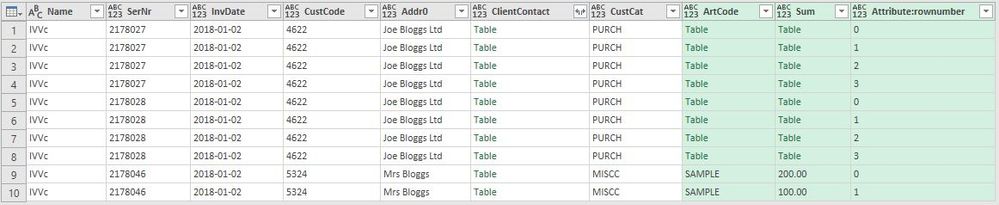
</data>When I expand the rows, then row, I get the following:
If I try to expand ClientContact, it says "No columns were found" despite there being data in the first invoice - it should say "Fred".
In the ArtCode and Sum columns, the values only seem to be displayed if every row on the invoice has a value, i.e. not null. Clicking on the Table cell in the ArtCode column on row 1, shows in the window at the bottom Element:Text with ASS003A beneath.
How do I get the data to show if there are null values on some rows?
Hi @paultimms
My assumption is that when you expand your columns and they are mixed data types ( text and table ) then it will not be able to expand them further, however, you can expand this column using M.
Try something like below.
let
Source = Xml.Tables(File.Contents("*** xml file path ****")),
Table0 = Source{0}[Table],
#"Expanded ClientContact" = Table.ExpandTableColumn(Table0, "ClientContact", {"Element:Text"}, {"Element:Text"}),
#"Expanded rows" = Table.ExpandTableColumn(#"Expanded ClientContact", "rows", {"row"}, {"row"}),
#"Expanded row" = Table.ExpandTableColumn(#"Expanded rows", "row", {"ArtCode", "Sum", "Attribute:rownumber"}, {"ArtCode", "Sum", "Attribute:rownumber"}),
#"Added Custom" = Table.AddColumn(#"Expanded row", "Custom", each
let
column = [ArtCode],
checkType = Value.Is( column, type table ),
getValue = try ( column )[#"Element:Text"] otherwise { null },
return = if checkType then getValue else { column }
in
return ),
#"Added Custom2" = Table.AddColumn(#"Added Custom", "Custom2", each let
column = [Sum],
checkType = Value.Is( column, type table ),
getValue = try ( column )[#"Element:Text"] otherwise { null },
return = if checkType then getValue else { column }
in
return),
#"Expanded Custom" = Table.ExpandListColumn(#"Added Custom2", "Custom"),
#"Expanded Custom2" = Table.ExpandListColumn(#"Expanded Custom", "Custom2"),
#"Removed Columns" = Table.RemoveColumns(#"Expanded Custom2",{"ArtCode", "Sum"}),
#"Changed Type" = Table.TransformColumnTypes(#"Removed Columns",{{"Custom2", type number}, {"Custom", type text}})
in
#"Changed Type"
Check out the November 2025 Power BI update to learn about new features.
Advance your Data & AI career with 50 days of live learning, contests, hands-on challenges, study groups & certifications and more!
| User | Count |
|---|---|
| 11 | |
| 7 | |
| 5 | |
| 5 | |
| 3 |