FabCon is coming to Atlanta
Join us at FabCon Atlanta from March 16 - 20, 2026, for the ultimate Fabric, Power BI, AI and SQL community-led event. Save $200 with code FABCOMM.
Register now!- Power BI forums
- Get Help with Power BI
- Desktop
- Service
- Report Server
- Power Query
- Mobile Apps
- Developer
- DAX Commands and Tips
- Custom Visuals Development Discussion
- Health and Life Sciences
- Power BI Spanish forums
- Translated Spanish Desktop
- Training and Consulting
- Instructor Led Training
- Dashboard in a Day for Women, by Women
- Galleries
- Data Stories Gallery
- Themes Gallery
- Contests Gallery
- QuickViz Gallery
- Quick Measures Gallery
- Visual Calculations Gallery
- Notebook Gallery
- Translytical Task Flow Gallery
- TMDL Gallery
- R Script Showcase
- Webinars and Video Gallery
- Ideas
- Custom Visuals Ideas (read-only)
- Issues
- Issues
- Events
- Upcoming Events
Get Fabric Certified for FREE during Fabric Data Days. Don't miss your chance! Request now
- Power BI forums
- Forums
- Get Help with Power BI
- Developer
- subtraction with two coloumns and project in time
- Subscribe to RSS Feed
- Mark Topic as New
- Mark Topic as Read
- Float this Topic for Current User
- Bookmark
- Subscribe
- Printer Friendly Page

- Mark as New
- Bookmark
- Subscribe
- Mute
- Subscribe to RSS Feed
- Permalink
- Report Inappropriate Content
subtraction with two coloumns and project in time
hi community, I'm asking for your help ; I have in my dataset four columns Asset ID, Date, TotalAmount and SubtractionByMonth. I wish to make a total subtraction of TotalAmount by deducing the column SubtractionByMonth according to the 18 following months and to display each month with the remainder to deduct in columns even if there is nothing to deduct before turning off the 18 months, in this cases display Zeros until the 18th month. Thanks in advance.
Solved! Go to Solution.


- Mark as New
- Bookmark
- Subscribe
- Mute
- Subscribe to RSS Feed
- Permalink
- Report Inappropriate Content
Hi @Anonymous ,
We can create a calendar table first (you can use yours)
CalendarTable = ADDCOLUMNS(CALENDARAUTO(),"MonthYear",FORMAT([Date],"YYYYMM"))
Then modify the measure as following:
Reminder =
VAR currentDate =
    MAX ( 'CalendarTable'[Date] )
VAR AID =
    DISTINCT ( 'Table'[Asset ID] )
VAR t =
    ALLSELECTED ( 'CalendarTable' )
RETURN
    IF (
        DATEDIFF (
            CALCULATE (
                MIN ( 'CalendarTable'[Date] ),
                ALLSELECTED ( 'CalendarTable' ),
                'Table'[Asset ID] IN DISTINCT ( 'Table'[Asset ID] )
            ),
            currentDate,
            MONTH
        ) > 17,
        BLANK (),
        IF (
            COUNTROWS (
                FILTER (
                    SUMMARIZE (
                        FILTER ( t, [Date] <= currentDate ),
                        'CalendarTable'[Date].[Year],
                       'CalendarTable'[Date].[MonthNo],
                        "Temp",
                        VAR td =
                            DATE ( [Date].[Year], [Date].[MonthNo] + 1, 1 ) - 1
                        RETURN
                            CALCULATE (
                                CALCULATE (
                                    SUM ( 'Table'[TotalAmount] ) - SUM ( 'Table'[SubtractionByMonth] ),
                                    t,
                                    'Table'[Date] <= td,
                                    'Table'[Asset ID] IN AID
                                )
                            )
                    ),
                    [Temp] <= 0
                )
            ) > 0,
            0,
            CALCULATE (
                SUM ( 'Table'[TotalAmount] ) - SUM ( 'Table'[SubtractionByMonth] ),
                ALLSELECTED ( 'Table' ),
                'Table'[Date] <= currentDate,
                'Table'[Asset ID] IN AID
            )
        )
    )
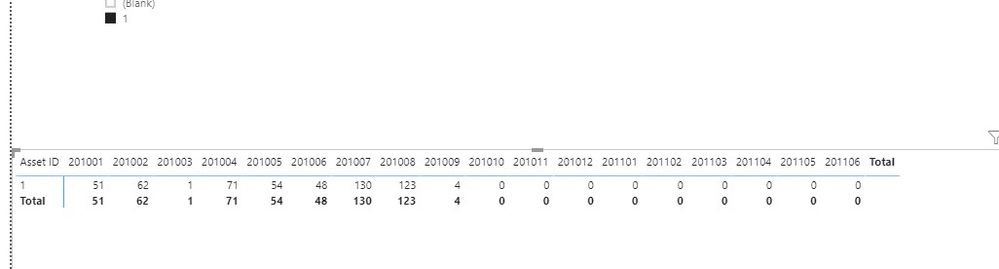
By the way, PBIX file as attached.
Best regards,
If this post helps, then please consider Accept it as the solution to help the other members find it more quickly.
- Mark as New
- Bookmark
- Subscribe
- Mute
- Subscribe to RSS Feed
- Permalink
- Report Inappropriate Content
Hi @Anonymous ,
We can try to use the following measure to meet your requirement:
Reminder =
VAR currentDate =
    MAX ( 'Table'[Date] )
VAR AID =
    DISTINCT ( 'Table'[Asset ID] )
VAR t =
    ALLSELECTED ( 'Table' )
RETURN
    IF (
        DATEDIFF (
            CALCULATE (
                MIN ( 'Table'[Date] ),
                ALLSELECTED ( 'Table' ),
                'Table'[Asset ID] IN DISTINCT ( 'Table'[Asset ID] )
            ),
            currentDate,
            MONTH
        ) > 18,
        BLANK (),
        IF (
            COUNTROWS (
                FILTER (
                    SUMMARIZE (
                        FILTER ( t, [Date] <= currentDate ),
                        'Table'[Date].[Year],
                        'Table'[Date].[MonthNo],
                        "Temp",
                        VAR td =
                            DATE ( [Date].[Year], [Date].[MonthNo] + 1, 1 ) - 1
                        RETURN
                            CALCULATE (
                                CALCULATE (
                                    SUM ( 'Table'[TotalAmount] ) - SUM ( 'Table'[SubtractionByMonth] ),
                                    t,
                                    'Table'[Date] <= td,
                                    'Table'[Asset ID] IN AID
                                )
                            )
                    ),
                    [Temp] <= 0
                )
            ) > 0,
            0,
            CALCULATE (
                SUM ( 'Table'[TotalAmount] ) - SUM ( 'Table'[SubtractionByMonth] ),
                ALLSELECTED ( 'Table' ),
                'Table'[Date] <= currentDate,
                'Table'[Asset ID] IN AID
            )
        )
    )
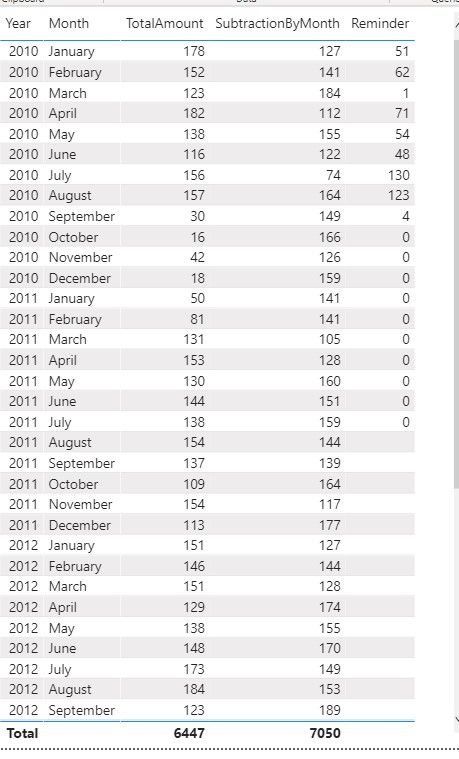
If it doesn't meet your requirement, Could you please show the exact expected result based on the tables that we have shared?
By the way, PBIX file as attached.
Best regards,
If this post helps, then please consider Accept it as the solution to help the other members find it more quickly.
- Mark as New
- Bookmark
- Subscribe
- Mute
- Subscribe to RSS Feed
- Permalink
- Report Inappropriate Content
- Mark as New
- Bookmark
- Subscribe
- Mute
- Subscribe to RSS Feed
- Permalink
- Report Inappropriate Content
Hi @Anonymous ,
The table looks as similar as we have shared before, how about the result after you follow the suggestions mentioned in my original post? Could you please provide more details about it If it doesn't meet your requirement?
Best regards,
If this post helps, then please consider Accept it as the solution to help the other members find it more quickly.
- Mark as New
- Bookmark
- Subscribe
- Mute
- Subscribe to RSS Feed
- Permalink
- Report Inappropriate Content
Hello , your proposal is good but the need that it's was asked for me is to display the months in column format no rows, but thank you for your effort in any case. calculate it is good.
But i still have some issues to how adapt with my own data.
- Mark as New
- Bookmark
- Subscribe
- Mute
- Subscribe to RSS Feed
- Permalink
- Report Inappropriate Content
Hi @Anonymous ,
How about the result after you follow the suggestions mentioned in my previous post?Could you please provide more details about it If it doesn't meet your requirement?
Best regards,
If this post helps, then please consider Accept it as the solution to help the other members find it more quickly.
- Mark as New
- Bookmark
- Subscribe
- Mute
- Subscribe to RSS Feed
- Permalink
- Report Inappropriate Content
Hi @Anonymous ,
We can create a calendar table first (you can use yours)
CalendarTable = ADDCOLUMNS(CALENDARAUTO(),"MonthYear",FORMAT([Date],"YYYYMM"))
Then modify the measure as following:
Reminder =
VAR currentDate =
    MAX ( 'CalendarTable'[Date] )
VAR AID =
    DISTINCT ( 'Table'[Asset ID] )
VAR t =
    ALLSELECTED ( 'CalendarTable' )
RETURN
    IF (
        DATEDIFF (
            CALCULATE (
                MIN ( 'CalendarTable'[Date] ),
                ALLSELECTED ( 'CalendarTable' ),
                'Table'[Asset ID] IN DISTINCT ( 'Table'[Asset ID] )
            ),
            currentDate,
            MONTH
        ) > 17,
        BLANK (),
        IF (
            COUNTROWS (
                FILTER (
                    SUMMARIZE (
                        FILTER ( t, [Date] <= currentDate ),
                        'CalendarTable'[Date].[Year],
                       'CalendarTable'[Date].[MonthNo],
                        "Temp",
                        VAR td =
                            DATE ( [Date].[Year], [Date].[MonthNo] + 1, 1 ) - 1
                        RETURN
                            CALCULATE (
                                CALCULATE (
                                    SUM ( 'Table'[TotalAmount] ) - SUM ( 'Table'[SubtractionByMonth] ),
                                    t,
                                    'Table'[Date] <= td,
                                    'Table'[Asset ID] IN AID
                                )
                            )
                    ),
                    [Temp] <= 0
                )
            ) > 0,
            0,
            CALCULATE (
                SUM ( 'Table'[TotalAmount] ) - SUM ( 'Table'[SubtractionByMonth] ),
                ALLSELECTED ( 'Table' ),
                'Table'[Date] <= currentDate,
                'Table'[Asset ID] IN AID
            )
        )
    )
By the way, PBIX file as attached.
Best regards,
If this post helps, then please consider Accept it as the solution to help the other members find it more quickly.


- Mark as New
- Bookmark
- Subscribe
- Mute
- Subscribe to RSS Feed
- Permalink
- Report Inappropriate Content
@Anonymous
Can you share your sample table and expected output in a tabular format.
Regards,
Nandu Krishna
Helpful resources

Power BI Monthly Update - November 2025
Check out the November 2025 Power BI update to learn about new features.

Fabric Data Days
Advance your Data & AI career with 50 days of live learning, contests, hands-on challenges, study groups & certifications and more!

FabCon Atlanta 2026
Join us at FabCon Atlanta, March 16-20, for the ultimate Fabric, Power BI, AI and SQL community-led event. Save $200 with code FABCOMM.

| User | Count |
|---|---|
| 6 | |
| 2 | |
| 2 | |
| 2 | |
| 2 |


