cancel
Showing results for 
Search instead for 
Did you mean: 

The Power BI Data Visualization World Championships is back! Get ahead of the game and start preparing now! Learn more

Reply
docgregt
New Member

clone tiles errors

From the blog "Duplicate workspaces using the Power BI REST APIs: a step-by-step tutorial". This code is quite useful for our usecase. Unfortunately, the piece that clones Tiles only works for pinned tiles from reports. Tiles with links do not get cloned properly and the API seems to have no option for resetting properties. For example:
{
"id": "fff7cee8-5ec0-xxxx-ab2f-4ad53c1a99de",
"title": "",
"subTitle": "",
"action": {
"openUrl": {
"targetUrl": "/reports/832f0434-6fad-xxxx-9000-f323229246f9"
},
"report": null,
"qAndA": null
},
"definition": {
"imageTile": {
"imageUrl": "http://xxxxxx/default/PowerVConsumption.png",
"origin": null
},
"ssrsTile": null
},
"embedUrl": "https://app.powerbi.com/emb...",
"rowSpan": 0,
"colSpan": 0
}


TargetUrl gets set to null on clone. Clone tile only supports setting following properties:
{ 
"TargetDashboardId":"df9f0e94-31df-450b-b97f-4461a7e4d308",
"TargetWorkspaceId":"000588f5-56b1-4a33-a690-fc25343d3fae",
"TargetReportId":"",
"TargetModelId":""
"PositionConflictAction":"Tail|Abort"
}

Why? Why not add all the properties and let end user to set them or at least clone them.

4 REPLIES 4
Eric_Zhang
Microsoft Employee
Microsoft Employee

@docgregt

I don't reproduce your issue. After calling the REST API Clone tile, I got the targetUrl instead of null. However I'm still finding some issues about the API.


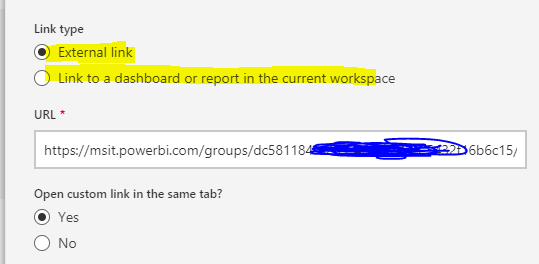
In your case, "reports/xxxxxx-xx-xx- some reportid" is a related path so when such report doesn't exists in the target workspace, the link doesn't work after cloned. And, unfortunately, as you mentioned, the clone API doesn't support specifying a new target URL. A workaround may be using a external link pointing to the original link, however this workaround won't work if the orginal/target workspaces are for isolated users.

Capture.PNG


By the way, the duplicate workspace looks more a workaround than solution in my opinion. There might be more limitations that those has been listed.


For more requests, you can submit them at Power BI Ideas and vote it up.

Hi,


I have a script that clones reports, dashboards and tiles into a different workspace.

Reports and dashboards are cloned correctly.

When cloning tiles, I get the following error:

System.Net.WebException: The remote server returned an error: (401) Unauthorized.
at Microsoft.PowerShell.Commands.WebRequestPSCmdlet.GetResponse(WebRequest request)
at Microsoft.PowerShell.Commands.WebRequestPSCmdlet.ProcessRecord()


function GetAuthToken
{
$adal = "${env:ProgramFiles}\WindowsPowerShell\Modules\AzureRM.profile\4.5.0\Microsoft.IdentityModel.Clients.ActiveDirectory.dll"

$adalforms = "${env:ProgramFiles}\WindowsPowerShell\Modules\AzureRM.profile\4.5.0\Microsoft.IdentityModel.Clients.ActiveDirectory.WindowsForms.dll"

[System.Reflection.Assembly]::LoadFrom($adal) | Out-Null

[System.Reflection.Assembly]::LoadFrom($adalforms) | Out-Null

$redirectUri = "urn:ietf:wg:oauth:2.0:oob"

$resourceAppIdURI = "https://analysis.windows.net/powerbi/api"

$authority = "https://login.microsoftonline.com/common/oauth2/authorize";

$authContext = New-Object "Microsoft.IdentityModel.Clients.ActiveDirectory.AuthenticationContext" -ArgumentList $authority

$authResult = $authContext.AcquireToken($resourceAppIdURI, $clientId, $redirectUri, "Auto")

return $authResult
}


# PART 1: Authentication
# ==================================================================
$token = GetAuthToken

# Building Rest API header with authorization token
$auth_header = @{
'Content-Type'='application/json'
'Authorization'=$token.CreateAuthorizationHeader()
}


Please help!!!

I was able to make it work!!

Hi Mariano, can you share how you managed to make it work? I am also facing the same exact issue (unauthorised). Thanks!

Helpful resources

Announcements
Power BI DataViz World Championships

Power BI Dataviz World Championships

The Power BI Data Visualization World Championships is back! Get ahead of the game and start preparing now!

November Power BI Update Carousel

Power BI Monthly Update - November 2025

Check out the November 2025 Power BI update to learn about new features.

FabCon Atlanta 2026 carousel

FabCon Atlanta 2026

Join us at FabCon Atlanta, March 16-20, for the ultimate Fabric, Power BI, AI and SQL community-led event. Save $200 with code FABCOMM.