We've captured the moments from FabCon & SQLCon that everyone is talking about, and we are bringing them to the community, live and on-demand. Starts on April 14th. Register now
Hi All,
I am trying to create few calculated measures and then want to re-use them to derive new Stats / Values. Here is an example from my end
Customer Premium Customer band (Derived Measure) Org
C1 100 O1
C1 400 O2
C2 50 O1
C2 375 O2
C3 425 O2
I created a Calculated Measure named Customer Band which I would project in my Visualization along with Customer.
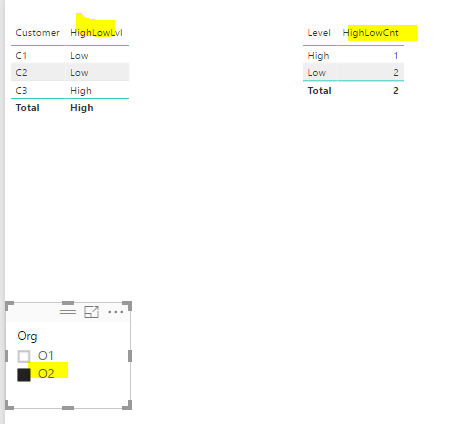
Assuming user selected Org = O2 then
Customer Band Derivation -> (total premium > 400) then High else Low
Customer Customer Band
C1 Low
C2 Low
C3 High
Using above result, I would like to project a new Visualisation using measure Customer Band
Customer Band Count (DISTINCT Customers)
High 1
Low 2
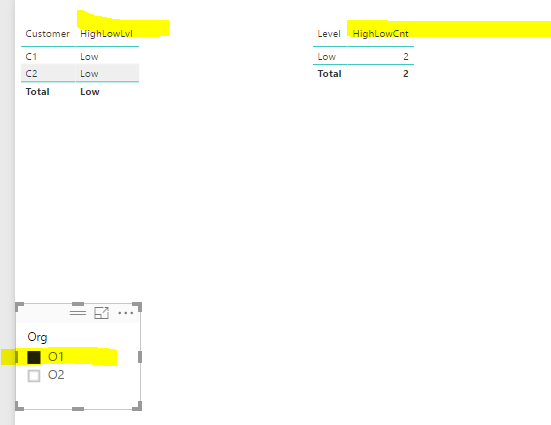
Now Lets assume User selected Org = O1 then
Customer Customer Band
C1 Low
C2 Low
Using Above result, I would like to project a new Visualisation using measure Customer Band
Customer Band Count (DISTINCT Customers)
Low 2
How can this be achieved in Power BI. Please let me know you if more information is required.
Solved! Go to Solution.
@Anonymous
Such detailed description does make your requirement as clear as crystal!
It is always a really good practice to ask a question in a forum. ![]()
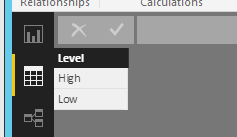
For your case, I will create a auxiliary table and two measures as below. See more details in the attached pbix.
HighLowCnt =
VAR summizedTbl =
ADDCOLUMNS (
SUMMARIZE ( 'Table', 'Table'[Customer], "totalPrem", SUM ( 'Table'[Premium] ) ),
"level", IF ( [totalPrem] > 400, "High", "Low" )
)
RETURN
COUNTROWS (
FILTER ( summizedTbl, [level] = LASTNONBLANK ( 'Level'[Level], "" ) )
)
HighLowLvl = IF(SUM('Table'[Premium])>400,"High","Low")
Thanks Eric for the solution. Please correct me if my understanding of the solution is incorrect ...
"summizedTbl" gets calculated / evaluated for each of the Level values "High" and "Low". If I have 10 different bands then the "summizedTbl" get calculated for all the Bands.
Would this slow down the performance of my PowerBI Report / Dashboard ???
@Anonymous
Such detailed description does make your requirement as clear as crystal!
It is always a really good practice to ask a question in a forum. ![]()
For your case, I will create a auxiliary table and two measures as below. See more details in the attached pbix.
HighLowCnt =
VAR summizedTbl =
ADDCOLUMNS (
SUMMARIZE ( 'Table', 'Table'[Customer], "totalPrem", SUM ( 'Table'[Premium] ) ),
"level", IF ( [totalPrem] > 400, "High", "Low" )
)
RETURN
COUNTROWS (
FILTER ( summizedTbl, [level] = LASTNONBLANK ( 'Level'[Level], "" ) )
)
HighLowLvl = IF(SUM('Table'[Premium])>400,"High","Low")
Thanks Eric for the solution. Please correct me if my understanding of the solution is incorrect ...
"summizedTbl" gets calculated / evaluated for each of the Level values "High" and "Low". If I have 10 different bands then the "summizedTbl" get calculated for all the Bands.
Would this slow down the performance of my PowerBI Report / Dashboard ???
If you have recently started exploring Fabric, we'd love to hear how it's going. Your feedback can help with product improvements.
A new Power BI DataViz World Championship is coming this June! Don't miss out on submitting your entry.
Share feedback directly with Fabric product managers, participate in targeted research studies and influence the Fabric roadmap.
| User | Count |
|---|---|
| 1 | |
| 1 | |
| 1 | |
| 1 | |
| 1 |