Hello Greg,
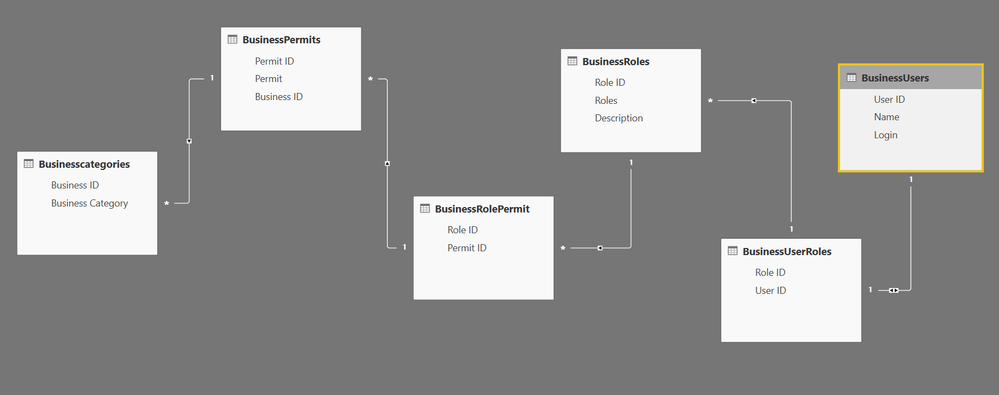
Thank you for the quick response. I have six tables namely BusinessCategories, BusinessPermits, BusinessRolePermit, BusinessRoles, BusinessUserRoles, BusinessUsers as my input. Using these tables, I have to create a report.
BusinessCategories
| Business ID | Business Category |
| NY101 | Person |
| NY102 | Mail Form |
| NY103 | Application |
| NY104 | Accounts |
BusinessPermits
| Permit ID | Permit | Business ID |
| 100 | Enter Person Module (Read-only) | NY101 |
| 200 | Edit a Person | NY101 |
| 300 | Delete a person | NY103 |
| 400 | Enter Member Company Module (Read-only) | NY104 |
| 500 | Edit a company | NY103 |
BusinessRolePermit
| Role ID | Permit ID |
| XBXY-987V-A678-HLFJSFSA6 | 100 |
| GFHY-837F-F725-LIPGSTFSL2 | 500 |
| XBXY-987V-A678-HLFJSFSA6 | 200 |
| LPAR-298R-U364-LPSRKHVY5 | 500 |
BusinessRoles
| Role ID | Roles | Description |
| XBXY-987V-A678-HLFJSFSA6 | Guest | Read-Only Access |
| GFHY-837F-F725-LIPGSTFSL2 | Admin | Read Write Access |
| JKSP-567W-J275-KSPFNXMT8 | User | Read-Only Access |
| LPAR-298R-U364-LPSRKHVY5 | Super User | Read-Only Access |
BusinessUserRoles
| Role ID | User ID |
| XBXY-987V-A678-HLFJSFSA6 | A00201 |
| GFHY-837F-F725-LIPGSTFSL2 | A00202 |
| JKSP-567W-J275-KSPFNXMT8 | A00203 |
| GFHY-837F-F725-LIPGSTFSL2 | A00204 |
BusinessUsers
| User ID | Name | Login |
| A00201 | Raghav Vellanki | rvellanki |
| A00202 | Jason Peterson | Jpeterson |
| A00203 | Alan King | Aking |
| A00204 | Mark Waugh | Mwaugh |
The expected output report should have the following columns:
| Role ID | Roles | Description | Permit | BusinessCategory | Permit ID | Name | Login |
| XBXY-987V-A678-HLFJSFSA6 | Guest | Read-Only Access | Enter Person Module (Read-only) | Person | 600 | Raghav Vellanki | rvellanki |
| GFHY-837F-F725-LIPGSTFSL2 | Admin | Read Write Access | Enter Person Module (Read-only) | Person | 500 | Jason Peterson | Jpeterson |
| JKSP-567W-J275-KSPFNXMT8 | Guest | Read-Only Access | Enter Person Module (Read-only) | Person | 500 | Alan King | Aking |
| LPAR-298R-U364-LPSRKHVY5 | Guest | Read-Only Access | Enter Member Company Module (Read-only) | Member Company | 600 | Mark Waugh | Mwaugh |
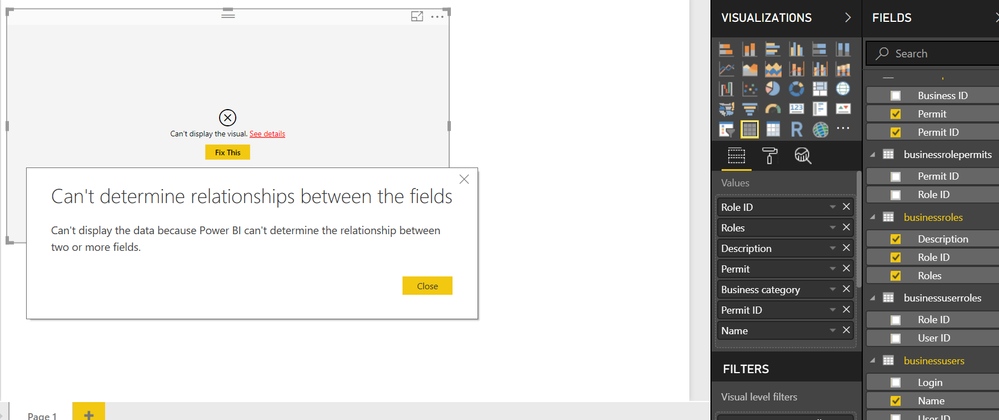
The relationships that I built could only retriev till column PermitID. When I try to pull data for 'Name' and 'Login' columns. I am getting an error message "Can't determine relationships between the fields"