

cancel
Showing results for 
Search instead for 
Did you mean: 

The Power BI Data Visualization World Championships is back! Get ahead of the game and start preparing now! Learn more

Reply
athomp15
Helper I
Helper I

Report Automation PowerShell REST API

Hi,


I've been working with the Power BI PowerShell model PowerBIPS to try and do some simple automation, but am currently failing.  I was looking for a way of importing a templated PBIX (or PBIT) file, then loading it with data, ideally all through PowerShell.  It seems you can't automate the upload of a PBIT file, so was looking to import a PBIX file and cleaning down the tables.   When the file is imported, the dataset doesnt seem 100% accessible through the REST API?   any help on this would be greatly recieve

2017-01-22_00-00-23.png


Can I use the REST API o import a pbxi file, then update table rows?  Or if i create a dataset through the REST API and populate tables with data, how can I automate the creation of a report ?


Thanks 

Alex

1 ACCEPTED SOLUTION


@athomp15 wrote:

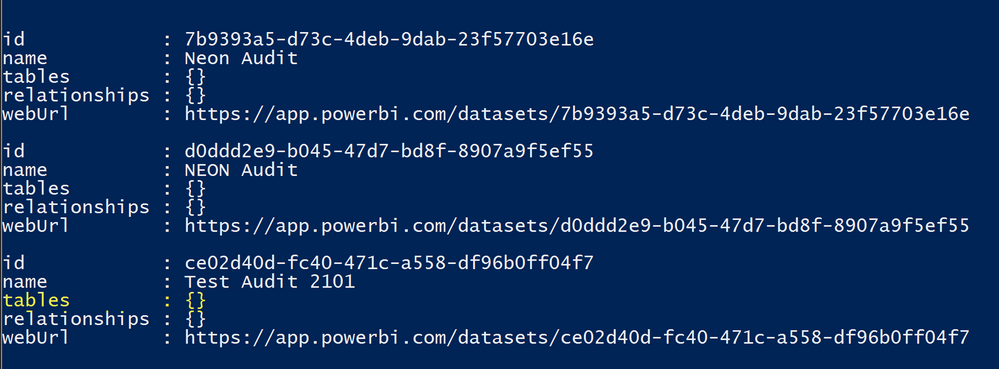
Thanks for the response @Eric_Zhang.  I've taken a look through the information availble on the API, what's not clear is what I can do to the datasets (tables etc) when I import a PBXI file.  Currently it shows that there are not tables in the datasets belonging to the imported reports.  


List of data sets from imported PBIX filesList of data sets from imported PBIX files


Which seems that I can either use the API to automate the data - then build the report manually, or template the reports using Power BI desktop, but then not have any flexability around updating it's data using the API.


That seems the limitation. As I suggested, you can creat tables and add rows via REST API to the datasets which also are created via REST, neither to the datasets published by PBI desktop nor to the ones imported.


I think the flexiability is making sense and maybe the product team is working on some feature. Meanwhile you can submit your idea at Power BI Ideas.


You can also check this idea Allow to update the dataset (tables) of a published desktop via API and vote it up.

View solution in original post

6 REPLIES 6
Eric_Zhang
Microsoft Employee
Microsoft Employee

@athomp15

You can creat tables and add rows via REST API to the datasets which also are created via REST.


AFAIK, there's no way automation way to create a report.  Please check this idea Create a report/dashboard programatically using the API  and vote it up.


At this moment, you can create a dataset via REST API and design a report in Power BI Service. Then update the data via REST API.


Thanks for the response @Eric_Zhang.  I've taken a look through the information availble on the API, what's not clear is what I can do to the datasets (tables etc) when I import a PBXI file.  Currently it shows that there are not tables in the datasets belonging to the imported reports.  


List of data sets from imported PBIX filesList of data sets from imported PBIX files


Which seems that I can either use the API to automate the data - then build the report manually, or template the reports using Power BI desktop, but then not have any flexability around updating it's data using the API.


@athomp15 wrote:

Thanks for the response @Eric_Zhang.  I've taken a look through the information availble on the API, what's not clear is what I can do to the datasets (tables etc) when I import a PBXI file.  Currently it shows that there are not tables in the datasets belonging to the imported reports.  


List of data sets from imported PBIX filesList of data sets from imported PBIX files


Which seems that I can either use the API to automate the data - then build the report manually, or template the reports using Power BI desktop, but then not have any flexability around updating it's data using the API.


That seems the limitation. As I suggested, you can creat tables and add rows via REST API to the datasets which also are created via REST, neither to the datasets published by PBI desktop nor to the ones imported.


I think the flexiability is making sense and maybe the product team is working on some feature. Meanwhile you can submit your idea at Power BI Ideas.


You can also check this idea Allow to update the dataset (tables) of a published desktop via API and vote it up.

@Eric_Zhang; Can we automate publishing/deployment of reports to app workspace? (Through Rest API or Through Power Shell )

Anonymous
Not applicable

Hi


Did you get any anwer on your last questio


n. Actually I am also trying to achieve it.


Let me know if you have any ideas.


Regards

Shilpi

Anonymous
Not applicable

Hi


Did you get any anwer on your last question. Actually I am also trying to achieve it.


Let me know if you have any ideas.


Regards

Shilpi

Helpful resources

Announcements
Power BI DataViz World Championships

Power BI Dataviz World Championships

The Power BI Data Visualization World Championships is back! Get ahead of the game and start preparing now!

December 2025 Power BI Update Carousel

Power BI Monthly Update - December 2025

Check out the December 2025 Power BI Holiday Recap!

FabCon Atlanta 2026 carousel

FabCon Atlanta 2026

Join us at FabCon Atlanta, March 16-20, for the ultimate Fabric, Power BI, AI and SQL community-led event. Save $200 with code FABCOMM.