Join us at FabCon Atlanta from March 16 - 20, 2026, for the ultimate Fabric, Power BI, AI and SQL community-led event. Save $200 with code FABCOMM.
Register now!The Power BI Data Visualization World Championships is back! Get ahead of the game and start preparing now! Learn more
Hi all,
I have a desktop report that is using the Power BI rest api.
Example:
My desktop report has the source as = Json.Document(Web.Contents("https://api.powerbi.com/v1.0/myorg/groups/zzzzzzee9f8-d046-3a-8ad2-ae746e17a5ec%2F/reports", [Headers=[Authorization="xxxxxxxx"]]))
This works fine - I am getting the list of all of the reports in that workspace.
I publish this to the Service.
I understand that I have to use "anonymous" but I keep getting messages like "failed to update data source credentials: the credentials provided forthe Web source are invalid...."
What am I doing wrong?
Proud to be a Datanaut!
Private message me for consulting or training needs.
Solved! Go to Solution.
Hi @collinq ,
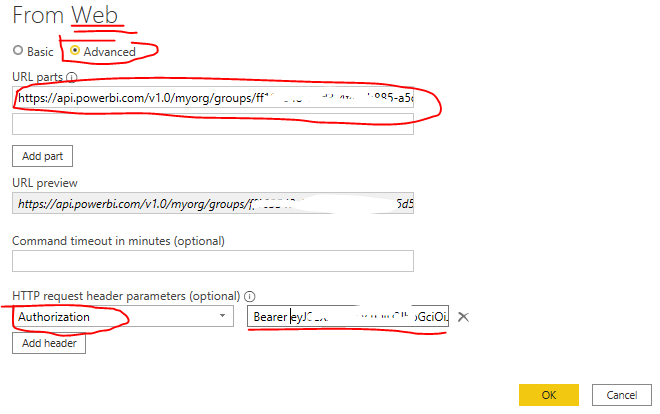
Please try to connect to your REST API using Web connector, and switch to Advanced setting page. To add HTTP request header parameter: Authorization just as Figure 1. The parameter value can get from the related rest API page as Figure 2.
Then please refer the solution in the following links to resolve the invalid credentail error.
Power BI: Using anonymous authentication on Web data sources with a API key in URL
update the data source from API to the Proxy
Best Regards
Hi @collinq ,
Please try to connect to your REST API using Web connector, and switch to Advanced setting page. To add HTTP request header parameter: Authorization just as Figure 1. The parameter value can get from the related rest API page as Figure 2.
Then please refer the solution in the following links to resolve the invalid credentail error.
Power BI: Using anonymous authentication on Web data sources with a API key in URL
update the data source from API to the Proxy
Best Regards
The Power BI Data Visualization World Championships is back! Get ahead of the game and start preparing now!
| User | Count |
|---|---|
| 4 | |
| 2 | |
| 2 | |
| 1 | |
| 1 |
| User | Count |
|---|---|
| 4 | |
| 4 | |
| 4 | |
| 3 | |
| 2 |