# The following code to create a dataframe and remove duplicated rows is always executed and acts as a preamble for your script:
# dataset = pandas.DataFrame(add_to_cart_order, days_since_prior_order, order_dow, order_hour_of_day, order_number, product_id, reordered, user_id)
# dataset = dataset.drop_duplicates()
# Paste or type your script code here:

X = dataset.values
y = dataset.reordered.values

groups = dataset.user_id.values
group_kfold = GroupKFold(n_splits=5)
group_kfold.get_n_splits(X, y, groups)

for train_index, test_index in group_kfold.split(X, y, groups):
    X_train, X_test = X[train_index], X[test_index]
    y_train, y_test = y[train_index], y[test_index]

X_train = pd.DataFrame(X_train.astype(int), columns=['product_id',
'add_to_cart_order',
'reordered',
'user_id',
'order_number',
'order_dow',
'order_hour_of_day',
'days_since_prior_order'])
X_train = X_train.drop('reordered', 1)
X_train = X_train.drop('user_id',1)
X_train = X_train.drop("product_id",1)

X_test = pd.DataFrame(X_test.astype(int), columns=['product_id',
'add_to_cart_order',
'reordered',
'user_id',
'order_number',
'order_dow',
'order_hour_of_day',
'days_since_prior_order'])
X_test = X_test.drop('reordered', 1)
X_test = X_test.drop('user_id',1)
X_test = X_test.drop("product_id",1)

y_train = pd.DataFrame(y_train,columns=['reordered'])
y_test = pd.DataFrame(y_test,columns=['reordered'])

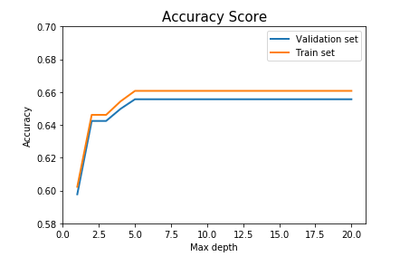
max_depths = [1,2,3,4,5,6,7,8,9,10,11,12,13,14,15,16,17,18,19,20]
training_accuracies = []
testing_accuracies = []

for max_depth in max_depths:

    dtc = tree.DecisionTreeClassifier(criterion="entropy", max_depth=max_depth, min_samples_split=0.05)
    dtc_fit = dtc.fit(X_train,y_train)

    prediction_training = dtc_fit.predict(X_train)
    training_accuracy = dtc_fit.score(X_train, y_train)
    training_accuracies.append(training_accuracy)

    prediction_testing = dtc_fit.predict(X_test)
    testing_accuracy = dtc_fit.score(X_test, y_test)
    testing_accuracies.append(testing_accuracy)

import matplotlib.pyplot as plt
plt.plot(max_depths, training_accuracies, max_depths, testing_accuracies,linewidth=2.0)

plt.title('Accuracy Score', fontsize = 20)
plt.xlabel("Max depth", fontsize=20)
plt.ylabel("Accuracy", fontsize = 20)
plt.legend(['Validation set', 'Train set'], loc='upper right')

plt.show() # The following code to create a dataframe and remove duplicated rows is always executed and acts as a preamble for your script:
# dataset = pandas.DataFrame(add_to_cart_order, days_since_prior_order, order_dow, order_hour_of_day, order_number, product_id, reordered, user_id)
# dataset = dataset.drop_duplicates()
# Paste or type your script code here:
X = dataset.values
y = dataset.reordered.values
groups = dataset.user_id.values
group_kfold = GroupKFold(n_splits=5)
group_kfold.get_n_splits(X, y, groups)
for train_index, test_index in group_kfold.split(X, y, groups):
X_train, X_test = X[train_index], X[test_index]
y_train, y_test = y[train_index], y[test_index]
X_train = pd.DataFrame(X_train.astype(int), columns=['product_id',
'add_to_cart_order',
'reordered',
'user_id',
'order_number',
'order_dow',
'order_hour_of_day',
'days_since_prior_order'])
X_train = X_train.drop('reordered', 1)
X_train = X_train.drop('user_id',1)
X_train = X_train.drop("product_id",1)
X_test = pd.DataFrame(X_test.astype(int), columns=['product_id',
'add_to_cart_order',
'reordered',
'user_id',
'order_number',
'order_dow',
'order_hour_of_day',
'days_since_prior_order'])
X_test = X_test.drop('reordered', 1)
X_test = X_test.drop('user_id',1)
X_test = X_test.drop("product_id",1)
y_train = pd.DataFrame(y_train,columns=['reordered'])
y_test = pd.DataFrame(y_test,columns=['reordered'])
max_depths = [1,2,3,4,5,6,7,8,9,10,11,12,13,14,15,16,17,18,19,20]
training_accuracies = []
testing_accuracies = []
for max_depth in max_depths:
dtc = tree.DecisionTreeClassifier(criterion="entropy", max_depth=max_depth, min_samples_split=0.05)
dtc_fit = dtc.fit(X_train,y_train)
prediction_training = dtc_fit.predict(X_train)
training_accuracy = dtc_fit.score(X_train, y_train)
training_accuracies.append(training_accuracy)
prediction_testing = dtc_fit.predict(X_test)
testing_accuracy = dtc_fit.score(X_test, y_test)
testing_accuracies.append(testing_accuracy)
import matplotlib.pyplot as plt
plt.plot(max_depths, training_accuracies, max_depths, testing_accuracies,linewidth=2.0)
plt.title('Accuracy Score', fontsize = 20)
plt.xlabel("Max depth", fontsize=20)
plt.ylabel("Accuracy", fontsize = 20)
plt.legend(['Validation set', 'Train set'], loc='upper right')
plt.show()