I have successfully connected to Power BI via PowerShell and I can refresh a dataset using the very helpful information here https://www.fourmoo.com/2018/06/05/using-the-power-bi-api-with-powershell-scripts-refreshing-your-da....
What I want to be able to do now is to build a report that pulls the refresh history of each dataset and then pushes that data to a Push dataset so end users can view the status of all reports and if the refresh is in progress the estimated time it will complete.
The PowerShell script to get the refresh history is;
# Parameters - fill these in before running the script!
# =====================================================

$groupID = "REDACTED" # the ID of the group that hosts the dataset. Use "me" if this is your My Workspace
$datasetID = "REDACTED"
$clientId = "REDACTED"

# End Parameters =======================================

# Calls the Active Directory Authentication Library (ADAL) to authenticate against AAD
function GetAuthToken
{
       if(-not (Get-Module AzureRm.Profile)) {
         Import-Module AzureRm.Profile
       }

       $redirectUri = "urn:ietf:wg:oauth:2.0:oob"

       $resourceAppIdURI = "https://analysis.windows.net/powerbi/api"

       $authority = "https://login.microsoftonline.com/common/oauth2/authorize";

       $authContext = New-Object "Microsoft.IdentityModel.Clients.ActiveDirectory.AuthenticationContext" -ArgumentList $authority

       $authResult = $authContext.AcquireToken($resourceAppIdURI, $clientId, $redirectUri, "Auto")

       return $authResult
}

# Get the auth token from AAD
$token = GetAuthToken

# Building Rest API header with authorization token
$authHeader = @{
   'Content-Type'='application/json'
   'Authorization'=$token.CreateAuthorizationHeader()
}

# properly format groups path
$groupsPath = ""
if ($groupID -eq "me") {
    $groupsPath = "myorg"
} else {
    $groupsPath = "myorg/groups/$groupID"
}

# Check the refresh history
# Uncomment + '?$top=1' to get the most recent refresh
$uri = "https://api.powerbi.com/v1.0/$groupsPath/datasets/$datasetID/refreshes"# + '?$top=1'
$refreshHistory = Invoke-RestMethod -Uri $uri –Headers $authHeader –Method GET –Verbose | Select-Object -ExpandProperty value
# Remove $refreshHistory in final
$refreshHistory
This gives the complete refresh history for my dataset, an example is below;
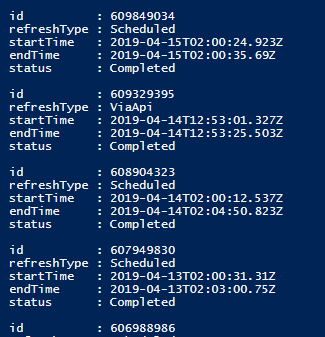
The next step is to push that data back to Power BI. I've got the PowerShell that I need to use from the API info page, as below with parts redacted.
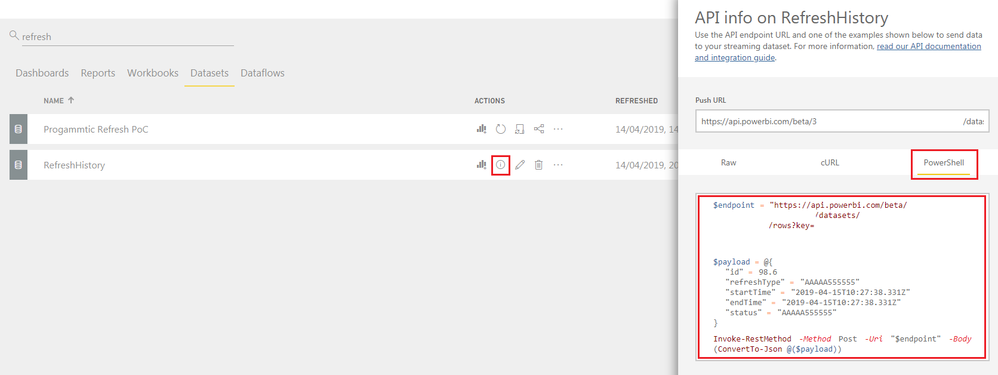
So all that is need is to replace the examples in the payload section with what I get from my previous request, an example with just the id using the response data is below;
$endpoint = "https://api.powerbi.com/beta/<REDACTED>/datasets/<REDACTED>/rows?key=<REDACTED>"
$payload = @{
"id" = $refreshHistory | Select-Object -ExpandProperty id
"refreshType" ="TEST"
"startTime" ="2019-04-15T00:00:00.000Z"
"endTime" ="2019-04-15T01:00:00.000Z"
"status" ="TEST"
}
# Remove $payload in final
$payload
Invoke-RestMethod -Method Post -Uri "$endpoint" -Body (ConvertTo-Json @($payload))
The above works if I were just to get the most recent refresh, i.e. one result. But I get an error when trying to post the whole refresh history i.e. multiple results.

I assume this is because the script is attempting to push an array rather than a single result. How can modify my PowerShell to push the whole refresh history?


