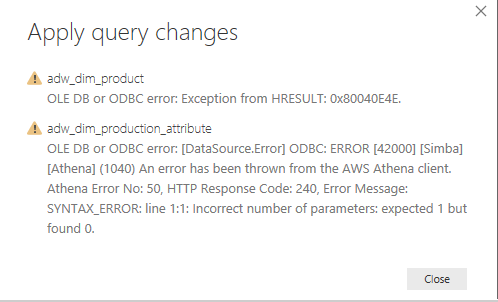
I don't know Direct Query very much. I have tried successfully to use ODBC Driver to connect to Athena using import mode. But I got a lot of problems when it comes to use Direct Query. And I have traced the ODBC log, not ERROR log found.
Here is the stack:
Feedback Type:
Frown (Error)
Timestamp:
2017-12-18T04:08:30.5680135Z
Local Time:
2017-12-18T17:08:30.5680135+13:00
Session ID:
8344369f-a76b-4b25-acbd-24e3daf77ac4
Release:
December 2017
Product Version:
2.53.4954.481 (PBIDesktop) (x64)
Error Message:
OLE DB or ODBC error: [Expression.Error] We couldn't fold the expression to the data source. Please try a simpler expression..
OS Version:
Microsoft Windows NT 10.0.16299.0 (x64 en-GB)
CLR Version:
4.7 or later [Release Number = 461308]
Peak Virtual Memory:
33.8 GB
Private Memory:
281 MB
Peak Working Set:
420 MB
IE Version:
11.125.16299.0
User ID:
03567265-88fc-4e3e-9713-7c0d41fb9c47
Workbook Package Info:
1* - en-NZ, Query Groups: 0, fastCombine: Disabled, runBackgroundAnalysis: True.
Telemetry Enabled:
True
Model Default Mode:
DirectQuery
Snapshot Trace Logs:
C:\Users\ping.qiaop\AppData\Local\Microsoft\Power BI Desktop\FrownSnapShot1409790640.zip
Performance Trace Logs:
C:\Users\ping.qiaop\AppData\Local\Microsoft\Power BI Desktop\PerformanceTraces.zip
Enabled Preview Features:
CustomConnectors
Disabled Preview Features:
PBI_shapeMapVisualEnabled
PBI_EnableReportTheme
PBI_numericSlicerEnabled
PBI_SpanishLinguisticsEnabled
PBI_daxTemplatesEnabled
PBI_reportBookmarks
PBI_AdobeAnalytics
PBI_qnaExplore
Disabled DirectQuery Options:
PBI_DirectQuery_Unrestricted
Cloud:
GlobalCloud
Activity ID:
null
Time:
Mon Dec 18 2017 17:08:25 GMT+1300 (New Zealand Summer Time)
Error Code:
QueryUserError
OData Error Message:
Failed to execute the DAX query.
DPI Scale:
200%
Supported Services:
Power BI
Formulas:
section Section1;
shared events = let
Source = ThriveConnector.Database(null),
thrive_development_Database = Source{[Name="thrive_development",Kind="Database"]}[Data],
events_Table = thrive_development_Database{[Name="events",Kind="Table"]}[Data]
in
events_Table;