cancel
Showing results for 
Search instead for 
Did you mean: 

The Power BI Data Visualization World Championships is back! Get ahead of the game and start preparing now! Learn more

Reply
Anonymous
Not applicable

PostgreSQL data provider problem

Hello,


I am trying to connect to the posgresql database. I have installed npsql 4.0.10 as it was recommended in the PowerBI docs. It does not work. How can I get the access to the posgresql database ? 


zarebskaAZ_0-1630929825940.png


1 ACCEPTED SOLUTION
Anonymous
Not applicable

Hi @Anonymous ,

Based on this error message screenshot, it appears that this issue is caused by the certification problem on the server. You can refer to the solution in the threads below to try to solve your problem.

PostgreSQL + powerbi desktop connection error

The remote certificate is invalid according to the validation procedure - Connecting Postgres

Client Certificates
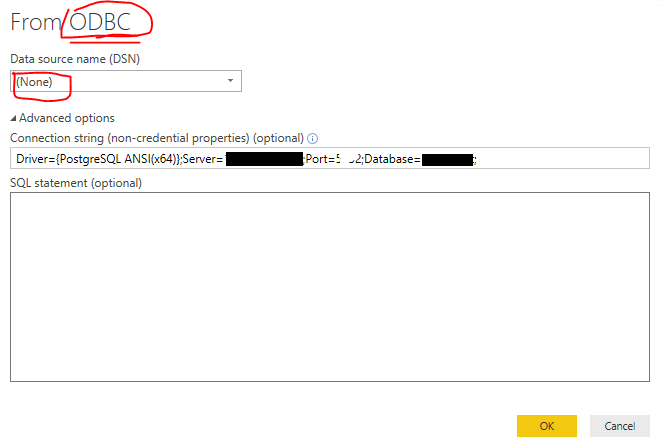
If the above solution does not solve your problem, you can use ODBC connector to connect to PostgreSQL as an alternative solution. You can see the details of the steps in the links below.

Connecting Power BI to Postgre SQL Database

An error happened while reading data from the provider. The remote certificate is invalid according to the validation procedure

yingyinr_0-1631168316070.png

Best Regards

View solution in original post

2 REPLIES 2
Anonymous
Not applicable

i have the same probleme can u help me please to solve it ?

in fact in the desktop i visualise the data with no problemes and it exchange with the data base postgreSQL normaly but one i publish it in the siteweb i cant visualise any thing sayin to me that this error :

Erreur sous-jacente: PowerBI service client received error HTTP response. HttpStatus: 400. PowerBIErrorCode: QueryUserError
QueryUserError: DataSource.Error: An error happened while reading data from the provider: '[ccon]The remote certificate is invalid according to the validation procedure.'. DataSourceKind = PostgreSQL. DataSourcePath = hutchinson.ineo-sense.com;ICM. [/ccon]. L'exception a été déclenchée par l'interface IDbCommand.
ID de corrélation: 8267c764-5d00-8cae-5a92-c807aab21ac1
ID d'activité: 9c2ff7f3-e846-47b3-960e-1752b6e6bac4
ID de demande: d6b88234-835d-9ee8-84f5-0af04b100662
Heure: Tue Mar 07 2023 22:22:49 GMT+0100 (heure normale d’Europe centrale)
Version du service: 13.0.20195.63
Version du client: 2302.4.12605-train
URI du cluster: https://wabi-west-europe-b-primary-redirect.analysis.windows.net/

any help pleaaaaaaaaaase 

Anonymous
Not applicable

Hi @Anonymous ,

Based on this error message screenshot, it appears that this issue is caused by the certification problem on the server. You can refer to the solution in the threads below to try to solve your problem.

PostgreSQL + powerbi desktop connection error

The remote certificate is invalid according to the validation procedure - Connecting Postgres

Client Certificates
If the above solution does not solve your problem, you can use ODBC connector to connect to PostgreSQL as an alternative solution. You can see the details of the steps in the links below.

Connecting Power BI to Postgre SQL Database

An error happened while reading data from the provider. The remote certificate is invalid according to the validation procedure

yingyinr_0-1631168316070.png

Best Regards

Helpful resources

Announcements
Power BI DataViz World Championships

Power BI Dataviz World Championships

The Power BI Data Visualization World Championships is back! Get ahead of the game and start preparing now!

December 2025 Power BI Update Carousel

Power BI Monthly Update - December 2025

Check out the December 2025 Power BI Holiday Recap!

FabCon Atlanta 2026 carousel

FabCon Atlanta 2026

Join us at FabCon Atlanta, March 16-20, for the ultimate Fabric, Power BI, AI and SQL community-led event. Save $200 with code FABCOMM.