cancel
Showing results for 
Search instead for 
Did you mean: 

The Power BI Data Visualization World Championships is back! Get ahead of the game and start preparing now! Learn more

Reply
sebsenciel
Frequent Visitor

POWERBI : MATRIX - GROUP and HEADER and COLORS

Hello,

I have a big problem that I can't solve with PowerBi

I want to make the following report :


sebsenciel_0-1701453534943.png


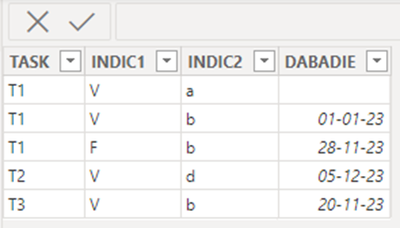
from the following table :

sebsenciel_1-1701453553348.png

management rules :

If the value in column "INDIC1" = "V" then colour in GREEN

If the value in column "INDIC1" = "F" then colour in RED

If the value in column "INDIC2" = "a " then colour in YELLOW

For dates, if the value of the date < TODAY then colour in GREEN, otherwise RED


How can I do this with PowerBi

I've tried using a matrix, but to no avail, as I can't colour in the INDIC1 and INDIC2 columns and  1 column without a date appears at date level, which I don't want.
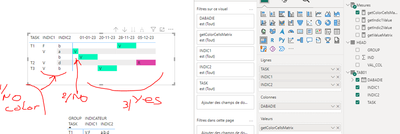
sebsenciel_2-1701453581535.png


I've tried another approach, which is to use an intermediate table (HEAD) to format the header of my matrix, but I can't do it, especially as I don't know how to make the dates, which are variable, appear in the header:
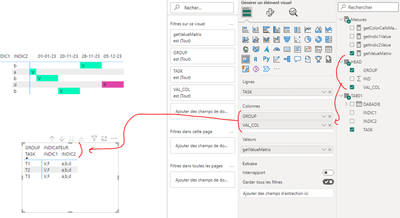
sebsenciel_3-1701453607733.png

If anyone can help me, that would be great.

Thank’s a lot

My measures :

getColorCellsMatrix =
IF(
    TODAY() >= MAX(TAB01[DABADIE]),
     "V",
     "R"
       
)

getIndic1Value = CONCATENATEX(ALL(TAB01[INDIC1]),TAB01[INDIC1],",")
getIndic2Value = CONCATENATEX(ALL(TAB01[INDIC2]),TAB01[INDIC2],",")
 
getValueMatrix =
VAR _Val = SWITCH(SELECTEDVALUE('HEAD'[IND]),
    1, [getIndic1Value],
    2, [getIndic2Value])
    RETURN
  _Val


Table HEAD :

sebsenciel_0-1701454147324.png


Table TAB01 :

sebsenciel_1-1701454173341.png


1 ACCEPTED SOLUTION
Anonymous
Not applicable

HI @sebsenciel,

AFAIK, current conditional formatting feature not able to directly apply to the matrix visual header field and total levels. If you mean to apply condition formatting on value field based on current row and column field values, it is possible.

I'd like to suggest you do unpivot columns on these 'INDIC' fields to convert them to attribute and value.

Unpivot columns - Power Query | Microsoft Learn

Then you can add variables to extract the current field values and use them compare with conditions to get result color code.

Sample measure formulas:

ValueColor =
VAR currDate =
    MAX ( Table1[Date] )
VAR currAttr =
    SELECTEDVALUE ( Table1[Attribute] )
VAR currValue =
    SELECTEDVALUE ( Table1[Value] )
RETURN
    SWITCH (
        currAttr,
        "INDIC1", SWITCH ( currValue, "V", "GREEN", "F", "RED", "BLACK" ),
        "INDIC2", IF ( currValue = "a ", "YELLOW", "BLACK" ),
        "BLACK"
    )
    
DateColor =
IF ( currDate < TODAY (), "GREEN", "RED" )

After these steps, you can use these formulas on value and date field background color to achieve your requirement.

Regards,

Xiaoxin Sheng

View solution in original post

2 REPLIES 2
Anonymous
Not applicable

HI @sebsenciel,

AFAIK, current conditional formatting feature not able to directly apply to the matrix visual header field and total levels. If you mean to apply condition formatting on value field based on current row and column field values, it is possible.

I'd like to suggest you do unpivot columns on these 'INDIC' fields to convert them to attribute and value.

Unpivot columns - Power Query | Microsoft Learn

Then you can add variables to extract the current field values and use them compare with conditions to get result color code.

Sample measure formulas:

ValueColor =
VAR currDate =
    MAX ( Table1[Date] )
VAR currAttr =
    SELECTEDVALUE ( Table1[Attribute] )
VAR currValue =
    SELECTEDVALUE ( Table1[Value] )
RETURN
    SWITCH (
        currAttr,
        "INDIC1", SWITCH ( currValue, "V", "GREEN", "F", "RED", "BLACK" ),
        "INDIC2", IF ( currValue = "a ", "YELLOW", "BLACK" ),
        "BLACK"
    )
    
DateColor =
IF ( currDate < TODAY (), "GREEN", "RED" )

After these steps, you can use these formulas on value and date field background color to achieve your requirement.

Regards,

Xiaoxin Sheng

Hello Xiaoxine Sheng,
Thank you for your reply
I've passed it on to OK because it's so nice of you to reply to me.
But, unfortunately I can't put the indexes + dates in columns on the same line.
There's something I don't understand at all.
If you have the time to attach a demo pbix, I'd really appreciate it.
But if not, forget it.
I don't understand why Microsoft hasn't made a matrix that lets you put colors in the header. I'm sorry, but in cobol in the 90's, it was possible to make matrices with colors... 30 years later, it's impossible with the new tools... find the error 😉

Helpful resources

Announcements
Power BI DataViz World Championships

Power BI Dataviz World Championships

The Power BI Data Visualization World Championships is back! Get ahead of the game and start preparing now!

December 2025 Power BI Update Carousel

Power BI Monthly Update - December 2025

Check out the December 2025 Power BI Holiday Recap!

FabCon Atlanta 2026 carousel

FabCon Atlanta 2026

Join us at FabCon Atlanta, March 16-20, for the ultimate Fabric, Power BI, AI and SQL community-led event. Save $200 with code FABCOMM.