Join us at FabCon Atlanta from March 16 - 20, 2026, for the ultimate Fabric, Power BI, AI and SQL community-led event. Save $200 with code FABCOMM.
Register now!The Power BI Data Visualization World Championships is back! Get ahead of the game and start preparing now! Learn more
Hi All
Please help me.
Can I merge columns in the Query editor by column name (if the colname contain the setted text)?
And how can i do?
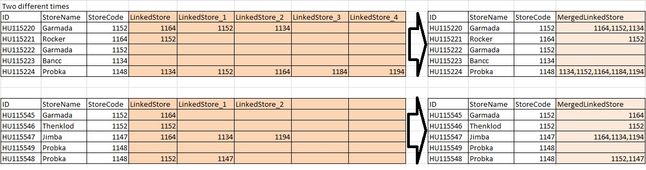
I would like to merge the columns (in the query editor), which name started with "LinkedStore" string. And this "LinkedStore_* " columns number is dinamically changing.
For example:
I saw in the advance editor, and combine the following but... 😞
let
Source = #"HUData (2)",
ColNames = Table.ColumnNames(Source),
TransformCommand = List.Transform(ColNames, each {_, type text}),
#"Changed Type1" = Table.TransformColumnTypes(Source, TransformCommand),
#"Merged Columns" = Table.CombineColumns(#"Changed Type1", ColNames,Combiner.CombineTextByDelimiter("", QuoteStyle.None),"Merged")
in
#"Merged Columns"Thanks a lot
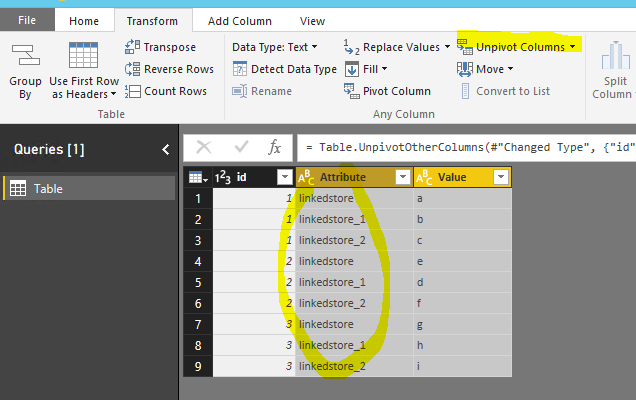
Instead of merge columns, I'd suggest you do a "unpivot".
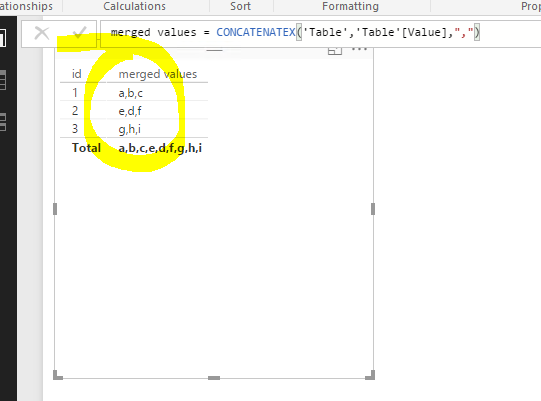
Then unpivoted data model are more normalized and it is easy to get the "merged" column in a visual by using a measure. See more details in the attached pbix.
merged values = CONCATENATEX('Table','Table'[Value],",")
Check out the November 2025 Power BI update to learn about new features.
Advance your Data & AI career with 50 days of live learning, contests, hands-on challenges, study groups & certifications and more!
| User | Count |
|---|---|
| 4 | |
| 2 | |
| 2 | |
| 1 | |
| 1 |