
Don't miss your chance to take the Fabric Data Engineer (DP-600) exam for FREE! Find out how by attending the DP-600 session on April 23rd (pacific time), live or on-demand.
Learn moreNext up in the FabCon + SQLCon recap series: The roadmap for Microsoft SQL and Maximizing Developer experiences in Fabric. All sessions are available on-demand after the live show. Register now
Hi, I have a large number of columns in SQL Server (150) that have values. Let's say the values are green, blue, red. My goal is to display all of the columns with a value of green from top to bottom vs. a table that wants to add the columns left to right.
Is there a way to do this?
Columns don't have values. They have row numbers (or indexes) which then point to cells that have values.
To swap columns and rows you can use Pivot/unpivot transforms.
You would need to run a custom function that identifies the names of the columns containing cellse with the value "green".
Then you would do a SelectColumns against that list
Then you would do the pivoting thing to swap rows and columns.
Now the question is - how many rows does your table have? This might be fine for 20 rows, but will certainly not work for millions of rows.
For your proposed solution, do you have any direction to perform/create the function?
provide some sample data and the expected result
Hi, here's the same information. For my real data, I have hundreds title, description and "status" columns.
| Audit_ID | Audit_Date | Company_ID | ABC123_Title | ABC123_Description | ABC123_Status | XYZ123_Title | XYZ123_Description | XYZ123_Status |
| 1 | 1/1/20 | 1 | ABC123_Title #1 | ABC123_Description #1 | Implemented | XYZ123_Title #1 | XYZ123_Description #1 | Not Implemented |
| 2 | 2/1/20 | 2 | ABC123_Title #2 | ABC123_Description #2 | Implemented | XYZ123_Title #2 | XYZ123_Description #2 | Not Implemented |
| 3 | 3/1/20 | 3 | ABC123_Title #3 | ABC123_Description #3 | Implemented | XYZ123_Title #3 | XYZ123_Description #3 | Not Implemented |
| 4 | 4/1/20 | 4 | ABC123_Title #4 | ABC123_Description #4 | Implemented | XYZ123_Title #4 | XYZ123_Description #4 | Not Implemented |
| 5 | 5/1/20 | 5 | ABC123_Title #5 | ABC123_Description #5 | Implemented | XYZ123_Title #5 | XYZ123_Description #5 | Not Implemented |
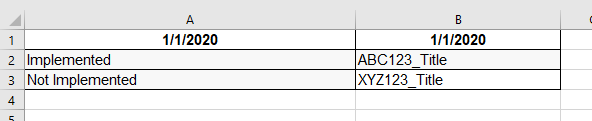
Ideally I would like to have a report showing the following:
Company 1
Date Performed (1/1/20)
| Implemented | ABC123_Title |
| Not Implemented | XYZ123_Title |
Sorry, tables smashed together and I didn't see a spot to upload an excel file.
Hi @ez1138 ,
I don't particularly understand what you want.
Do you want to convert Table 1 to get Table 2?
Table1
Table2
Best regards,
Lionel Chen
If this post helps, then please consider Accept it as the solution to help the other members find it more quickly.
Thanks for the reply. I have a few hundred columns and only a few hundred rows. I have no clue, yet, on how to do what you mentioned although it moves the ball forward and I will research it. Thanks!
If you have recently started exploring Fabric, we'd love to hear how it's going. Your feedback can help with product improvements.
A new Power BI DataViz World Championship is coming this June! Don't miss out on submitting your entry.
Experience the highlights from FabCon & SQLCon, available live and on-demand starting April 14th.
| User | Count |
|---|---|
| 1 | |
| 1 | |
| 1 | |
| 1 | |
| 1 |
| User | Count |
|---|---|
| 8 | |
| 8 | |
| 4 | |
| 3 | |
| 2 |