Move the visual around in the Edit mode on a report
This is dependant on the 'Visual options' setup either on your Desktop or Web version of the report.
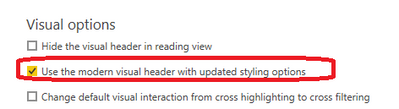
To locate this on "Power BI Desktop", goto File > Options and settings > Options > "CURRENT FILE" > Report Settings > "Visual Options" > 'Use the modern visual header with updated styling options'.
To locate this on "Power BI Web", goto My Workspace > Report (locate the specific report) > Settings > "Visual Options" > 'Use the modern visual header with updated styling options'.
Modern visual header turned "off"
Ensure the 'modern visual' setting is unchecked.
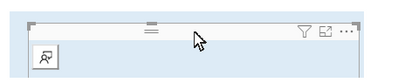
Fig 1
You can only grab the visual by the header pane/bar to move it around using your mouse as shown above. However you cannot click within the visual and move it around.
In addition, you can also use the keyboard arrow keys to move the visual around once the header is selected/highlighted.
Modern visual header turned "on"
Ensure the 'modern visual' setting is checked

Fig 2
The header is no more visible as shown above. Hence click to select on the border in order to move it around using your mouse. Please note that that this very sensitive and the user should ensure the border is selected.
In addition, you can also use the keyboard arrow keys to move the visual around once the border is selected/highlighted.
Delete the visual in the Edit mode on a report
Modern visual header turned "off"
Ensure the 'modern visual' setting is unchecked.
Click on the header as shown on 'Fig 1' and then hit on the Delete key on your keyboard. This will ensure that the visual is deleted.
Alternately you can also click on the 'Remove' menu as shown below:
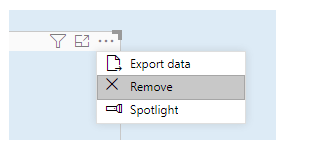
Fig 3
Modern visual header turned "on"
Ensure the 'modern visual' setting is checked
Click on the border as shown on 'Fig 2' and then hit on the Delete key on your keyboard. This will ensure that the visual is deleted.
Alternately you can also click on the 'Remove' menu as shown on 'Fig 3'


