This is best Fabric, Power BI, SQL and AI community event. How do we know? The last event sold out! Save €200 with code FABCMTY200.
Register nowA new Data Days event is coming soon! This time we’re going bigger than ever. Fabric, Power BI, SQL, AI and more. Don't miss out.
Solved! Go to Solution.
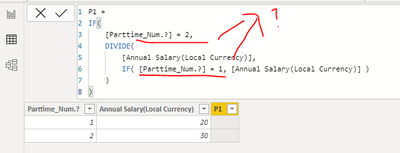
@Grande , it looks like you are authoring a measure, aren't you? If so, you might try,
P1 =
VAR __pt = MAX ( VW_ORT[Partime_Num.?] )
VAR __as = MAX ( VW_ORT[Annual Salary (Local Currency)] )
RETURN
IF ( __pt = 2, DIVIDE ( __as, IF ( __pt = 1, __as ) ) )
| Thanks to the great efforts by MS engineers to simplify syntax of DAX! Most beginners are SUCCESSFULLY MISLED to think that they could easily master DAX; but it turns out that the intricacy of the most frequently used RANKX() is still way beyond their comprehension! |
DAX is simple, but NOT EASY! |
I would like to creted the below formaula for the which is giving me error Please help me..
Annual Salary (USD) - AOP FX Rates + (Annual Salary (USD) - AOP FX Rates * Fringe Rate)
Excel Formula =IFERROR(BR31765+(BR31765*BP31765),"NA")
data Values :
Fringe Rate = 15%
AOP FY20 FX Rates = 1
Annual Salary (USD) - AOP FX Rates = 152,360
Annual Salary + Benefits (USD) = 175,774
I created the formula but it does not giving me the correct Results
I should get the Result = 175774
Please help me
Hi @Grande ,
Has your problem been solved?
Best regards,
Lionel Chen
If this post helps, then please consider Accept it as the solution to help the other members find it more quickly.
Hi @Grande ,
Even if you want to create a calculated column, this formula has a logic error.
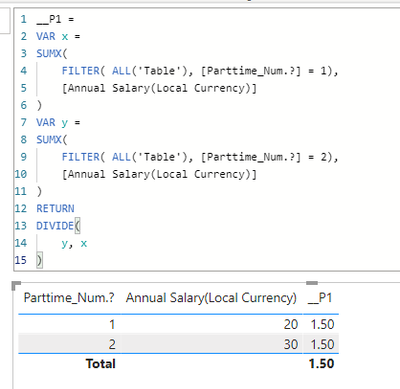
Or Is this what you want?(30/20 =1.5)
Best regards,
Lionel Chen
If this post helps, then please consider Accept it as the solution to help the other members find it more quickly.
@Grande , it looks like you are authoring a measure, aren't you? If so, you might try,
P1 =
VAR __pt = MAX ( VW_ORT[Partime_Num.?] )
VAR __as = MAX ( VW_ORT[Annual Salary (Local Currency)] )
RETURN
IF ( __pt = 2, DIVIDE ( __as, IF ( __pt = 1, __as ) ) )
| Thanks to the great efforts by MS engineers to simplify syntax of DAX! Most beginners are SUCCESSFULLY MISLED to think that they could easily master DAX; but it turns out that the intricacy of the most frequently used RANKX() is still way beyond their comprehension! |
DAX is simple, but NOT EASY! |
Check out the May 2026 Power BI update to learn about new features.
Sign up to receive a private message when registration opens and key events begin.
If you have recently started exploring Fabric, we'd love to hear how it's going. Your feedback can help with product improvements.
| User | Count |
|---|---|
| 3 | |
| 1 | |
| 1 | |
| 1 | |
| 1 |