Join us at FabCon Atlanta from March 16 - 20, 2026, for the ultimate Fabric, Power BI, AI and SQL community-led event. Save $200 with code FABCOMM.
Register now!The Power BI Data Visualization World Championships is back! Get ahead of the game and start preparing now! Learn more
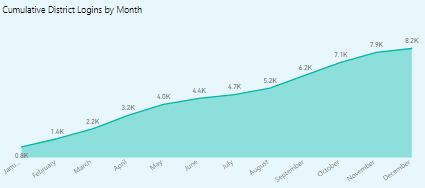
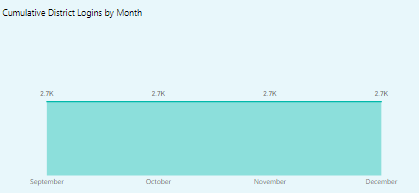
I have a DAX to calculate cumulative total. it is giving correct result if there are no filters or slicers applied. I have year slicer, when I click on that, 2019 year gives me correct result for every month but when I click 2018, it is giving me same result for every month. I have only data from September to December for 2018.
2019 result:2019 data
2018 Data
Solved! Go to Solution.
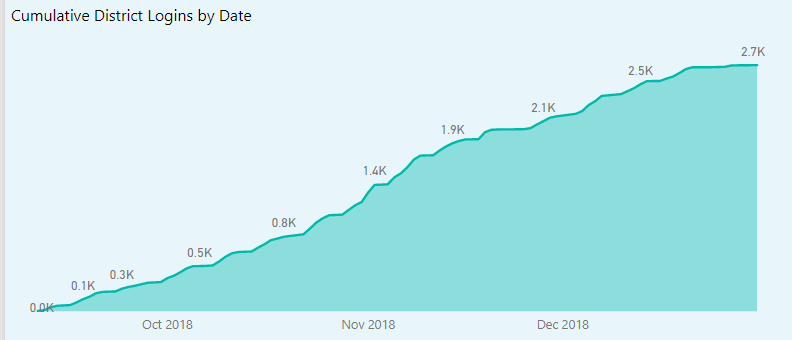
I found solution for this. First of all I should be using Dates instead of months in the dat for x- axis. Also, to improve performance, it is better to create a Standard 'Date' lookup table. This helped to improve performace significanly.
2018 cumulative count by Date
I found solution for this. First of all I should be using Dates instead of months in the dat for x- axis. Also, to improve performance, it is better to create a Standard 'Date' lookup table. This helped to improve performace significanly.
2018 cumulative count by Date
The Power BI Data Visualization World Championships is back! Get ahead of the game and start preparing now!
Check out the November 2025 Power BI update to learn about new features.
| User | Count |
|---|---|
| 10 | |
| 10 | |
| 4 | |
| 3 | |
| 3 |