cancel
Showing results for 
Search instead for 
Did you mean: 

Next up in the FabCon + SQLCon recap series: The roadmap for Microsoft SQL and Maximizing Developer experiences in Fabric. All sessions are available on-demand after the live show. Register now

Reply
Anonymous
Not applicable

Help in customizing chart

Hi Folks, 


I am trying to create a comparision report. That said i am trying to compare the volume of tickets between 2 calendar years

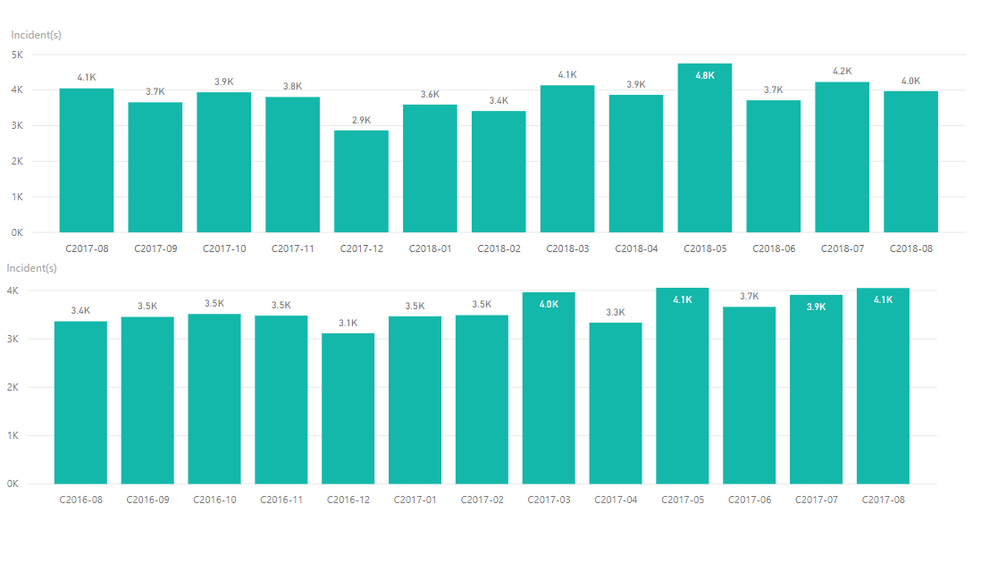
(Aug2016 to Aug 2017  and Aug 2017 to Aug 2018).  I have created two seperate bar charts, Refer attached picture. 

comparsion.PNGHow do i combine both or customise the charts to show the comparison report ? 


I need to get any of the following combination 

  1. Display ticket volume as comparison b/w calendar year in the same report. E.G. ticket volume for C2016-08 follwed by ticket volume by C2017-08, and so on. In other words, 1st bar of the 2nd graphs follwed by 1st bar of the 1st graph etc. 
  2. Dispaly a bar chart with tickets volume for this year and a trend graph ( incorporated in the same graph ) for previous year for comparison 

I am not sure how to apply the filter because both the graphs have different date ranges. 

2 REPLIES 2
v-chuncz-msft
Community Support
Community Support

@Anonymous,


You may use clustered column chart and take advantage of the Legend field.

Community Support Team _ Sam Zha
If this post helps, then please consider Accept it as the solution to help the other members find it more quickly.
Anonymous
Not applicable

Hi, 


Tried then and no good . As i am comparing a unit value with two different date ranges. 

Helpful resources

Announcements
New to Fabric survey Carousel

New to Fabric Survey

If you have recently started exploring Fabric, we'd love to hear how it's going. Your feedback can help with product improvements.

Power BI DataViz World Championships carousel

Power BI DataViz World Championships - June 2026

A new Power BI DataViz World Championship is coming this June! Don't miss out on submitting your entry.

Join our Fabric User Panel

Join our Fabric User Panel

Share feedback directly with Fabric product managers, participate in targeted research studies and influence the Fabric roadmap.

March Power BI Update Carousel

Power BI Community Update - March 2026

Check out the March 2026 Power BI update to learn about new features.