cancel
Showing results for 
Search instead for 
Did you mean: 

Join the FabCon + SQLCon recap series. Up next: Power BI, Real-Time Intelligence, IQ and AI, and Data Factory take center stage. All sessions are available on-demand after the live show. Register now

Reply
raghukumarch
Frequent Visitor

Help for Calculated/Conditional/Custom Column

Hi @tamerj1 @amitchandak @SpartaBI@Jihwan_Kim 

Could you please help me in achieving this either in DAX or PowerQuery.
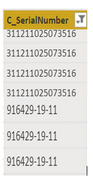
One of my column in table has values like this.

raghukumarch_0-1660668552655.png


I wanted to create another column in same table by adding "0" in the begining for the values which dose not contain "-" and other value which contains "-" should remains same as it is. 

For example column 'C_SerialNumber' have values like "311211025073516" and "916429-19-11"

I wanted to add '0' in the begining if the value DOES NOT Contain '-'. So the output will be "0311211025073516" and other values remains same.


Thanks

RK

1 ACCEPTED SOLUTION
bilalrana
Resolver I
Resolver I

Dear @raghukumarch ,

I have implemented your scenario, Here's the few steps to achieve the required output.

Go to Home - > Transform Data 


Open the Query which contains the column C_SerialNumber.

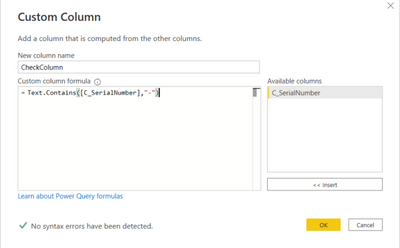
Go to - > Add Column - > Custom Column

bilalrana_0-1660732226260.png

New Column Name: CheckColumn

Custom column formula: Text.Contains([C_SerialNumber],"-")

Now click on OK.


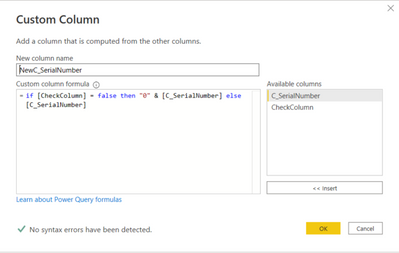
Now again click on  Add Column - > Custom Column

bilalrana_1-1660732436132.png

New Column Name: NewC_SerialNumber

Custom column formula: if [CheckColumn] = false then "0" & [C_SerialNumber] else [C_SerialNumber]

Now click on OK.

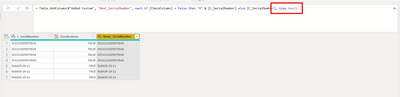
Now, check on the formula bar, if the type isn't set to text then write it in a way as below screen short and click on the tick.

bilalrana_2-1660732650679.png


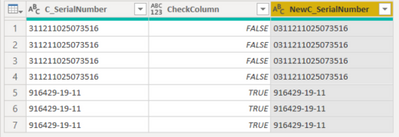
Here's the desire output in a new column.

bilalrana_3-1660732673210.png


Please like the reply and accept it as a solution to help the Power BI Community.


View solution in original post

3 REPLIES 3
bilalrana
Resolver I
Resolver I

Dear @raghukumarch ,

I have implemented your scenario, Here's the few steps to achieve the required output.

Go to Home - > Transform Data 


Open the Query which contains the column C_SerialNumber.

Go to - > Add Column - > Custom Column

bilalrana_0-1660732226260.png

New Column Name: CheckColumn

Custom column formula: Text.Contains([C_SerialNumber],"-")

Now click on OK.


Now again click on  Add Column - > Custom Column

bilalrana_1-1660732436132.png

New Column Name: NewC_SerialNumber

Custom column formula: if [CheckColumn] = false then "0" & [C_SerialNumber] else [C_SerialNumber]

Now click on OK.

Now, check on the formula bar, if the type isn't set to text then write it in a way as below screen short and click on the tick.

bilalrana_2-1660732650679.png


Here's the desire output in a new column.

bilalrana_3-1660732673210.png


Please like the reply and accept it as a solution to help the Power BI Community.


raghukumarch
Frequent Visitor

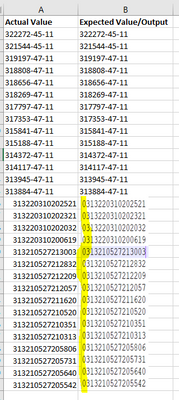
Hi @Greg_Deckler  Thanks for the quick response. Please find the attachment for sample data. and expected results. I couldn't find an option to attach sample data in xlsx. hence sharing a screenshot here.

raghukumarch_0-1660669713333.png


Greg_Deckler
Community Champion
Community Champion

@raghukumarch DAX Help for Custom/Conditional Column - Microsoft Power BI Community

Please don't cross-post. Sorry, having trouble following, can you post sample data as text and expected output?
Not really enough information to go on, please first check if your issue is a common issue listed here: https://community.powerbi.com/t5/Community-Blog/Before-You-Post-Read-This/ba-p/1116882

Also, please see this post regarding How to Get Your Question Answered Quickly: https://community.powerbi.com/t5/Community-Blog/How-to-Get-Your-Question-Answered-Quickly/ba-p/38490

The most important parts are:
1. Sample data as text, use the table tool in the editing bar
2. Expected output from sample data
3. Explanation in words of how to get from 1. to 2.


Follow on LinkedIn
@ me in replies or I'll lose your thread!!!
Instead of a Kudo, please vote for this idea
Become an expert!: Enterprise DNA
External Tools: MSHGQM
YouTube Channel!: Microsoft Hates Greg
Latest book!:
DAX For Humans

DAX is easy, CALCULATE makes DAX hard...

Helpful resources

Announcements
April Power BI Update Carousel

Power BI Monthly Update - April 2026

Check out the April 2026 Power BI update to learn about new features.

New to Fabric survey Carousel

New to Fabric Survey

If you have recently started exploring Fabric, we'd love to hear how it's going. Your feedback can help with product improvements.

Power BI DataViz World Championships carousel

Power BI DataViz World Championships - June 2026

A new Power BI DataViz World Championship is coming this June! Don't miss out on submitting your entry.

FabCon and SQLCon Highlights Carousel

FabCon & SQLCon Highlights

Experience the highlights from FabCon & SQLCon, available live and on-demand starting April 14th.

Users online (6,230)