cancel
Showing results for 
Search instead for 
Did you mean: 

Join the FabCon + SQLCon recap series. Up next: Power BI, Real-Time Intelligence, IQ and AI, and Data Factory take center stage. All sessions are available on-demand after the live show. Register now

Reply
Derekp978
Frequent Visitor

Fields for Conditional Formatting/Functions Not Appearing

All -


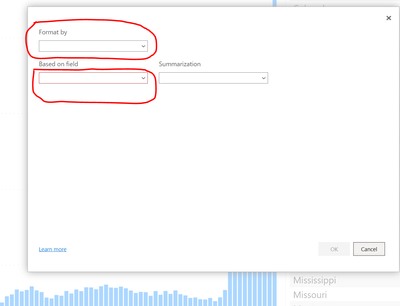
We have been using PBI Server for years and have several reports that have some sort of conditional formatting based on field values or other things - When building a new report today on a published dataset when opening the Function Pop Up for setting colors/formatting the drop downs would not load any fields - this now impacts current reports, too - as long as I don't try and adjust any conditional formatting they will still work - any help is appreciated, see picture below:

Derekp978_0-1644952468222.png


1 ACCEPTED SOLUTION

Hi @Derekp978 ,


I found that this issue have been submited internal to confirm,Please focus on this thread.

PBI Service - conditional formatting not displayin... - Microsoft Power BI Community


Best Regards,
Liang
If this post helps, then please consider Accept it as the solution to help the other members find it more quickly.

View solution in original post

5 REPLIES 5
Derekp978
Frequent Visitor

@V-lianl-msft -  


We are using the Online version - https://app.powerbi.com/ - and we have a tabular model that has been operational for over 2 years.  We have never had this particular issue with the Dataset - I was wondering if there is some sort of limit on measures/rows where this sort of restriction would occur.

Hi @Derekp978 ,


As far as I am know, You cannot modify the report model in PBI service currently. If you want to modify the conditional formattng, please connect the dataset of this report in PBI desktop, modify it and republish it again as workaround.

https://docs.microsoft.com/en-us/power-bi/connect-data/desktop-report-lifecycle-datasets 

If you are the publisher of this report, you can directly modify the original pbix and republish it as workaround.


Best Regards,
Liang
If this post helps, then please consider Accept it as the solution to help the other members find it more quickly.


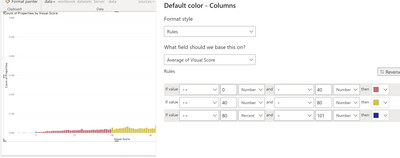
Hi @V-lianl-msft  I am the original publisher and creator - the conditional format if not part of the model - the dataset underlying is - using the same Tabular model in PBI Desktop I can successfully do column formatting...

Derekp978_0-1645162803483.png


Hi @Derekp978 ,


I found that this issue have been submited internal to confirm,Please focus on this thread.

PBI Service - conditional formatting not displayin... - Microsoft Power BI Community


Best Regards,
Liang
If this post helps, then please consider Accept it as the solution to help the other members find it more quickly.

V-lianl-msft
Community Support
Community Support

Hi @Derekp978 ,


Which version of desktop are you using? Is it connect to PBI dataset? Unfortunately,I can't reproduce your issue. Please provide more details so that I can do more tests.

Vlianlmsft_0-1645161364186.png


Best Regards,
Liang
If this post helps, then please consider Accept it as the solution to help the other members find it more quickly.

Helpful resources

Announcements
April Power BI Update Carousel

Power BI Monthly Update - April 2026

Check out the April 2026 Power BI update to learn about new features.

New to Fabric survey Carousel

New to Fabric Survey

If you have recently started exploring Fabric, we'd love to hear how it's going. Your feedback can help with product improvements.

Power BI DataViz World Championships carousel

Power BI DataViz World Championships - June 2026

A new Power BI DataViz World Championship is coming this June! Don't miss out on submitting your entry.

FabCon and SQLCon Highlights Carousel

FabCon &SQLCon Highlights

Experience the highlights from FabCon & SQLCon, available live and on-demand starting April 14th.