cancel
Showing results for 
Search instead for 
Did you mean: 

The Power BI Data Visualization World Championships is back! Get ahead of the game and start preparing now! Learn more

Reply
Anonymous
Not applicable

Data update

Hi


I am working with a company that issues its data weekly in a .txt format. 


The .txt files contain data for a rolling 52 week period ie. each week the oldest week is removed and the latest week is appended.


I have imported the most recent .txt file and created the dashboard that I wanted to do with the required measures.


How do I make it so when I download the latest .txt file on monday (Which will have a different file name) my dasboard updates with the latest 52 weeks of data?

1 ACCEPTED SOLUTION
Anonymous
Not applicable

If you use the Get Data from Folder, Power BI will pick up any files it can from that folder. You can do this by clicking on "Get Data" and in the default window that opens there should be an option for folder toward the middle of the options on the right.


Capture.PNG


Enter the file path in the resulting window and hit connect. 


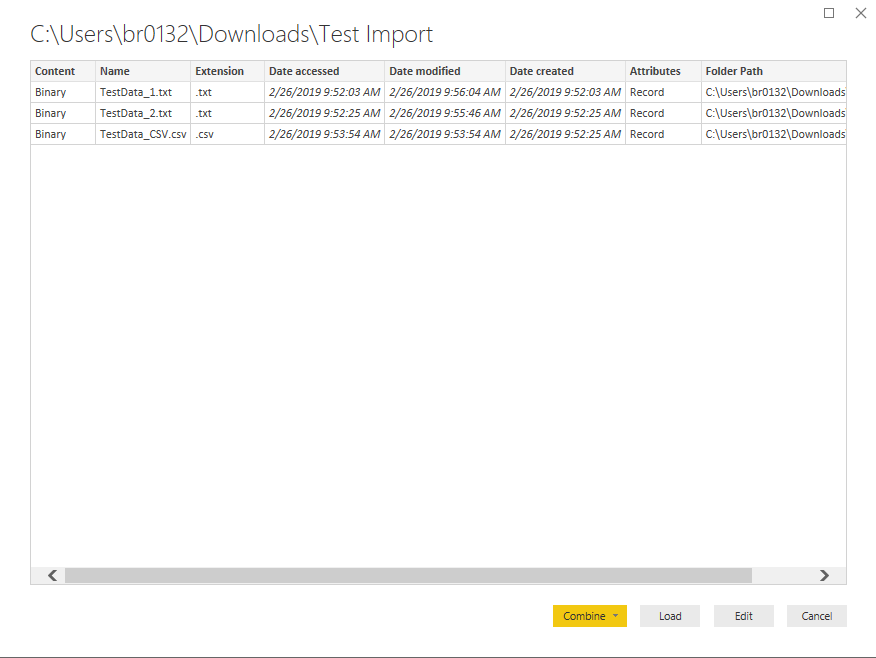
the next screen will show you what is being imported and you can either load as separate queries or combine them from here.


Capture.PNG 


In my example, I combined the data I had in a Pipe Delimited, Comma Delimited, and Tab Delimited file. all of the values were the same. so my headers came from the first file loaded (you can change this) and my data comes up from that first file. there is a column with source name so you can see where it came from and what was used. it will not duplicate your data. 


Capture.PNG


Hope this helps. 

View solution in original post

2 REPLIES 2
Anonymous
Not applicable

If you use the Get Data from Folder, Power BI will pick up any files it can from that folder. You can do this by clicking on "Get Data" and in the default window that opens there should be an option for folder toward the middle of the options on the right.


Capture.PNG


Enter the file path in the resulting window and hit connect. 


the next screen will show you what is being imported and you can either load as separate queries or combine them from here.


Capture.PNG 


In my example, I combined the data I had in a Pipe Delimited, Comma Delimited, and Tab Delimited file. all of the values were the same. so my headers came from the first file loaded (you can change this) and my data comes up from that first file. there is a column with source name so you can see where it came from and what was used. it will not duplicate your data. 


Capture.PNG


Hope this helps. 

ImkeF
Community Champion
Community Champion

You choose the import-from folder method. That returns a list of all tables in that folder with additional data like date. 

Put a filter on the date (Max) and you have the latest file.

Imke Feldmann (The BIccountant)

If you liked my solution, please give it a thumbs up. And if I did answer your question, please mark this post as a solution. Thanks!

How to integrate M-code into your solution -- How to get your questions answered quickly -- How to provide sample data -- Check out more PBI- learning resources here -- Performance Tipps for M-queries

Helpful resources

Announcements
Power BI DataViz World Championships

Power BI Dataviz World Championships

The Power BI Data Visualization World Championships is back! Get ahead of the game and start preparing now!

December 2025 Power BI Update Carousel

Power BI Monthly Update - December 2025

Check out the December 2025 Power BI Holiday Recap!

FabCon Atlanta 2026 carousel

FabCon Atlanta 2026

Join us at FabCon Atlanta, March 16-20, for the ultimate Fabric, Power BI, AI and SQL community-led event. Save $200 with code FABCOMM.