I am still on the early stage of getting the Custom Visual working stage. I was following the tutorial from Microsoft
https://docs.microsoft.com/en-us/power-bi/developer/custom-visual-develop-tutorial
So far I am getting to a point that the "UPDATE COUNT:0" example working. So all the npm, certificate, compiler works.
Then I was trying to follow an example where I can plug in some data. I downloaded this simple histogram example from Microsft:
https://github.com/Microsoft/powerbi-visuals-histogram/
Here are the steps I did:
1. Download the zip from github.
2. Unzip it and did an npm install
3. pbiviz start
In power bi my workspace, I used my dataset to use this custom visual, dragged my data into the visual, and nothing shows up (see figure below)
 doesn't display on web portal
Then just to make sure my data is not the culprit of this issue. I did some checking with my Power BI Desktop:
1. Under the same directory in powershell, pbiviz package
2. the I imported the .pbiviz file from the dist folder into my Power Bi Desktop.
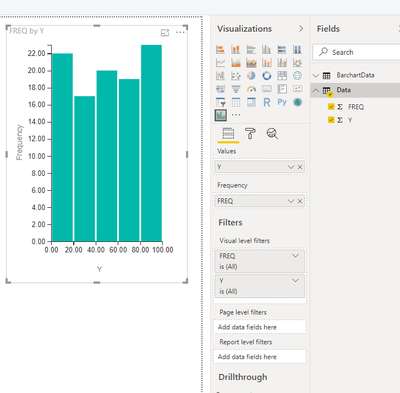
3. drag the data into the visual, it shows correctly (See below)
Here is my data file in dropbox
https://www.dropbox.com/s/iamccmlmrox4gkj/rData.pbix?dl=0
Can anyone help please? Thanks!


