Join us at FabCon Atlanta from March 16 - 20, 2026, for the ultimate Fabric, Power BI, AI and SQL community-led event. Save $200 with code FABCOMM.
Register now!The Power BI Data Visualization World Championships is back! Get ahead of the game and start preparing now! Learn more
I want to be able to have each variable calculate with its own measurement each time it is pulled into the report.
For example:
Variable 1: Each time this variable's box is checked and brought into the report, I want it to calculate as a SUM
Variable 2: Each time this variable's box is checked and brought into the report, I want it to calculate as an AVERAGE
I want these custom measurements to be tied statically to the variables, so each time i pull the variable into the visualization in a different tab, the same calculation happens.
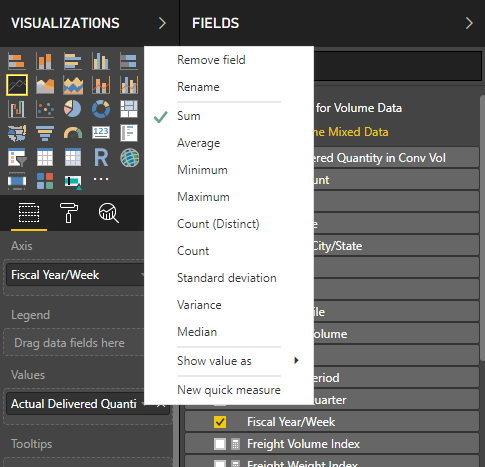
Is this possible? Below are picutres the definitions of calculations being changed.
Solved! Go to Solution.
As mentioned here, dataset owners have the option to set the default summarization for each field. If you are a dataset owner, change the default summarization in the Modeling tab of Power BI Desktop.
I want to be able to permanantly set a measurement type for each variable that I pull into the report visualization. For example,
Variable 1: When it's box is checked, I want it to appear in the report as a SUM measurement
Variable 2: When it's box is checked, I want it to appear in the report as an AVERAGE measurement.
I want these variations to be tied to each variable, so that each time I pull the data into a new tab, the same measurement is taken.
Is there a way to acheive this?
The Power BI Data Visualization World Championships is back! Get ahead of the game and start preparing now!
| User | Count |
|---|---|
| 3 | |
| 2 | |
| 2 | |
| 1 | |
| 1 |
| User | Count |
|---|---|
| 11 | |
| 7 | |
| 4 | |
| 4 | |
| 3 |