cancel
Showing results for 
Search instead for 
Did you mean: 

The Power BI Data Visualization World Championships is back! Get ahead of the game and start preparing now! Learn more

Reply
Anonymous
Not applicable

Custom Column

If Table 1 has a common feild as table two then bring third column from Table two in Table 1.

IF Table1(ID) = Table2(ID)

Than Return Table2(Name)

Not able to create direct relationship due to having indirect relationship between both the tables.

1 ACCEPTED SOLUTION
Anonymous
Not applicable

Hi @Anonymous ,


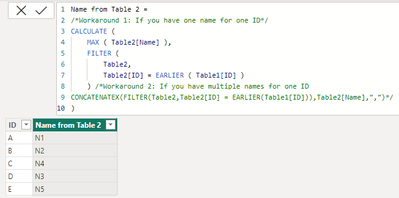
According to your statement, I know there is no relationship between two tables. I suggest you to try code as below to achieve your goal.

Name from Table 2 =
/*Workaround 1: If you have one name for one ID*/
CALCULATE (
    MAX ( Table2[Name] ),
    FILTER (
        Table2,
        Table2[ID] = EARLIER ( Table1[ID] )
    ) /*Workaround 2: If you have multiple names for one ID
CONCATENATEX(FILTER(Table2,Table2[ID] = EARLIER(Table1[ID])),Table2[Name],",")*/
)

Result is as below.

vrzhoumsft_0-1693376602976.png


Best Regards,

Rico Zhou


If this post helps, then please consider Accept it as the solution to help the other members find it more quickly.


View solution in original post

2 REPLIES 2
Anonymous
Not applicable

Hi @Anonymous ,


According to your statement, I know there is no relationship between two tables. I suggest you to try code as below to achieve your goal.

Name from Table 2 =
/*Workaround 1: If you have one name for one ID*/
CALCULATE (
    MAX ( Table2[Name] ),
    FILTER (
        Table2,
        Table2[ID] = EARLIER ( Table1[ID] )
    ) /*Workaround 2: If you have multiple names for one ID
CONCATENATEX(FILTER(Table2,Table2[ID] = EARLIER(Table1[ID])),Table2[Name],",")*/
)

Result is as below.

vrzhoumsft_0-1693376602976.png


Best Regards,

Rico Zhou


If this post helps, then please consider Accept it as the solution to help the other members find it more quickly.


SamInogic
Super User
Super User

Hi @Anonymous 

You can use Lookup function in DAX expression as below,

column1 = Lookup(table2, Table2(ID), Table(1)ID, Table2(Name)

Thanks!


Inogic Professional Services Division

Power Platform and Microsoft Dynamics 365 CRM Development – All under one roof!

Drop an email at crm@inogic.com

Services:  http://www.inogic.com/services/

Power Platform/Dynamics 365 CRM Tips and Tricks:  http://www.inogic.com/blog/

Inogic Professional Services: Power Platform/Dynamics 365 CRM
An expert technical extension for your techno-functional business needs
Service: https://www.inogic.com/services/
Tips and Tricks: https://www.inogic.com/blog/

Helpful resources

Announcements
Power BI DataViz World Championships

Power BI Dataviz World Championships

The Power BI Data Visualization World Championships is back! Get ahead of the game and start preparing now!

December 2025 Power BI Update Carousel

Power BI Monthly Update - December 2025

Check out the December 2025 Power BI Holiday Recap!

FabCon Atlanta 2026 carousel

FabCon Atlanta 2026

Join us at FabCon Atlanta, March 16-20, for the ultimate Fabric, Power BI, AI and SQL community-led event. Save $200 with code FABCOMM.