cancel
Showing results for 
Search instead for 
Did you mean: 

Try your skills in the Power BI Dataviz World Championship! Round one ends June 26. Join now

Reply
gabrielvigo
Helper I
Helper I

Create Sankey Graphics

Hi everyone.


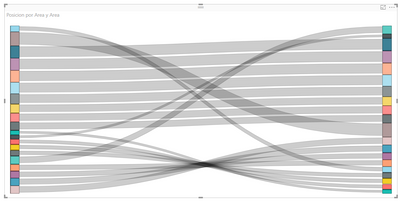
I need your help with this graphics.


Screenshot_1.png


In this case the origin and the destination are the same.

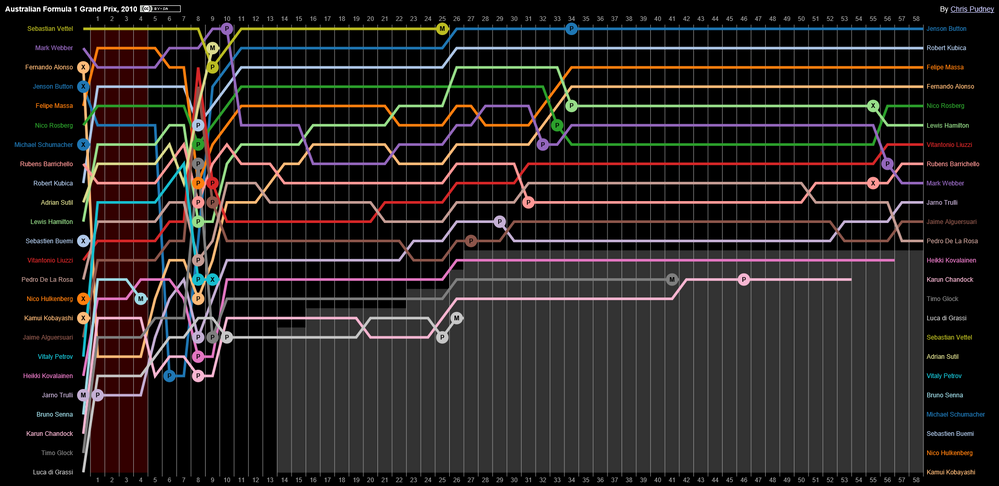
But, I need to add one more axis, the month of the year.
Throughout the month each value of the origin and destination is obtaining a different position.


In short, I need to come up with something like this:

Screenshot_2.png

1 ACCEPTED SOLUTION
v-viig
Community Champion
Community Champion

Sankey Diagram is not what you need. It looks like a new custom visual that should be implemented.


We'd recommend to ask community to develop this Custom Visual to implement required funtionality.


Ignat Vilesov,

Software Engineer


Microsoft Power BI Custom Visuals

pbicvsupport@microsoft.com

View solution in original post

1 REPLY 1
v-viig
Community Champion
Community Champion

Sankey Diagram is not what you need. It looks like a new custom visual that should be implemented.


We'd recommend to ask community to develop this Custom Visual to implement required funtionality.


Ignat Vilesov,

Software Engineer


Microsoft Power BI Custom Visuals

pbicvsupport@microsoft.com

Helpful resources

Announcements
Fabric Data Days is here Carousel

Fabric Data Days 2026

Don't miss out on Data Days, June 15 through August 7. Learn Fabric, Power BI, SQL, AI and more.

Power BI DataViz World Championships carousel

Power BI DataViz World Championships - June 2026

A new Power BI DataViz World Championship is coming this June! Don't miss out on submitting your entry.