cancel
Showing results for 
Search instead for 
Did you mean: 

Vote for your favorite vizzies from the Power BI Dataviz World Championship submissions. Vote now!

Reply
jb007
Frequent Visitor

Access Power BI API with Python

My requirement is to push real time data into Power BI using Python to first read from a database and then send the data inside a Streaming dataset in Power BI.

The first thing I want is to make a simple "get" call to Power BI.

The official documentation explains the processes of connecting to Power BI via the REST API for either a Client App or a Web App. However, I'm using Python - not sure if that is either a client app or a web app.


Anyway, I am able to get the accessToken using the adal library and the method .acquire_token_with_client_credentials, which asks for authority_uri, tenant, client_id and client_secret (notice this is not asking for username and password). By the way, I've also tried getting the accessToken with .acquire_token_with_username_password, but that didn't work.


Unfortunately, when I use the below code with the obtained accessToken, I get a response 403.

#accessToken is received using the adal libary 
headers = {'Authorization': 'Bearer ' + accessToken, 'Content-Type': 'application/json'}
read_datasets = requests.get('https://api.powerbi.com/v1.0/myorg/datasets', headers=headers)
#shockingly, this will result in a response 403

After reading other stackoverflow posts and looking at console apps, I believe the reason this doesn't work is because there is no user sign-in process.

This thread mentions that using Client Credentials is not enough (it is enough to get the accessToken, but not enough to use the APIs)


Not sure how to proceed, but what I need is perhaps a way to keep using this adal template that gives me the accessToken, and also to provide my username and password (in a silent way, i.e. via the scrip, without GUI), and together with the accessToken, to access the APIs.

1 ACCEPTED SOLUTION
Eric_Zhang
Microsoft Employee
Microsoft Employee


@jb007 wrote:

My requirement is to push real time data into Power BI using Python to first read from a database and then send the data inside a Streaming dataset in Power BI.

The first thing I want is to make a simple "get" call to Power BI.

The official documentation explains the processes of connecting to Power BI via the REST API for either a Client App or a Web App. However, I'm using Python - not sure if that is either a client app or a web app.


Anyway, I am able to get the accessToken using the adal library and the method .acquire_token_with_client_credentials, which asks for authority_uri, tenant, client_id and client_secret (notice this is not asking for username and password). By the way, I've also tried getting the accessToken with .acquire_token_with_username_password, but that didn't work.


Unfortunately, when I use the below code with the obtained accessToken, I get a response 403.

#accessToken is received using the adal libary 
headers = {'Authorization': 'Bearer ' + accessToken, 'Content-Type': 'application/json'}
read_datasets = requests.get('https://api.powerbi.com/v1.0/myorg/datasets', headers=headers)
#shockingly, this will result in a response 403

After reading other stackoverflow posts and looking at console apps, I believe the reason this doesn't work is because there is no user sign-in process.

This thread mentions that using Client Credentials is not enough (it is enough to get the accessToken, but not enough to use the APIs)


Not sure how to proceed, but what I need is perhaps a way to keep using this adal template that gives me the accessToken, and also to provide my username and password (in a silent way, i.e. via the scrip, without GUI), and together with the accessToken, to access the APIs.


@jb007

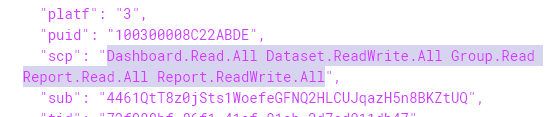
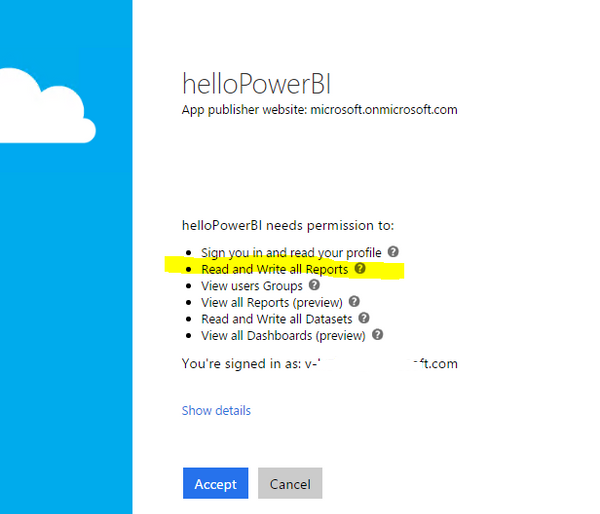
It is a web app. After registion, Use the client_id and client_secrect to get the accesstoken. What are the client_id and client_secrect in your case? 403 in your case most probably indicates a invalid accesstoken, when dedcoding the token at http://jwt.io, what is the scp(scope)? Normally you'd get access as below according to the premission checked when registering the app.

Capture.PNG


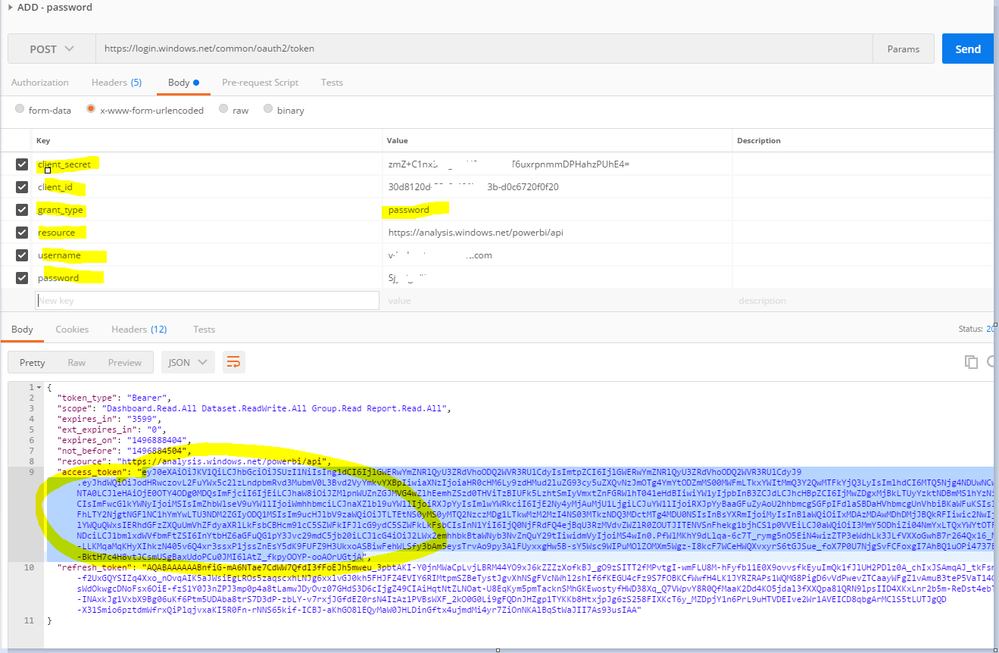
Techinically it is possible to get the access token without GUI interaction in a silent way, just call the POST API with grant_type=password. Then use the refreshtoken to get token afterwards. Note that it might violate the license compliance if other people use the this token to access the embedded reports. People who access the reports in Power BI service shall have their own accounts/tokens.

Capture.PNG


Capture.PNG


However for the first time, AFAIK, you'll always have the GUI consent page and accept it. 

large.png


View solution in original post

10 REPLIES 10

Helpful resources

Announcements
Power BI DataViz World Championships

Power BI Dataviz World Championships

Vote for your favorite vizzies from the Power BI World Championship submissions!

Sticker Challenge 2026 Carousel

Join our Community Sticker Challenge 2026

If you love stickers, then you will definitely want to check out our Community Sticker Challenge!

January Power BI Update Carousel

Power BI Monthly Update - January 2026

Check out the January 2026 Power BI update to learn about new features.

FabCon Atlanta 2026 carousel

FabCon Atlanta 2026

Join us at FabCon Atlanta, March 16-20, for the ultimate Fabric, Power BI, AI and SQL community-led event. Save $200 with code FABCOMM.