Join us at FabCon Atlanta from March 16 - 20, 2026, for the ultimate Fabric, Power BI, AI and SQL community-led event. Save $200 with code FABCOMM.
Register now!The Power BI Data Visualization World Championships is back! Get ahead of the game and start preparing now! Learn more
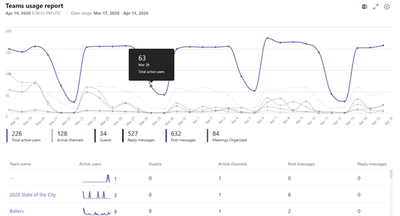
Without the GraphAPI connector in PBI, we have to build web api calls to fetch teams usage data from scratch.
What would be the API call to fetch usage by Team?
This is the call to fetch the usage by user (https://graph.microsoft.com/beta/reports/getTeamsUserActivityUserDetail(date=YYYY-MM-DD)), but a user can belong to many teams, so we are unable to summarize from this content.
Solved! Go to Solution.
HI @s-roberts ,
I checked the official document but not found the api that shows each record without any aggregate.
Perhaps you can try to access the admin portal to confirm if any export feature that allow you to export the detail user activity logs.
Regards,
Xiaoxin Sheng
HI @s-roberts ,
I checked the official document but not found the api that shows each record without any aggregate.
Perhaps you can try to access the admin portal to confirm if any export feature that allow you to export the detail user activity logs.
Regards,
Xiaoxin Sheng
"a user can belong to many teams, so we are unable to summarize from this content"
Please elaborate. You can run multiple API calls in Power Query and then combine the results.
The mentioned call provides an activity count by user and by day (not broken down by team).
When a user belongs to multiple teams, it would not be accurate to apply all the activities to each team. We'd need the portion of that activity that applies to each team.
Is there another call that would already have acitvity counts by team and by day (and possibly by user).
The Power BI Data Visualization World Championships is back! Get ahead of the game and start preparing now!
| User | Count |
|---|---|
| 3 | |
| 3 | |
| 2 | |
| 1 | |
| 1 |