Join us at FabCon Atlanta from March 16 - 20, 2026, for the ultimate Fabric, Power BI, AI and SQL community-led event. Save $200 with code FABCOMM.
Register now!The Power BI Data Visualization World Championships is back! Get ahead of the game and start preparing now! Learn more
Hi all.
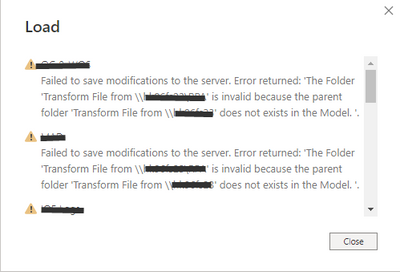
What goes wrong when i get this error when i click 'close and apply'?
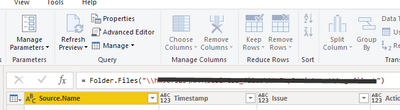
It say the folder does not exist un the model but that is wrong, the folder is indicate here
Solved! Go to Solution.
I have now the query`s copy and paste in a new file and that works.
No errors and the data is refreshed succesful.
Strange but it works.
@Frixel Looks like a Folder query. Can you take a screen shot of your Queries pane in Power BI Editor. When you create a Folder query it creates a very specific set of folders and queries that are all interconnected. I am wondering if something got deleted or renamed?
I have a similar error. I have connected to a sharepoint folder that has sub folders with the same excel file that is updated month by month. I just deleted 3 folders with their excel files and when I try to update I get a message of "The folder was not found", why do I have this error? Is BI only supposed to read current folders?
I have now the query`s copy and paste in a new file and that works.
No errors and the data is refreshed succesful.
Strange but it works.
The Power BI Data Visualization World Championships is back! Get ahead of the game and start preparing now!
| User | Count |
|---|---|
| 41 | |
| 39 | |
| 37 | |
| 29 | |
| 24 |
| User | Count |
|---|---|
| 118 | |
| 98 | |
| 70 | |
| 69 | |
| 65 |