Join us at FabCon Atlanta from March 16 - 20, 2026, for the ultimate Fabric, Power BI, AI and SQL community-led event. Save $200 with code FABCOMM.
Register now!The Power BI Data Visualization World Championships is back! Get ahead of the game and start preparing now! Learn more
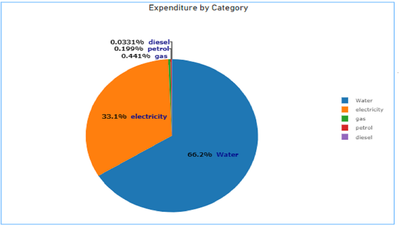
hi i have the pie chart as shown below and i see th values of categories which are minimal are shown in the report . can anyone help here please to show all the lables .condition is i need to use either donut or pie charts . values of two large distibutions are shown as below
Hi @Anonymous ,
Here is custom visual which will help you to see values of categories which are minimal.Pie chart with clear data label PBIVizEdit.com
Download link in this page
https://pbivizedit.com/gallery/pie-chart-with-clear-data-labels-for-small-data
This was made with our Custom Visual creator tool PBIVizEdit.com. With this tool,
You can use the editor to modify your visual further (some modifications cannot be done in Power BI window and have to be in editor).
Thanks,
Team PBIVizEdit
Hi @Anonymous
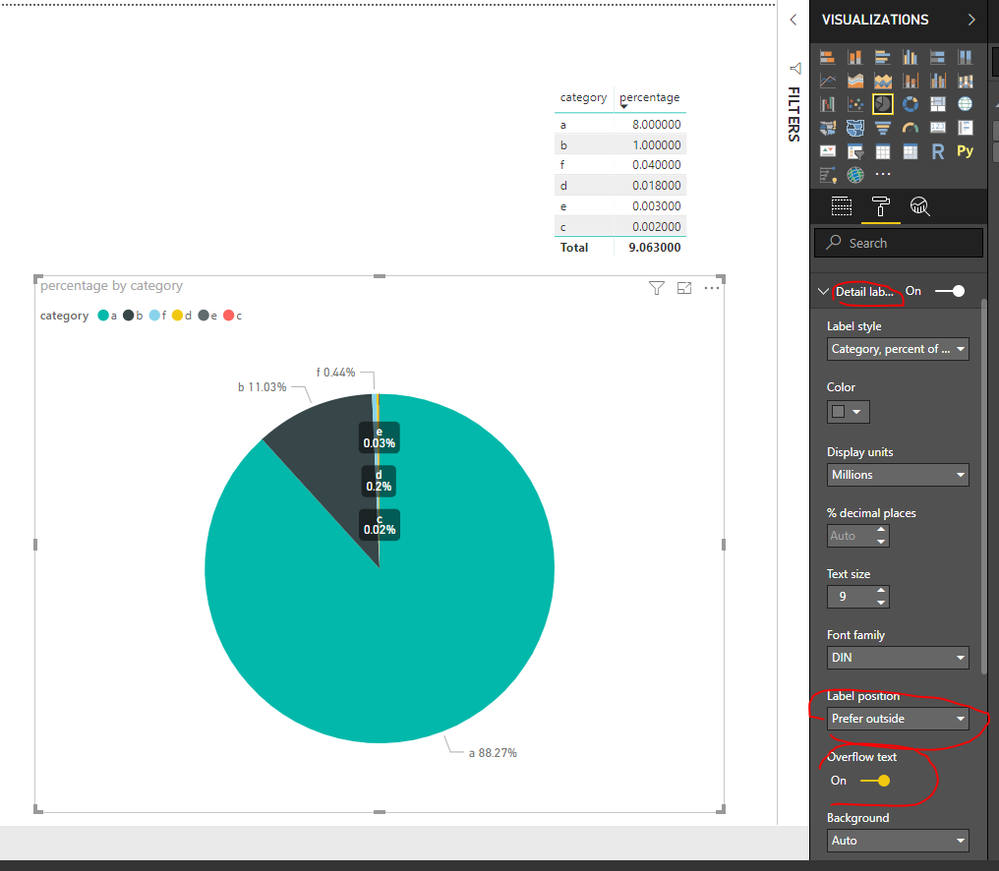
Enlarge the chart, change the format setting as below
Details label->Label position: perfer outside,
turn on "overflow text"
For donut charts, you could refer to the following thread:
How to show all detailed data labels of donut chart
Best Regards
Maggie
Community Support Team _ Maggie Li
If this post helps, then please consider Accept it as the solution to help the other members find it more quickly.
@v-juanli-msft : there is s space crunch where i wil not able to increase the size of pie chart
Check out the November 2025 Power BI update to learn about new features.
Advance your Data & AI career with 50 days of live learning, contests, hands-on challenges, study groups & certifications and more!
| User | Count |
|---|---|
| 58 | |
| 45 | |
| 42 | |
| 21 | |
| 18 |